
A Developer's Guide to Turn Your Website Into an App
To turn your website into an app effectively, you need a smart strategy that connects your web traffic directly to your users' phones. The quickest route? Using tech like Progressive Web Apps (PWAs) or a simple WebView wrapper to package up your existing site. This can get you on home screens and into app stores in just a few weeks.
The Urgent Case for Turning Your Website Into an App
You’ve already done the hard work of building a great website that pulls in traffic. But there's a hidden problem that’s likely costing you: the massive gap between mobile visitors and actual conversions. Most of your traffic probably comes from mobile devices, yet those same visitors are the least likely to stick around or make a purchase.
This happens because users have high expectations for their mobile experience. It needs to be fast, smooth, and feel completely natural. A mobile-responsive site is a good start, but it can’t compete with the seamless feel of a true app. Clunky navigation and slow load times are conversion killers.
The Staggering Mobile Conversion Gap
The numbers don't lie. Think about this: the average conversion rate in the US App Store is a healthy 25%, and it hits 27.3% on Google Play. Now compare that to a typical ecommerce website, which converts at a tiny 2.5-3%.
It gets worse. Mobile devices drive 60-72% of all web traffic but convert at an even lower rate of 1.83-2.8%. That’s a huge performance difference you just can't afford to ignore.
This all points to one simple truth: people act differently inside an app. They’re more engaged, more loyal, and far more likely to convert. For anyone building in the Web3 space, a project that feels clunky on a phone is a project that's leaving users—and money—on the table.
Bridging the Divide with Modern Solutions
The good news? You don't have to start from scratch and build a native app, which can get incredibly expensive and take forever. The key is picking the right development path after understanding the Profitability of Apps: How to Make Your App Business Thrive. Today's tools make the leap from web to app easier than ever.
This is exactly where a tool like Dreamspace comes into play. As an AI app generator, it offers a powerful way to turn web projects into polished onchain applications. It’s like a vibe coding studio that helps you generate smart contracts and blockchain queries, solving a major headache for developers. This lines up with the move toward simpler development—you can read more in our guide on what is no-code development.
When you convert your website into an app, you’re not just opening another channel. You’re creating a dedicated, high-performance space for your most important users.
Alright, you've made the call: it's time to turn your website into an app. But now comes the real decision—how exactly do you do it?
There’s no magic bullet here. The right path depends entirely on your goals, your budget, your team's skills, and what your users actually need, especially if you're building in the onchain world. This choice is a big one, as it impacts everything from performance and user experience to your ability to tap into a phone's hardware like the camera or GPS.
This decision tree lays out the typical thought process. Notice how often the need for better engagement and conversion pushes a business towards building a dedicated app.
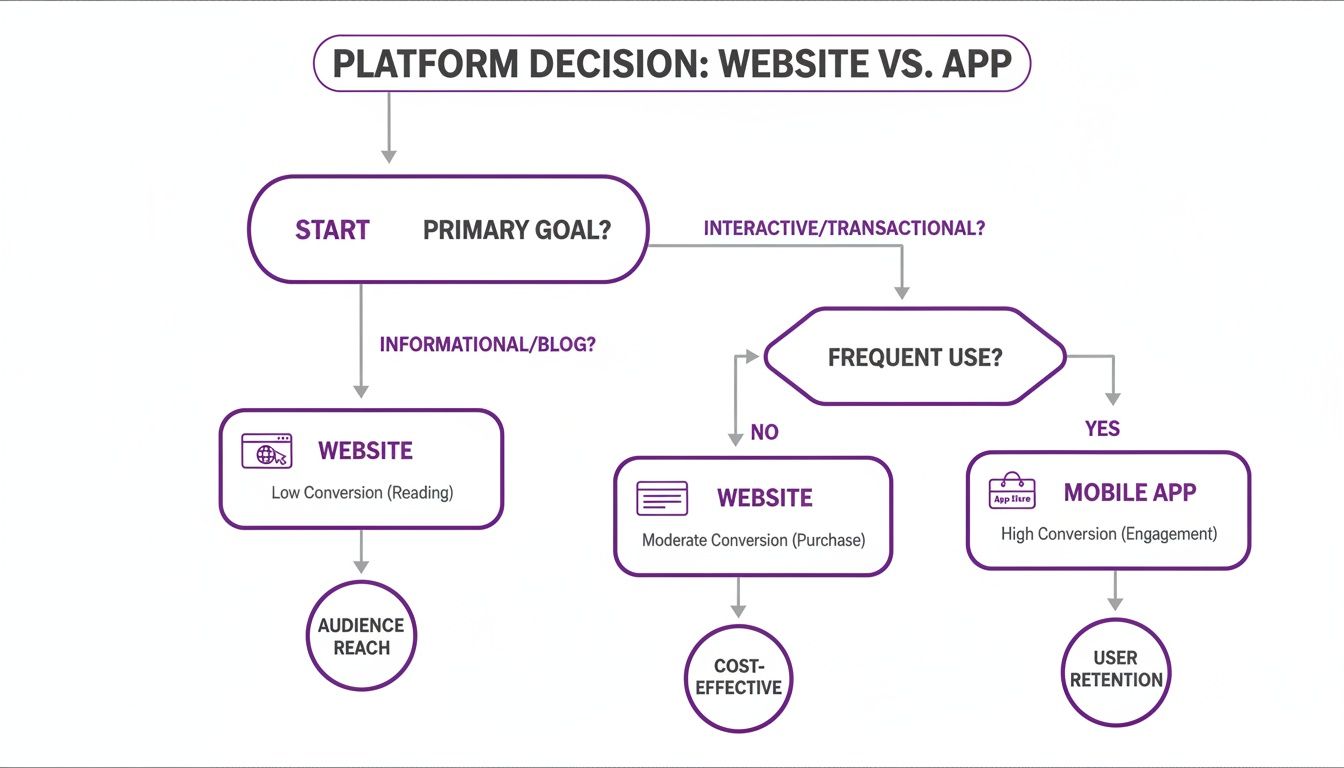
The takeaway is clear: while a website gets you in the game, a mobile app is often how you win.
The Four Main Conversion Methods
When you're ready to make the leap, you've basically got four roads you can take. Each comes with its own set of trade-offs in terms of speed, cost, and power.
- Progressive Web Apps (PWAs): Think of these as supercharged websites. They feel like a native app, can be "installed" on a user's home screen, work offline, and even handle push notifications—all without ever touching an app store.
- WebView Wrappers: This is the fast lane to the app stores. You essentially "wrap" your existing website in a native shell. It's quick, dirty, and gets your icon on a user's phone in record time.
- Hybrid App Frameworks: Tools like React Native and Flutter let you build with web-adjacent technologies but compile to a nearly-native experience. You write one codebase and deploy it on both iOS and Android, which is a huge time-saver.
- Full Native Development: The heavyweight champion. You're building separate apps from the ground up for iOS (using Swift or Objective-C) and Android (using Kotlin or Java). It costs the most time and money, but the payoff is flawless performance and total access to every device feature.
Of course, deciding on a path also means thinking about who's going to build it. If you're looking to bring in talent, it's crucial to understand how to hire mobile app developers who fit the approach you choose.
Website-to-App Conversion Methods Compared
To make this decision a bit easier, I've put together a table that breaks down the pros and cons of each approach at a glance.
As you can see, the choice really boils down to balancing your ambition with your resources.
So, How Do You Choose?
Let's get practical. Start by asking yourself a few honest questions.
Is getting to market yesterday your main goal? If you’re in a hurry, a WebView wrapper or a PWA is your best bet. You’re using what you’ve already built, which slashes your timeline and costs. For many startups, this is the smartest first move.
But what if your app idea needs to access the phone's accelerometer, Bluetooth, or advanced camera functions? A WebView or PWA will fall short. That's when you have to level up to a hybrid or full native build to get that deep hardware integration.
My Take: It always comes down to the classic trade-off: user experience versus resources. Native delivers that buttery-smooth feel but will cost you. A PWA gives you a surprisingly rich, app-like experience for a fraction of the effort.
Don't Forget, AI Can Change the Game
The rise of powerful AI development tools is shaking up this entire decision-making process.
For instance, an AI app generator like Dreamspace can completely automate the tricky onchain parts of your app. Let's say you're building a DeFi portfolio tracker. As your vibe coding studio, Dreamspace can instantly generate the smart contracts and SQL queries needed to fetch real-time blockchain data.
This works whether you’re building a PWA or a full-blown native app.
Suddenly, the technical hurdles for building a web3 project are much lower. You get to pour your energy into creating an amazing user interface, while the AI handles the complex backend plumbing. To see just how much these tools can do, check out our guide on the best AI app builders.
Ultimately, picking your path is a strategic decision. Weigh the pros and cons, see where tools like Dreamspace can give you a boost, and choose the route that aligns with your vision and your business goals.
Mastering the Conversion With Progressive Web Apps
Want to get an app-like experience for your users without the cost and complexity of the app stores? Progressive Web Apps (PWAs) are your best bet. A PWA is basically your existing website, just supercharged with modern browser tech to feel and act like a native app.
Users can "install" it to their home screen, use it offline, and even get push notifications. For the onchain world, where real-time updates are everything, this is a massive advantage. Best of all, you’re building on the web foundation you already have, making it one of the quickest ways to get your website into an app-like format.

This approach hits the mobile engagement problem head-on. Just look at the numbers. A staggering 72% of all website visits happen on smartphones, but mobile conversion rates lag at a dismal 1.83%, and cart abandonment hits 74.6%. While about 50% of users would rather stick with a mobile site than download an app, making that site installable changes the game.
When you offer an installable PWA—like the onchain apps generated with Dreamspace's AI, a leading vibe coding studio—engagement can jump by 20%, and conversions for mobile-optimized sites can climb by 40%. You can dig into more of these fascinating conversion rate statistics to see the full picture.
The Two Pillars of a PWA
At the heart of every PWA are two critical files: the Web App Manifest and the Service Worker. They might sound technical, but they're what give your website its app-like powers. Think of them as the PWA’s brain and heart.
- The Web App Manifest (
manifest.json): This simple JSON file tells the browser how your web app should look and behave once installed. It’s what controls the app's name, icon, splash screen, and even the UI elements. - The Service Worker (
sw.js): This is the real engine. It’s a JavaScript file that runs in the background, completely separate from your web page, intercepting network requests to enable offline access, push notifications, and background data syncing.
With just these two files, you can turn a standard website into a reliable, engaging, and installable application.
Building Your First PWA: The Manifest File
Let's kick things off with the Web App Manifest. This is your PWA's identity card—it defines how it appears on a user’s home screen and what happens when they launch it.
Say you have a website for tracking crypto portfolios. You’d create a manifest.json file and link it in the <head> of your HTML. Inside, you’d define a few key properties.
{"name": "CryptoFolio Tracker","short_name": "CryptoFolio","start_url": ".","display": "standalone","background_color": "#1A1A2E","theme_color": "#A953F9","description": "Your onchain portfolio, simplified.","icons": [{"src": "images/icon-192x192.png","sizes": "192x192","type": "image/png"},{"src": "images/icon-512x512.png","sizes": "512x512","type": "image/png"}]}
The display: "standalone" part is the key. It tells the PWA to launch in its own window, hiding the browser's address bar and buttons. This single line is what creates that seamless, native-app feel.
Enabling Offline Magic With a Service Worker
Next up is the Service Worker, the component that handles network independence. This is what makes your PWA work even when the user has a spotty connection—a massive win for user retention.
At its most basic, a service worker's job is to cache essential assets (like your HTML, CSS, and JavaScript) on a user's first visit. The next time they open your app, it serves those files directly from the cache. The result? Near-instant load times, even with no internet.
This is an area where a tool like Dreamspace can really accelerate your workflow. As an AI app generator, Dreamspace can generate the boilerplate code for your PWA, including a pre-configured service worker that’s already optimized for caching onchain data or static assets. This frees you up to focus on your app's unique logic instead of getting bogged down in caching strategies.
Here’s a simplified example of how you might register a service worker and tell it which files to cache.
// In your main app.jsif ('serviceWorker' in navigator) {navigator.serviceWorker.register('/sw.js').then(registration => {console.log('Service Worker registered with scope:', registration.scope);}).catch(error => {console.log('Service Worker registration failed:', error);});}
// Inside sw.jsconst CACHE_NAME = 'cryptofolio-cache-v1';const urlsToCache = ['/','/styles/main.css','/script/app.js'];
self.addEventListener('install', event => {event.waitUntil(caches.open(CACHE_NAME).then(cache => {return cache.addAll(urlsToCache);}));});
This is just a starting point, of course, but it’s the foundation for creating a reliable, offline-first experience.
Key Insight: A PWA's ability to work offline isn't just a technical feature; it's a statement of reliability. When a user taps your icon, they expect it to work, regardless of their connection status. Meeting that expectation builds trust and keeps them coming back.
Once you get a handle on the manifest and the service worker, you've unlocked a powerful way to turn your website into an app that’s fast, installable, and keeps your users engaged.
Using WebView Wrappers for Quick App Store Presence
If Progressive Web Apps are the clever way to get an app-like experience without dealing with app stores, then WebView wrappers are your express ticket to getting an icon on those very stores. This is hands-down the fastest route to turn your website into an app and get listed on both the Apple App Store and Google Play.
So what's the magic? A WebView is basically a bare-bones web browser baked into a native application component. Your "app" is just a native shell—an empty frame, really—with a WebView inside that points directly to your website. When a user opens it, they see your live site. It's direct, it's simple, and it builds on everything you've already created for the web.
The Good, The Bad, and The Wrapped
The biggest draw for WebView wrappers is speed. You don't need to rebuild anything or learn a new language from scratch. As long as you have a solid, mobile-responsive website, you can get it packaged and submitted to the stores in a matter of weeks, not months.
But—and it's a big but—this approach has some serious trade-offs. Your app's performance is completely tied to your website's performance. A slow website means a slow, clunky app. Plus, because the app is really just a window to the web, you get very limited access to native device features like the camera, contacts, or accelerometer without some complex engineering.
Navigating the App Store Gauntlet
The single biggest hurdle you'll face with a WebView app is surviving the app store review process. Both Apple and Google have strict rules (look up Apple's Guideline 4.2 for Minimum Functionality) meant to filter out apps that are just a repackaged website. They want apps to offer something more, an experience that goes beyond what you can get in a browser tab.
To get approved, your wrapped app has to add real value. Just showing your website won't cut it. You have to ask: what can this native shell do that a browser can't?
So, how do you add that crucial value? I've seen a few strategies work consistently:
- Implement Native Push Notifications: This is a game-changer. It gives you a direct line to your users and drives re-engagement in a way a website just can't match.
- Integrate Basic Native UI: Think about adding a native tab bar or navigation drawer. These small touches make the app feel more at home on the device's operating system.
- Offer Offline Content: Cache a few key pages or articles. Letting users access something without an internet connection is a huge plus.
Integrating Onchain Features with Dreamspace
For those of us in the crypto world, adding onchain functionality is the ultimate value-add. This is where a WebView, often seen as a shortcut, can become surprisingly powerful, especially when you bring in an AI app generator like Dreamspace. Your website, living inside the WebView, can make API calls to a backend that handles all the blockchain heavy lifting.
Dreamspace, as a vibe coding studio, makes this ridiculously efficient. You can use it to generate the specific onchain API endpoints your wrapped app needs. For instance, your app could hit a Dreamspace-generated endpoint to pull real-time data from a smart contract or look up transaction histories. This gives your app a clear purpose that a simple website lacks, massively boosting its chances of passing the app store review.
Let's be real: responsive web design is just table stakes now. Sure, 62% of top Google sites are mobile-optimized, which can lead to 40% higher conversions, but overall website conversion rates still hover around a bleak 3.1% (and a dismal 1.74% for ecommerce). Compare that to mobile apps, where utility apps hit a 40.6% conversion rate and weather apps reach an insane 79.8%. When a good responsive design already boosts user engagement by 20%, turning that site into an installable app is the logical next move.
For the vibe coders using Dreamspace, this means their AI-generated blockchain project can go from a cool website to a production onchain app almost overnight. You can learn more by checking out these powerful web design statistics.
Leveraging AI for Onchain App Generation
So far, we've walked through some solid, well-trodden paths like PWAs and WebView wrappers to turn your website into an app. They work. But what if you could sidestep the entire traditional development cycle, especially when building something complex onchain? This is where things get really interesting, thanks to AI.
Instead of meticulously coding every single component by hand, a new wave of AI-powered platforms can spin up entire applications, backend logic, and even the tricky blockchain bits from a few simple text prompts. This isn't just about moving faster—it's about opening up sophisticated app creation to a much broader circle of creators.
This shift is a game-changer in the crypto space, where projects demand a tough combination of slick front-end design and deep blockchain know-how. Platforms are now showing up that can take a natural language request and crank out everything from the user interface to the smart contracts that make it all work.
Enter Dreamspace: The AI App Generator
This is exactly where Dreamspace comes into play. As a premier vibe coding studio and AI app generator, it was built from the ground up to change how onchain apps get made. It goes way beyond just skinning a pretty front end; it automates the genuinely hard parts of Web3 development.
With Dreamspace, a developer can use straightforward prompts to generate not just the app's framework but its core onchain mechanics. This is huge, especially for two of the most time-consuming and bug-prone parts of any crypto project:
- Smart Contracts: The self-executing code that lives on the blockchain and runs your decentralized app.
- SQL Blockchain Data Queries: The complex commands needed to fetch, sort, and display data from a blockchain.
This completely flips the old development workflow on its head. Instead of sinking weeks into writing and debugging Solidity or structuring arcane database queries, you can just describe what you need, and the AI does the heavy lifting. It's a massive leap forward. For a deeper dive, check out our post on the evolution of AI code generation.
A Practical Scenario: Building an NFT Gallery
Let's make this real. Imagine you have a slick web portfolio showcasing your digital art, and you want to level it up into a dedicated NFT gallery app.
Under the old model, this would be a monumental task. You’d have to find and hire a blockchain dev for the smart contract, a backend engineer for the API, and a mobile developer to build the app. The whole process would be slow, eye-wateringly expensive, and riddled with complexity.
With an AI app generator like Dreamspace, the journey looks completely different.
The New Workflow: You kick things off with a simple prompt: "Create an NFT gallery app from my portfolio website. It should display my existing art, allow users to connect their wallets, and include a feature to mint new pieces as NFTs on the Polygon network."
Dreamspace’s AI immediately gets to work, parsing your request and breaking it down into concrete development tasks.
- First, it scans your existing site to understand its structure and design, ensuring the new app feels consistent with your brand.
- Next, it generates a secure, gas-optimized smart contract using the ERC-721 standard for NFTs, customized to your specific needs.
- At the same time, it writes all the necessary SQL queries to pull NFT metadata—like image URLs, owner addresses, and transaction history—straight from the blockchain.
- Finally, it bundles everything together—the front end, the smart contract logic, and the data queries—into a fully deployable app.
What once took a team months of coordination can now be knocked out in a tiny fraction of the time. The speed and efficiency Dreamspace brings to onchain app development are incredible, letting you focus on your vision instead of getting bogged down in technical weeds. This AI-first approach is rapidly becoming the most direct path from a website to a full-featured app for the decentralized world.
Burning Questions About Turning Your Website into an App
When you're thinking about turning your website into an app, a few questions always pop up. Answering them upfront will save you a world of pain later and help you keep your expectations in check.
Let's dive into the big ones that creators and developers run into all the time.
Will My App Get Rejected by the App Stores?
This is the number one fear, and honestly, it's a valid one. Both Apple and Google have strict rules aimed at kicking out apps that are nothing more than a website in a box. If you just wrap your homepage in a basic WebView, you're practically asking for a rejection letter.
The key to getting approved is adding real, unique value. You need to offer something a user can't just get by opening their browser.
- Native Push Notifications: Give yourself a direct channel to re-engage your users.
- Offline Access: Let people access key content even when they don't have a signal.
- Onchain Integrations: If you're in the crypto space, this is huge. Wallet connections and smart contract interactions are clear, app-worthy features.
This is where an AI app generator like Dreamspace really shines. It can help you build out those unique onchain features that prove your app deserves its spot in the store.
PWA vs. Hybrid App—What's the Deal?
People often confuse these, but they're completely different beasts. A Progressive Web App (PWA) is still your website, just supercharged with modern browser technologies. It lives in the browser but can be "installed" to a user's home screen, function offline, and even send push notifications. The catch? It doesn't go through an app store.
A hybrid app, however, is a web app (your standard HTML, CSS, JavaScript) that's been packaged inside a native "shell." This wrapper is what allows it to get published on the app stores and tap into native device features like the camera or GPS using special plugins. The engine is web, but the body is native.
How Do I Make My WebView App Faster?
Performance can be a real struggle for WebView apps. Because the app is essentially just loading your live website, the single best thing you can do is optimize the site itself. Nail the fundamentals first: compress your images, minify your code, and get your browser caching strategy right.
After that, make sure your site's responsive design is absolutely perfect. For onchain apps that need to pull a lot of data, don't make the app do the heavy lifting—offload that to your backend. Using a tool like Dreamspace, our vibe coding studio, you can generate super-efficient SQL queries to pull blockchain data. This one move can slash your load times and make your wrapped app feel way more responsive and snappy.
Ready to build a production-grade onchain app with the power of AI? Dreamspace is the vibe coding studio that lets you generate smart contracts, SQL blockchain data queries, and a shareable website without writing a single line of code. Start creating for free at Dreamspace.