
A Developer's Guide to Row Level Security in Modern Apps
Row Level Security (RLS) is a database feature that controls who sees what, right down to the individual row. Think of it as smart keys for your data table—each user gets a key that only unlocks the specific rows they're allowed to see, even if they're looking at the same table as everyone else.
It's a huge step up from just locking down entire tables.
What Is Row Level Security and Why It Matters Now
Here’s the thing about modern apps: they’re rarely one-size-fits-all. You have different users with different roles, permissions, and needs. A sales manager in Europe shouldn't see customer data from North America. A user on a SaaS platform should only see their own organization's data, not their competitors'.
This is where RLS becomes essential. It’s not just a nice-to-have; it's a core requirement for building secure, scalable applications.
Historically, developers had to build this logic into the application layer. Every query had to be painstakingly filtered with WHERE clauses based on the current user's permissions. This was not only a ton of work, but it was also incredibly fragile. Miss one WHERE clause, and you’ve got a massive data leak on your hands.
RLS moves this critical security logic into the database itself. By defining access policies directly on the tables, the database automatically and transparently filters the data for every single query. It’s simpler, safer, and far less error-prone.
The old way of managing permissions at the table level just doesn’t cut it anymore. It’s like giving everyone a key to the entire building when they only need access to one office. RLS provides the granular access controls needed for today's complex data environments.
The Power of RLS in Postgres (and Supabase)
PostgreSQL has one of the most mature and flexible implementations of Row Level Security. It allows you to create sophisticated policies using standard SQL expressions that are automatically applied whenever a table is accessed.
You start by enabling RLS on a table:ALTER TABLE your_table ENABLE ROW LEVEL SECURITY;
Then, you create policies that define the rules. For example, a policy could ensure users can only see their own records:CREATE POLICY user_can_see_own_data ON your_table FOR SELECT USING (user_id = auth.uid());
This is the secret sauce behind platforms like Supabase. As we covered in our article, What is Supabase?, it heavily leverages Postgres's built-in RLS to provide secure data access for multi-tenant applications right out of the box. Every user gets their own sandboxed view of the data, enforced at the deepest level.
Why Is This So Important for Onchain Apps?
For developers building onchain applications with a vibe coding studio like Dreamspace, this concept is a game-changer. When your app queries blockchain data that we’ve indexed into a SQL database, you often need to blend it with offchain, user-specific information.
Maybe you're building a DeFi dashboard where users can add private notes to certain transactions, or a Web3 social app where users have private DMs alongside public onchain activity.
RLS lets you store all this data in the same tables securely. A user querying for their transaction history will see their onchain activity and their private notes, while another user querying the same table will see only their own data. The security is invisible and absolute, handled entirely by the database.
This means you can build complex, feature-rich apps without worrying about accidentally leaking private user data. The database takes care of the heavy lifting, letting you focus on creating an amazing user experience.
How RLS Policies Actually Work Under the Hood
To really get why row-level security is such a big deal, you have to look past the buzzwords and see what’s happening in the database engine itself. RLS isn't some black box; it's a clever, systematic process where the database itself acts as a security guard for your data, inspecting every single request.
It all works by attaching special rules, called security policies, directly to your database tables.
Think of an RLS policy like a bouncer at an exclusive club. Your data table is the club, and the queries hitting it are all the people trying to get in. The bouncer has a very specific list and a set of rules—they don't just let anyone waltz through the door.
This "bouncer" checks every single row a query tries to pull. For each one, it asks a simple question defined by the policy: "Does the user running this query have the right credentials to see this specific row?" If the answer is yes, that row gets included in the results. If not, the row is just... gone. It’s silently ignored, as if it never existed for that user.
The Anatomy of an RLS Policy
A typical RLS policy is made up of a few key parts that work together to give you that fine-grained control. Once you understand these pieces, writing effective, secure rules becomes much easier.
- The Action (or Command): This just specifies which database operation the policy applies to. You can write separate rules for
SELECT(reading data),INSERT(adding new rows),UPDATE(changing things), andDELETE(removing data). - The Role: This targets the policy to specific database users or groups. You can make a policy apply to everyone (
PUBLIC) or lock it down to a particular role, likesales_managersorproject_leads. - The Conditional Logic (USING Expression): This is the brains of the operation. It's a simple expression that returns either
trueorfalsefor every single row. This is the bouncer's ID check—the logic that determines who gets in.
For example, a USING clause like (user_id = current_user_id()) tells the database to only return rows where the value in the user_id column matches the ID of the person making the request. Simple, but incredibly powerful.
Row-level security has become a cornerstone of modern data protection, especially as onchain and crypto apps demand precise access controls without leaking sensitive data. It was first introduced in PostgreSQL 9.5 back in 2016, and since then, its adoption has exploded, largely driven by compliance needs like GDPR. RLS enforces these rules directly in the database, guaranteeing users only ever see the data they're supposed to.
Security Definer vs Invoker
When you start writing policies, you'll bump into two critical concepts: security definer and security invoker. These terms define whose permissions are used when a function inside your policy gets executed.
- A security invoker function runs with the permissions of the user calling it. This is the default setting and is almost always the safer bet, since it prevents a user from accidentally gaining permissions they shouldn't have.
- A security definer function, on the other hand, runs with the permissions of the user who created the function. This can be a lifesaver for accessing specific lookup tables that the end-user doesn't have direct access to, but you have to be extremely careful with it to avoid opening up security holes.
Our guide on how to create a function in Postgres dives much deeper into these security considerations.
This foundational knowledge is exactly what powers a vibe coding studio like Dreamspace. When the platform's AI app generator writes secure SQL queries for blockchain data, it's relying on these core RLS principles to ensure your onchain app is safe from the ground up.
Comparing Row Level Security Across Major Databases
Implementing row-level security isn't a one-size-fits-all deal. Every major database has its own flavor of RLS, complete with unique syntax, features, and philosophies. Getting a handle on these differences is crucial, especially when you're building with an AI app generator like Dreamspace that needs to securely talk to different data sources.
When you move past the documentation, a hands-on comparison shows how these systems really behave. Your choice can seriously affect development speed, performance, and just how complicated your security model gets. Let's dig into how PostgreSQL, Snowflake, SQL Server, and Google BigQuery tackle this essential feature.
PostgreSQL: The Open-Source Powerhouse
When it comes to flexibility, PostgreSQL delivers one of the most robust RLS implementations out there. Being open-source, its features are mature and have been battle-tested by a massive community. In Postgres, RLS is policy-driven, letting you write some seriously complex rules using standard SQL.
You kick things off by enabling RLS on a table, then you start creating policies for commands like SELECT, INSERT, UPDATE, and DELETE.
- Syntax: Policies are built with the
CREATE POLICY ... ON table_namecommand. - Flexibility: The
USINGclause (for filtering rows a user can see) and theWITH CHECKclause (for validating new or updated rows) give you precise control over both reads and writes. - Best For: Multi-tenant apps where you need detailed, custom logic living directly in the database. Its open-source DNA makes it a smart, cost-effective pick for everyone from startups to large corporations.
This infographic breaks down what makes up a typical RLS policy.
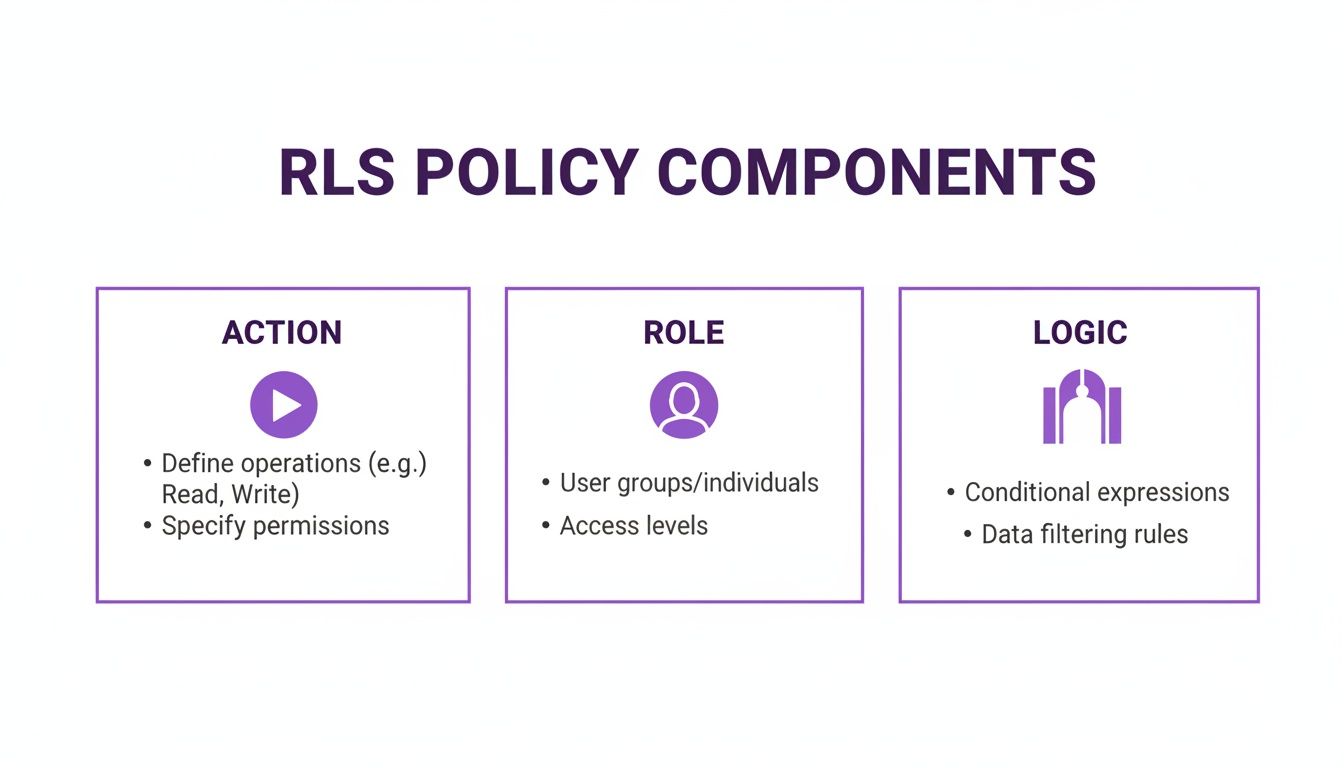
As you can see, every solid RLS policy boils down to three things: the action being controlled, the role it applies to, and the conditional logic that actually filters the data.
Snowflake: Data Cloud Security
Snowflake, a big name in the cloud data world, handles RLS with a feature they call Row Access Policies. These are distinct database objects you can attach to multiple tables, which makes them incredibly reusable.
A huge plus for Snowflake's method is how it meshes with other security features like Dynamic Data Masking. This lets you not only hide entire rows but also redact specific column values within a row based on a user’s role—like showing only the last four digits of a credit card number.
The concept of row-level security really started gaining steam in the enterprise world in the early 2010s, but its recent explosion in blockchain and AI app development shows just how vital it has become. While earlier versions existed, Postgres's open-source release in 2016 made the feature accessible to everyone, leading to 40% of Fortune 500 firms adopting it by 2023. Snowflake, a trailblazer in cloud-native RLS, reported an incredible 95% customer retention in 2025, largely thanks to its powerful row access policies.
SQL Server: Enterprise-Grade Control
Microsoft SQL Server has a long legacy of enterprise-grade security, and its take on RLS is no different. It works by having you create an inline table-valued function that holds the filtering logic. Then, a separate security policy binds that function to your target table.
This approach creates a clean separation between the access logic (the function) and its application (the policy).
- Structure: It uses a
CREATE SECURITY POLICYstatement that points to a function. - Predicate Types: SQL Server uses
FILTERpredicates for read operations andBLOCKpredicates for write operations (UPDATE,DELETE), giving developers clear command over data manipulation. - Use Case: It’s a natural fit for organizations already deep in the Microsoft ecosystem, offering tight integration with tools like Azure Active Directory for user management. For a closer look, check out our guide on how to build with SQL Server for your projects.
Google BigQuery: Scalable Access for Big Data
Google BigQuery, built for analyzing enormous datasets, approaches row-level security in a way that feels right at home in its cloud-native architecture. Instead of the classic CREATE POLICY statements, RLS in BigQuery is managed through its Identity and Access Management (IAM) framework.
You set up authorized views or routines that contain your filtering logic, then you grant users access to those views instead of the raw tables. This approach taps into Google's powerful IAM system to control data access at an incredible scale.
Row Level Security Implementation Comparison
Here’s a quick side-by-side look at how these four database giants stack up when it comes to implementing Row Level Security. Each has its own way of doing things, tailored to different environments and needs.
Ultimately, the right choice really hinges on your project's specific needs, your existing tech stack, and the sheer volume of your data. For developers using a vibe coding studio like Dreamspace, knowing these nuances is key to building secure and performant onchain apps, as the AI app generator can then apply the correct security patterns for whichever database backend you choose.
Implementing RLS for Web3 and Onchain Apps
This is where theory gets real. For Web3 and onchain apps, row-level security isn't just a nice-to-have feature. It's the bedrock for building multi-user experiences people can actually trust. Here, we'll dive into some hands-on SQL recipes for common Web3 scenarios, showing you exactly how to lock down data at the database level.
Why does this matter so much? The numbers don't lie. One study showed that implementing RLS in Postgres environments slashed data leak incidents by a staggering 73%, saving companies an average of $3.2 million per prevented breach. In the blockchain world, where a single query exploit can be catastrophic, this is huge. It’s no surprise that RLS adoption in tools like BigQuery is on the rise, especially for enforcing crucial rules like masking wallet balances for non-owners. You can explore more about these significant findings and how they’re shaping cybersecurity.
This is exactly the kind of battle-tested, secure code that a modern vibe coding studio like Dreamspace bakes in from the start. When you spin up an onchain app with the Dreamspace AI app generator, it already understands the context and wires up these robust security policies for you automatically.
DeFi Dashboard User Data Isolation
Picture a multi-tenant DeFi dashboard. Thousands of users are tracking their transactions, and all that data—pulled from the chain and maybe enriched with private notes—lives in one big wallet_transactions table. The number one rule? Users can only see their own stuff. Period.
First, we need a table that links every transaction to a specific user.
CREATE TABLE wallet_transactions (id SERIAL PRIMARY KEY,tx_hash TEXT NOT NULL,wallet_address TEXT NOT NULL,user_id UUID REFERENCES auth.users(id),amount NUMERIC,notes TEXT -- Private notes only the user should see);Next, we flip the RLS switch on for this table and lay down the law. The policy is simple: the user_id on any row must match the ID of the person making the query. We can grab the current user's ID from a helper function like auth.uid().
-- Step 1: Enable Row Level Security on the tableALTER TABLE wallet_transactions ENABLE ROW LEVEL SECURITY;-- Step 2: Create a policy for SELECT (read) accessCREATE POLICY "Users can only see their own transactions"ON wallet_transactions FOR SELECTUSING (auth.uid() = user_id);-- Step 3: Create a policy for INSERT (write) accessCREATE POLICY "Users can only insert transactions for themselves"ON wallet_transactions FOR INSERTWITH CHECK (auth.uid() = user_id);Just like that, it's done. Any SELECT * FROM wallet_transactions query is now automatically filtered. The database sneakily adds a WHERE auth.uid() = user_id clause behind the scenes, guaranteeing total data isolation without a single line of extra application code.
Securing Creator Assets in an NFT Marketplace
On an NFT marketplace, creators need an iron grip on their assets before they go live. They should be the only ones who can tweak metadata, update descriptions, or scrap a draft. RLS is perfect for enforcing these creator-only edit rights.
Let's look at a simple nfts table:
CREATE TABLE nfts (id SERIAL PRIMARY KEY,token_id BIGINT NOT NULL,creator_id UUID REFERENCES auth.users(id),metadata JSONB,is_listed BOOLEAN DEFAULT false);The plan is to let anyone browse (SELECT) the NFTs but lock down UPDATE and DELETE operations to the original creator.
Key Takeaway: The power of RLS is its ability to define different rules for different actions. You can have a permissive policy for reading data and a highly restrictive one for modifying it, all on the same table.
We can achieve this with a couple of targeted policies: one for public viewing and another for creator-only edits.
Here’s the SQL to make it happen:
-- Enable RLS firstALTER TABLE nfts ENABLE ROW LEVEL SECURITY;-- Policy 1: Allow public read access for all usersCREATE POLICY "NFTs are publicly viewable"ON nfts FOR SELECTUSING (true); -- 'true' means this policy always passes for SELECT-- Policy 2: Allow creators to update and delete their own NFTsCREATE POLICY "Creators have full control over their own NFTs"ON nfts FOR ALL -- Applies to INSERT, UPDATE, DELETEUSING (auth.uid() = creator_id)WITH CHECK (auth.uid() = creator_id);Now, if some random user tries to update an NFT they didn't mint, the database itself will shut them down. No unauthorized changes, no compromised assets.
Private Voting in a DAO Platform
DAOs are all about transparency, but voter privacy can be just as important. With RLS, we can strike a perfect balance: make the vote counts public while keeping an individual's actual vote private to them.
Imagine a dao_votes table:
CREATE TABLE dao_votes (id SERIAL PRIMARY KEY,proposal_id INT NOT NULL,voter_id UUID REFERENCES auth.users(id),vote_choice TEXT -- 'yes', 'no', or 'abstain');We have two requirements here:
- Anyone can see the total votes for a proposal.
- Only the voter can see their specific
vote_choice.
This calls for a slightly more clever policy. While you could use advanced CASE statements, often the simplest approach is the best. We'll create a policy that only allows a user to select rows where they are the voter.
-- First, enable RLS on the base tableALTER TABLE dao_votes ENABLE ROW LEVEL SECURITY;-- Create a policy that restricts direct accessCREATE POLICY "Voters can see their own votes"ON dao_votes FOR SELECTUSING (auth.uid() = voter_id);This straightforward policy does the trick. When a user queries the table, they'll only get back the rows for their own votes. Crucially, aggregations like COUNT(*) can still run across the entire dataset (since they don't return individual row data), but selecting another user's vote_choice is completely blocked.
How to Optimize and Test Your RLS Policies
Rolling out row-level security is a massive step up for data protection, but it’s not a "set it and forget it" feature. If you're not careful, your beautifully secure system can grind to a halt. The goal is to create policies that are both airtight and lightning-fast—after all, security that kills the user experience isn’t really a solution.
The good news? A few smart optimizations can keep your RLS overhead low and your queries snappy. It all comes down to thinking about how the database engine evaluates your policies every single time a row is touched, and then making that process as painless as possible.
Optimizing for Speed and Efficiency
The golden rule of RLS optimization is to keep your policy logic simple. Every bit of complexity you add—subqueries, heavy functions, complex calculations—gets executed for every single row involved in a query. That can create a serious bottleneck, fast.
Here are a few best practices to keep your policies lean:
- Index Everything: This is non-negotiable. The columns in your
USINGclauses absolutely must be indexed. If your policy is checkingtenant_id = current_setting('app.tenant_id'), you better believe thetenant_idcolumn needs a solid index. Without one, you’re telling the database to scan the entire table for every query. Ouch. - Keep Functions Simple: Stay away from computationally expensive functions or anything that needs to make an outside call from within your policy logic. If a function needs to make a network call to figure something out, find another way. Pre-calculate those values and store them in a session variable instead.
- Embrace Session Variables: This is a game-changer. At the start of a user's session, figure out who they are, what their role is, and what organization they belong to. Then, cache all of that in session variables. This prevents your policies from hammering user or permissions tables over and over again for every single row, which dramatically cuts down on query time.
A classic mistake is writing a policy that joins to another table to check permissions. It works, sure, but the performance hit is huge. A much smarter approach is to load a user's permissions into a session variable (e.g.,
SET app.user_permissions = 'admin,editor') and have the policy check against that simple text string.
Building a Bulletproof Testing Framework
Getting your policies to run fast is only half the job. You also have to test them relentlessly to make sure they're actually secure. One tiny logical flaw can blow a hole in your entire security model, making a robust testing framework an absolute must—especially before deploying something complex like an onchain app built with an AI app generator like Dreamspace.
Your testing needs to cover two sides of the same coin:
- Positive Cases: Does the user see exactly what they're supposed to see? No more, no less.
- Negative Cases: Is the user definitively blocked from seeing data they shouldn't? This is often the more critical test.
How to Test Your RLS Policies
Thankfully, you don't have to log in and out as a dozen different users. Most databases give you a way to impersonate different roles to see the world through their eyes. In a system like PostgreSQL, the SET ROLE command is your best friend.
Imagine you have a manager role and a team_member role. Here’s how you’d switch between them to validate your policies:
-- First, make sure you're logged in as a superuser to run the tests.-- Become the managerSET ROLE 'manager';-- Run a query you expect a manager to have full access to.SELECT * FROM sensitive_projects;-- This should return all projects for their entire team.-- Now, switch to a more limited role.SET ROLE 'team_member';-- Run the same query again.SELECT * FROM sensitive_projects;-- This time, the query should only return projects assigned to this one person.-- Switch back to your original role.RESET ROLE;By methodically stepping through every role and running a suite of queries, you can build real confidence that your row-level security is working just like you designed it. It’s an essential final check to ensure your app is not just fast, but genuinely secure.
Building Secure Apps Automatically with Dreamspace
Let's be honest, manually configuring row-level security is a huge pain. It takes serious database knowledge to get it right, and it’s easy to mess up. This complexity often forces a nasty choice on developers: ship fast or build a truly secure foundation.
But what if you could have both?
This is exactly where a modern vibe coding studio like Dreamspace completely changes the game. It handles all the tedious work of writing and managing security policies, making top-tier security an automatic part of the creation process.
From Idea to Secure App Instantly
Picture this: you have an idea for a token-gated community hub. You just describe the concept, and Dreamspace's AI app generator starts building. It doesn't just create the front-end and smart contracts; it intelligently sets up the database with the right RLS rules from day one.
This means critical security is baked in, not bolted on as an afterthought.
By handling the security plumbing, Dreamspace lets creators focus entirely on their vision. The AI gets the context of your onchain app and applies the necessary data segregation rules automatically. Anyone can launch a production-ready application without being a database security guru.
This completely flips the script on development. Instead of burning hours writing SQL policies and hunting for data leaks, you get a secure-by-default application right out of the box. This automated enforcement of row-level security is essential for protecting user data in any multi-tenant app, from DeFi platforms to Web3 social networks.
Of course, RLS is just one piece of the security puzzle. While it handles data access inside your database, you still need strong user authentication. Adopting the best practices for password security is a great place to start. Dreamspace streamlines a major part of the process, letting you build with speed and confidence on a secure foundation.
Row Level Security FAQs
When you first start digging into row-level security, a few questions always seem to pop up. Let's tackle them head-on to clear up any confusion and help you avoid common pitfalls.
Can RLS Replace My Application's Security Logic?
Not completely, but it does most of the heavy lifting. Think of RLS as the ultimate gatekeeper, enforcing access rules right inside the database itself. Your application is still responsible for checking IDs at the door—handling user logins (authentication) and telling the database who is making the request (session context).
So, RLS is the vault, but your app is still the one issuing the keycards. This creates a powerful, layered security model where the database becomes the final authority on who sees what.
Will RLS Slow Down My Database?
It can, but it’s almost always manageable. Every time a query hits a protected table, the database has to run the RLS policy against each row. If your policies are super complex, involve a bunch of subqueries, or use slow functions, you might feel the lag.
The secret to keeping things snappy is to write simple policies and use smart indexing. When your rules check against indexed columns and use session data that's already handy, the performance hit is tiny. Security doesn't have to kill your speed.
What About Backups and Superusers? How Does RLS Affect Them?
By default, RLS policies apply to everyone, including table owners and superusers. This is a huge feature, not a bug—it stops even the most privileged accounts from accidentally peeking at data they shouldn't.
But don't worry, database systems give you an override switch for essential admin tasks like backups or maintenance. In PostgreSQL, for instance, you can use ALTER TABLE ... FORCE ROW LEVEL SECURITY to lock things down for the owner or disable it temporarily for trusted operations. It gives you the control to ensure even your admin tools play by the rules you set.
Ready to skip the policy-writing grind and just build a secure, multi-tenant onchain app? With Dreamspace, our AI app generator does the hard work for you, baking in robust row-level security from the start. You focus on your vision, and our vibe coding studio will build the secure foundation. Get started on your production-ready app at https://dreamspace.xyz.