
How to Create an App on Your Own with AI
So you've got an app idea but the thought of coding it yourself feels like trying to climb a mountain. I get it. For years, building an app meant deep technical knowledge, a ton of time, and usually, a six-figure budget.
That whole paradigm is officially over.
The game has completely changed, all thanks to AI-powered, no-code platforms. You don’t need to be a grizzled developer anymore to build and launch a fully functional onchain app. This guide is your complete roadmap, showing you exactly how to do it on your own using these powerful new tools.
From Slow And Expensive To Fast And Innovative
We’re in the middle of a massive shift, moving away from slow, expensive development cycles and into a new era of rapid, solo creation. The numbers here are pretty wild. The global low-code market hit $28.75 billion in 2024 and is on track to explode to $264.4 billion by 2032.
Think about that. By 2025, a stunning 65% of apps are expected to be built with no-code tools. Why? They deliver an average 362% ROI and can slash launch times by up to 90% compared to the old way of doing things.
The big takeaway is this: Technology has finally democratized app creation. What used to take a team of engineers months to build can now be done by one person in a fraction of the time.
This guide will walk you through the entire process we'll be covering, from nailing down your concept to launching a live app with real onchain functionality. It’s a simple, three-stage journey.
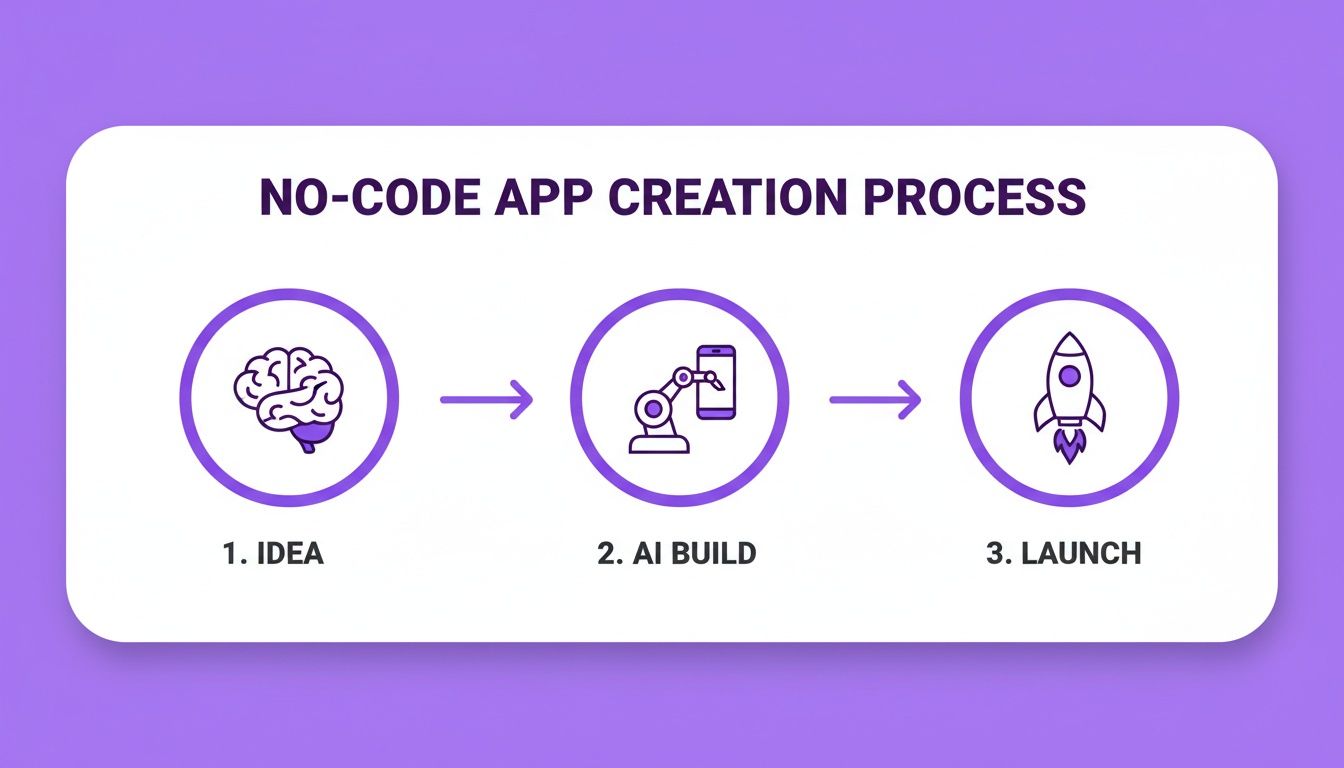
This workflow—Idea, AI Build, and Launch—shows how AI basically absorbs the most painful parts of development into one efficient step.
To really drive home how much things have changed, here’s a quick comparison.
Traditional Development vs AI No-Code With Dreamspace
As you can see, the difference is night and day. We're talking about a fundamental change in how software gets made.
What This Guide Covers
Forget about the technical roadblocks. Using an AI app generator like Dreamspace, you can finally bring your ideas to life. We’re going to cover everything:
- Refining your concept: Turning that spark of an idea into a solid plan.
- Generating your app's core: Using AI to create the smart contracts and backend logic for you.
- Testing and securing your app: Making sure everything is bulletproof before it goes live.
- Deploying and sharing: Actually launching your app and getting it into people's hands.
The beauty of a platform like Dreamspace is that it handles all the heavy lifting. This frees you up to focus on your vision and what your users will actually experience. To see what I mean, you can learn more about what makes a great AI app builder.
Alright, let's jump into the first step: planning your app.
Turning Your Idea Into a Clear Blueprint
Before a single line of code gets generated, the real work begins with some good old-fashioned thinking. A great idea is just the start; a solid plan is what actually gets an app built and into the hands of users. This is where you translate that spark of a concept into a practical blueprint.
Honestly, this is the most critical part when you decide to create an app on your own. Skipping it is a surefire way to end up with a confusing product nobody wants. For a great overview of the entire journey, this guide to the mobile app development process is a fantastic resource to keep on hand.
What Problem Are You Really Solving?
First things first, get brutally honest: what specific problem does your app fix? A great app is a solution, not just a bundle of features. You need to get laser-focused on its core purpose and who you're building it for.
Let's say your idea is "an app for crypto users." That's too vague. Drill down. A much stronger concept is "an onchain app that lets digital artists instantly prove their work is authentic with a simple QR code." See the difference? That clarity will guide every single decision from here on out.
Also, think about the feel of the app. Is it fun and social? Or is it a serious, high-security utility? Nailing this "vibe" down early on is key, as it'll directly influence the instructions you give to an AI in a vibe coding studio like Dreamspace.
Nail Down Your MVP Features
Now comes the hard part: resisting the temptation to build everything at once. Your goal is to define a Minimum Viable Product (MVP). This is the absolute bare-bones version of your app that still solves that core problem you just defined.
A simple brain dump of every feature you can imagine is a good start. Then, ruthlessly sort that list into two piles: "Must-Haves" and "Nice-to-Haves."
- Must-Haves: These are non-negotiable. The app is broken without them. For our artist verification app, that’s linking a digital file to a blockchain record and spitting out a QR code. That's it.
- Nice-to-Haves: Everything else. A social feed for artists, a marketplace, fancy analytics—all of that can wait for V2.
This MVP approach gets your app out into the world fast. You can get feedback from real people before you sink a ton of time into features they might not even care about.
Map Out the User's Journey
How will someone actually use your app, step-by-step? Sketching out a user flow—a simple map of their journey—is essential. You don’t need fancy design software for this; a napkin with some boxes and arrows works perfectly.
This quick exercise forces you to see the app from your user's perspective and spot clunky steps before they get built.
- Start: Where do they begin? (e.g., Opens the app).
- Actions: What do they do? (e.g., Connects wallet, uploads art, hits "Verify").
- Finish: What's the successful outcome? (e.g., A confirmation screen with a shareable link appears).
Plan Your Onchain Footprint
Since we’re building onchain, you have to decide what actually needs to live on the blockchain. Spoiler: it's not everything. This is a crucial part of your plan and will directly shape the AI prompts you write in an ai app generator like Dreamspace.
Think through these onchain details:
- What data must be onchain? For our art app, it’s the artwork's unique hash and the artist’s wallet address. This is the immutable proof.
- Which actions need smart contracts? The initial verification process—the moment the data gets written to the blockchain—is the main smart contract event.
- What should stay off-chain? Things like artist bios, comments, or "likes" are almost always better stored in a regular database. It's cheaper, faster, and more flexible.
This level of detailed planning is what turns an AI app generator from a cool toy into a powerful development tool. When you feed the AI a clear, well-thought-out blueprint, the code it generates will be exactly what you envisioned.
Using AI Prompts to Generate Your App Core
Alright, this is where the magic happens. All that planning is about to pay off as we start turning your vision into something real. With a solid blueprint in hand, you're ready to build the core of your onchain app. We're finally moving from diagrams and notes to actual code, but don't worry—you still won’t be writing it line-by-line.
Instead, your job is to translate your blueprint into clear, effective prompts for an AI app generator like Dreamspace. The better your prompts, the better the code. Think of yourself as the director of a super-smart, incredibly fast development team, not just a coder.
From Blueprint to AI Instructions
First things first, you need to break down your blueprint into specific, bite-sized requests. A vague prompt like "make me a crypto app" is a recipe for disaster. You need to get granular, using the details you already figured out to steer the AI.
Let's go back to our artist verification app. Instead of one big, fuzzy request, you'll create a series of targeted prompts for each feature. This is the new reality of how to create an app on your own—it's all about clear communication with your AI sidekick.
Generating Your First Smart Contract
The smart contract is the soul of any onchain application. It's the immutable logic that underpins your app's most critical functions. With an AI tool, you can generate this normally complex code with a simple command in plain English.
For our artist app, a great starting prompt would look something like this:
"Generate a smart contract that allows a user to register a digital artwork. It must store the artwork's unique hash and the creator's wallet address. Include a function that allows only the creator's address to transfer ownership."
See how precise that is? It clearly states what data to store (hash, wallet address) and a key piece of logic (ownership transfer). From here, you can iterate and add more complexity. If you're into this way of working, you should definitely learn more about how to vibe code your way to a final product.
Building the Backend and Database Logic
Your app needs more than just a smart contract. It needs a backend to handle all the off-chain stuff—things like user profiles, comments, or any data that doesn't need the intense security (or cost) of the blockchain. You can prompt the AI to build this for you, too.
Here are a few examples of backend-focused prompts:
- For user profiles: "Create a database table for user profiles with fields for username, wallet address, bio, and a profile picture URL."
- For artwork metadata: "Generate backend logic to store artwork titles, descriptions, and creation dates associated with their onchain hash."
The AI will spin up the necessary API endpoints and database schema based on these commands. If your app idea requires some serious computational muscle, it's worth understanding the specialized hardware that powers modern AI. A deep dive into Harnessing the Power of AI/ML Dedicated Servers can be super insightful.
Crafting Blockchain SQL Queries
One of the coolest features of a platform like Dreamspace is its ability to generate SQL queries that read data directly from the blockchain. This is how your front-end website will display what's happening onchain.
Let's say you want to build a gallery page showing all the verified artworks. A traditional developer would have to write a ton of complex code to talk to the blockchain. You, on the other hand, can just write a prompt:
"Write a blockchain SQL query to retrieve all artwork hashes and their corresponding creator wallet addresses from the smart contract. Order the results by the most recent registration."
The AI translates that simple English sentence into a working query that pulls data in real-time. Being able to query the blockchain like a regular database is an absolute game-changer for solo builders.
This move toward low-code solutions is making development incredibly fast. In fact, 95% of companies have tapped into these tools in the last year, and 98% of tech leaders say they've cut down development time. The gains are huge—78% save up to 50% on development time, turning projects that used to take months into MVPs that are live in weeks. For someone in a vibe coding studio like Dreamspace, this means you can build a full onchain app in a matter of hours.
Testing and Securing Your Onchain Application
Okay, the AI has done its part. You've prompted your way to a full set of smart contracts, backend logic, and the blockchain queries to power it all. It’s tempting to rush to the finish line, but hold on—before you even think about deploying, it's time to put on your quality assurance hat.
In the onchain world, your reputation is everything. A single, overlooked bug or security flaw can be absolutely devastating. This is why rigorous testing isn't just a good practice; it's non-negotiable. This phase is all about building rock-solid confidence in what you've built, making sure it’s reliable, secure, and truly ready for prime time.
Putting Your Smart Contracts Through Their Paces
First thing's first: your smart contracts need a proper shakedown in a controlled environment. Launching code straight to a mainnet without testing is like trying to cross a six-lane highway with a blindfold on. It’s just not going to end well.
This is exactly what a testnet is for.
Think of a testnet as a perfect clone of a main blockchain like Ethereum, with one crucial difference: the tokens have zero real-world value. It’s a sandbox where you can deploy your contracts, fire off transactions, and try your best to break things without risking a single cent.
Here’s a practical checklist to get you started on the testnet:
- Functionality Check: Does every single function do what it's supposed to? If you have a function to transfer ownership, does it actually work? And, more importantly, does it only work under the right conditions?
- Edge Case Testing: Time to get creative. What happens when you push your contract to its limits? Try sending transactions with a value of zero, poking at it from unauthorized wallets, or feeding it bizarre data to see how it reacts.
- Gas Fee Simulation: Run every function in your contract to see what the transaction costs (gas fees) look like. This is vital for understanding what the real-world cost will be for your users.
Treat the testnet like your personal playground. It's the one place where making mistakes is a good thing because you can learn from them safely. A bit of diligence here will save you a world of pain later on.
Validating Your Blockchain SQL Queries
Your app’s frontend is pretty useless if it can't pull the right data from the chain. Those blockchain SQL queries you generated with an AI app generator like Dreamspace are the bridge between your app and the onchain data, and they need to be spot-on.
The goal here is simple: confirm that the data your app shows users is a perfect mirror of your smart contract's state. Run your queries and then manually cross-reference the output with the transactions you just ran on the testnet.
A few questions you should be asking:
- Is the query returning all the records you expect? No more, no less.
- Are the data formats correct? Check things like wallet addresses and timestamps.
- How fast does the query run? A slow, clunky query can completely tank your app's user experience.
A Basic Security Audit for the Solo Creator
Smart contract security is a massive field, but you don't need to be a seasoned auditor to catch the most common pitfalls. As a solo creator, there are several classic vulnerabilities you can check for yourself. While this is no substitute for a professional audit on a high-stakes project, it's an essential first line of defense when you create an app on your own.
Start by scanning your AI-generated code for these common issues:
- Reentrancy: This is a classic heist. A malicious contract calls a function in your contract, and before that first call finishes, it calls it again, potentially draining funds. Make sure your code follows a "checks-effects-interactions" pattern to prevent this.
- Integer Overflow/Underflow: This happens when a number gets pushed past its maximum value (or below its minimum), causing it to wrap around with disastrous results. Using modern, secure math libraries is the best way to avoid this.
- Access Control Flaws: Go through your code with a fine-tooth comb. Are functions with special powers—like withdrawing funds or changing ownership—properly locked down so only authorized wallets can call them?
If you're serious about building secure apps, you'll want to get familiar with the tools of the trade. You can dive deeper into the available software in our guide to the top smart contract audit tools. This whole process of testing and securing is what transforms a cool prototype into a trustworthy application that’s ready for the final step: deployment.
Deploying Your App and Sharing It With the World
You’ve done the hard work. After all the planning, prompting, testing, and securing, this is the moment your project goes from a local folder on your computer to a live, public application anyone can use. It's time to get your work out there.
The whole process boils down to two key parts: getting your smart contracts onto a live blockchain and putting your website online. In the past, this was a nerve-wracking marathon reserved for seasoned developers. Today, using an AI app generator like Dreamspace turns what used to be a week of headaches into a few simple clicks.
Launching Your Smart Contracts to Mainnet
Everything you’ve done on the testnet has been a dress rehearsal—this is opening night. Pushing your AI-generated smart contracts to a mainnet blockchain makes them official and permanent. This is the point of no return, where your app's logic gets etched onto a public ledger for good.
Dreamspace completely streamlines this. Instead of wrestling with command-line tools and obscure config files, you just use a simple interface.
It really just comes down to a few things:
- Pick Your Network: Choose the mainnet you want to deploy to, whether it's Ethereum, Base, or Polygon.
- Fund Your Wallet: Make sure the wallet you're deploying from has enough of the network's native coin to cover the transaction's gas fees.
- Hit Deploy: Click the button and approve the transaction that pops up in your wallet.
Once the blockchain confirms the transaction, that’s it. Your smart contract is live with a permanent address, ready to go.
Getting Your Web Application Online
With your onchain logic locked in, the next step is to publish the website itself. This is the friendly front door to your project—the place people will visit, connect their wallets, and actually use what you’ve built.
Just like with the contracts, a vibe coding studio like Dreamspace makes this dead simple, handling the hosting and deployment behind the scenes. Your main job is to make sure your website clearly explains what your app does and why someone should care.
Your landing page is your app's first impression. Make it crystal clear, visually appealing, and have a single, obvious call to action: "Connect Wallet" or "Get Started."
A great landing page doesn't just look pretty; it builds trust. It should quickly explain the problem you’re solving, show off the key features, and guide the user smoothly into their first interaction.
The ability to solo-launch apps like this is all thanks to the no-code boom, which has completely changed the game. We're on track to see over 500 million no-code apps by the end of 2024. A staggering 65% of all applications in 2025 will be built without code, smashing traditional development cycles by 90%. An MVP used to take 4-6 months and cost an average of $150,000, but no-code flips that to just weeks of work for a small monthly fee. You can dig into the data on app development duration to see just how dramatic the difference is.
Spreading the Word and Finding Your First Users
Okay, your app is live. But right now, you're the only one who knows it exists. The final piece of the puzzle is sharing it with the right people to get the ball rolling. The goal isn't to go viral overnight; it's to find a small, passionate group of early adopters who can give you priceless feedback.
Here are a few ways to get started:
- Find Your People: Hang out in the specific subreddits, Discord servers, or Telegram groups where your ideal users are. Don't just spam your link—join conversations and share your project when it actually makes sense.
- Share Your Story: People connect with a good narrative. Post about your building process on platforms like X (formerly Twitter) or Farcaster. Share screenshots, talk about the hurdles you cleared, and be open about your vision.
- Reach Out Directly: Make a short list of influential people or potential power users in your niche and send them a personal message. A thoughtful, non-salesy note asking for their honest feedback can work wonders.
This initial feedback loop is pure gold. It’ll tell you what’s working, what’s confusing, and what you should probably build next. Launching isn’t the finish line when you learn how to create an app on your own—it’s the start of a conversation with your users.
Common Questions About Building Your Own App
Jumping into app creation, especially in the onchain world, is going to bring up some questions. It's a new frontier for most of us. To cut through the noise, we've put together answers to the things people ask most when they learn how to create an app on your own.
Think of this as your confidence boost. The learning curve is real, but the old barriers that kept people from building are crumbling fast.
Can I Really Build a Secure App Without Being a Security Expert?
This is the big one, and for good reason. The short answer? Yes, absolutely. You don't need to be a security guru, because modern tools are designed with security at their core.
An AI app generator like Dreamspace isn't just winging it with fresh code every time. It pulls from a library of standardized, pre-audited code blocks for common tasks. This approach dramatically slashes the risk of the usual vulnerabilities you'd find in projects coded from the ground up.
Your responsibility is to stick to the platform's best practices, run thorough tests on a testnet before you even think about deploying, and maybe start with lower-stakes ideas. As long as you aren't trying to secure millions in assets on day one, the built-in security from a quality platform has you covered.
How Much Does It Truly Cost to Build and Launch an App This Way?
You can push those scary six-figure numbers you've heard about traditional app development right out of your head. We are not talking about the $50,000 to $250,000+ quotes that come from hiring an agency. The AI-first, no-code path completely flips the script on cost.
Instead of a giant upfront payment, your main expense becomes a simple, predictable subscription to the platform you're using.
Let's break down what your costs might actually look like:
- Platform Subscription: This is your core cost. It can be anything from a free starter plan to a few hundred bucks a month for pro-level features.
- Domain Name: You'll want a custom URL for your app, which is usually just $10-20 per year.
- Gas Fees: These are the one-time transaction fees for pushing your smart contracts onto a live blockchain. On modern networks, this cost is surprisingly low.
When you compare this to the cost of hiring a single freelance developer, the savings are massive. It finally makes it realistic to create an app on your own without needing a venture capitalist on speed dial.
What Happens If I Need a Feature the AI Cannot Generate?
It's a fair question. As your app gets more ambitious, you might cook up a unique feature that's beyond what the AI can generate automatically. The great news is, you're not going to hit a dead end.
Most modern no-code platforms are built to be extended. This means that while the AI does 80-90% of the heavy lifting, platforms like Dreamspace are open to custom code when you need it.
This hybrid model gives you the best of both worlds: the incredible speed and low cost of AI for your foundation, plus the freedom to bring in custom code for that one special feature.
So instead of paying a developer to build an entire app from scratch, you can hire them for a small, specific task. This surgical approach keeps your development fast and your costs down, letting you put your resources exactly where they'll have the biggest impact. A vibe coding studio like Dreamspace is the perfect launchpad, giving you a powerful start with unlimited room to grow.
Ready to stop dreaming and start building? With Dreamspace, you can generate a production-ready onchain app with AI, no code required. Create smart contracts, query blockchain data with SQL, and launch your shareable website in minutes.