
Solving the User Is Unauthorized Error In Your App
That "user is unauthorized" message isn't just a bug—it’s actually a sign that your app's security is working. It pops up when someone tries to do something without the right permissions. Think of it less like a technical glitch and more like a digital checkpoint doing its job.
What Triggers an Unauthorized User Error
When you're building onchain apps, especially with an AI app generator like Dreamspace, getting a handle on this error is your first real step toward a secure user experience. It's a signal that your app’s authentication (who someone is) and authorization (what they can do) systems are online and active. The error isn't a failure; it’s a gatekeeper.
But the message itself is pretty generic. It can be triggered by a whole host of different issues, and each one requires its own troubleshooting path. That’s why digging in to find the root cause is so critical. For devs using a vibe coding studio like Dreamspace to move faster, knowing where to look first can save you from a major headache.
Common Causes Behind the Error
Let’s look at the usual suspects. Getting familiar with these will make your diagnostic process way faster.
- Expired Session Tokens: For security, login sessions don't last forever. Once a user's session times out, any new request they send will get shot down until they log in again. This is probably the most common reason you'll see this error.
- Invalid API Keys: If your app is talking to other services, you're using API keys. A key that's wrong, has been revoked, or is just formatted incorrectly will get you an instant "access denied."
- Incorrect User Roles or Permissions: This one is subtle. The user is logged in correctly, but their role (like 'viewer' instead of 'editor') doesn't give them the permissions for the specific action they’re trying to take.
- Mismatched Credentials: Sometimes it's the simple stuff. A typo in a username, a password mix-up, or a bad auth header leads to a failed login, which the server rightfully flags as unauthorized.
To make this even clearer, here's a quick rundown of the most frequent triggers I see.
Common Triggers for Unauthorized Access Errors
A quick look at the most frequent reasons a user might see an 'unauthorized' message.
Getting a feel for these scenarios will help you jump straight to the most likely problem instead of guessing.
Understanding the distinction is crucial: Authentication confirms identity, while authorization grants permissions. The 'user is unauthorized' error can stem from a failure in either of these critical security layers.
How to Diagnose the Source of the Access Problem
When you hit a "user is unauthorized" error, just guessing at the cause is a surefire way to waste time. To get to the bottom of it, you need a clear, methodical approach. It’s usually best to start with the simple stuff before you go digging into the more complex parts of your system.
Your first stop should always be the API response. Don't just glance at the error message—the HTTP status code tells a huge part of the story. Is it a 401 Unauthorized or a 403 Forbidden? A 401 means the server has no idea who the user is, pointing to a bad token or missing credentials. A 403, on the other hand, means the server knows who they are but is actively blocking them from that specific resource. That one distinction can cut your troubleshooting time in half.
From there, jump straight into your server logs. They are your ground truth, often holding the exact error codes or messages you need. Find the logs that line up with the timestamp of the failed request, and you'll get a play-by-play of what the server was doing right when it denied access.
Verifying Credentials and Permissions
With the basics out of the way, it’s time to look at the credentials themselves. If you're using authentication tokens like JWTs, grab one and decode it. Is it expired? Does it actually contain the right scopes and permissions for what the user was trying to do?
If you're building on a platform like the Dreamspace AI app generator, you’ve got a bit of an advantage here. You can pop open the auto-generated authentication logic and see exactly how roles and permissions are being handled. I’ve seen cases where the default settings just don’t quite line up with the specific needs of an app, causing these exact kinds of headaches.
This flowchart maps out a simple path for figuring out what’s gone wrong.
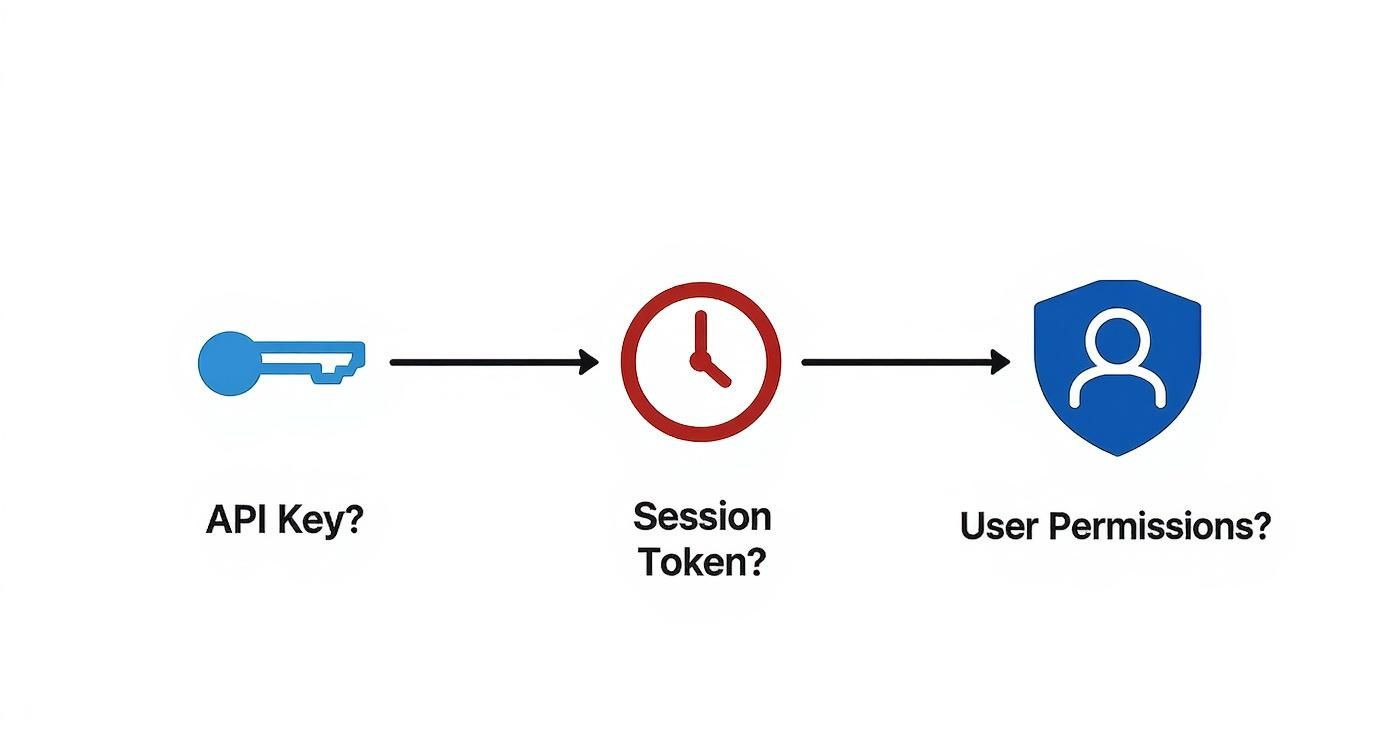
As you can see, the logic flows from one step to the next: first, make sure authentication methods like keys and tokens are valid, then check the user's specific permissions. This diagnostic process isn't just about fixing bugs; it's a critical security measure. With 42% of organizations now reporting credential-stealing attacks like phishing, attackers are constantly targeting public-facing apps. You can learn more about the global cybersecurity outlook and see why this is so important.
Getting Your Hands Dirty: Practical Fixes for Authorization Errors

Okay, you've figured out why the "user is unauthorized" error is popping up. The good news is that once you know the cause, the fix is usually pretty clear-cut. It all comes down to whether you're dealing with a simple settings mix-up or a more fundamental flaw in your app's security logic.
If the problem is rooted in user roles, your solution is all about permissions. You might need to hop into your database and assign a new role to the user, or maybe it's a quick tweak in a third-party service like Auth0 or Okta. The goal is simple: make sure the user's permissions line up with what they're trying to do.
On the other hand, if an expired session token is the villain, it's time to look at your token management. The best practice here is to implement a solid refresh token system. This lets your app grab a new access token behind the scenes when the old one dies, all without your user ever knowing it happened. No more annoying, surprise logouts.
Tailoring Security in Your Dreamspace App
Building with an AI app generator like Dreamspace gives you a fantastic head start on security. But let's be real—every app is different. You'll almost always need to fine-tune the default rules to sidestep these pesky authorization errors.
Smart API Key Management: Never give a key more power than it needs. This is the principle of least privilege in action. Generate keys with laser-focused permissions for a single service, and for goodness' sake, store them in environment variables, not hardcoded in your app. That’s a rookie mistake you don't want to make.
Get Granular with Custom Roles: Dreamspace is more than just a builder; it's a vibe coding studio that lets you get specific. Don't just settle for 'admin' or 'user'. Create roles that actually mean something in your app, like 'project-manager' or 'read-only-guest'.
Think of a clear permission structure as your first line of defense. It forces you to be intentional about who gets access to what, which makes debugging a thousand times easier and your app way more secure.
For those looking to really get the most out of the platform, it helps to understand the core concepts. We dive deeper into how tools like the Dreamspace AI app generator can accelerate your workflow in our guide on what no-code development is and how it fits into a modern security-first mindset.
Proactive Strategies to Prevent Unauthorized Access
Fixing an auth error after the fact is one thing. Building your app so it never happens in the first place? That's the real win.
Shifting your mindset from reactive to proactive not only hardens your app’s defenses but, more importantly, builds genuine trust with your users. The best place to start is with a rock-solid Role-Based Access Control (RBAC) system.
But RBAC is more than just slapping on "admin" and "user" labels. It’s about deeply embedding the principle of least privilege. This core security concept means every single user—and every API key—gets only the bare-minimum permissions needed to do their job. Nothing more. This kind of granular control shrinks your attack surface dramatically if an account ever gets popped.
Strengthening Your Security Posture
You can't just wait for a problem to find you. Regularly auditing your app for security holes is completely non-negotiable, especially in the onchain world.
- Conduct Regular Audits: Don't let your code get stale. Routinely scan your application and all its dependencies for known vulnerabilities. Automating this is a huge help for catching issues before they blow up.
- Secure Your APIs: This is foundational. Implement basic but powerful API security practices like strict input validation to shut down malicious data and rate limiting to fend off brute-force attacks.
- Monitor User Activity: Keep a close eye on your access logs. Look for weird patterns like a sudden storm of failed login attempts or access from unusual geolocations. These are often the first signs of trouble.
To get a better handle on the human element of risk, this ethical and proactive guide to preventing insider threats offers some fantastic insights. Here at Dreamspace, our vibe coding studio, building secure-by-default applications isn't just a goal; it's our entire philosophy.
The numbers don't lie. Unauthorized access costs companies an average of $787,671 per hour across the globe. It's a staggering figure that highlights just how critical robust security is. With 60% of organizations now looking at cybersecurity risk as a primary business factor, you can't afford to be left behind.
Ultimately, consistent security audits are your best friend, particularly when smart contracts are controlling real assets. Having the right toolkit is everything. To beef up your defenses, check out our deep dive on essential smart contract audit tools.
Why Unauthorized Access Is a Growing Global Threat

When you see a "user is unauthorized" error, it's easy to dismiss it as just another bug to squash. But it’s much more than a simple coding hiccup. Think of it as your app’s immune system kicking in, actively fighting off a potential threat. Every time your system correctly flags an unauthorized request, it’s doing its job perfectly.
This isn't just a hypothetical problem; we're in the middle of a daily, worldwide battle against cybercrime. For developers, understanding the sheer scale of this fight is critical. The damage from a single breach can be catastrophic, not just financially but to your reputation as well.
The Staggering Numbers Behind the Threat
Unauthorized access isn't a niche issue—it's a global epidemic. The latest figures are enough to make any developer pause and double-check their security protocols.
Take the UK, for example. It recently reported the highest number of cybercrime victims per million internet users at 4,783. That’s a shocking 40% increase in just two years. It's not an isolated trend, either. In one recent quarter alone, Russia saw 22.3 million accounts breached, with France not far behind at 13.8 million. These numbers are more than just statistics; they represent real people and compromised data. You can dig into the latest cyber crime statistics yourself to see the full picture.
This constant onslaught of malicious activity puts a massive responsibility on our shoulders. It doesn't matter if you're coding an app from the ground up or using an AI-powered tool like the Dreamspace AI app generator to speed things up—the buck stops with you when it comes to securing user data.
The hard truth is that attackers are relentlessly looking for the smallest crack in your defenses. A solid authorization system isn't just a nice-to-have feature; it's the core promise of safety you make to every single user.
Baking security into your app from day one is the only way to stay ahead. If you're building in the web3 space, this is even more crucial. Getting a handle on secure architecture is non-negotiable, and our guide on approaching decentralized app development is a great place to start. At the end of the day, our job is to build great things without becoming another cautionary tale.
Digging Deeper into Access Errors
Let's tackle some of the common questions that pop up when you're staring down a 'user is unauthorized' error. Getting these concepts straight can make the difference between a quick fix and a day-long headache.
What's the Real Difference Between 401 Unauthorized and 403 Forbidden?
It's easy to mix these two up, but they mean very different things. Think of it like a bouncer at a club.
A 401 Unauthorized error is the bouncer saying, "I don't see your name on the list, I don't even know who you are." The request simply doesn't have the right credentials to be identified.
A 403 Forbidden error is when the bouncer looks at your ID, finds your name, and says, "I know exactly who you are, and you're still not getting in." Your identity is confirmed, but your permissions fall short. This distinction is your first clue in solving any access puzzle.
How Can I Stop Session Hijacking in Its Tracks?
Session hijacking is a classic way for bad actors to cause trouble, often leading to a legitimate user getting locked out. The good news is, the fixes are pretty standard security practices.
Always, and I mean always, enforce HTTPS. Encrypting data in transit is non-negotiable. You’ll also want to use secure, HttpOnly flags on your session cookies, which prevents sneaky client-side scripts from getting their hands on them.
A pro-tip I swear by: regenerate the session ID the moment a user successfully logs in. It’s a simple move that immediately invalidates the pre-login session, shutting down a common attack vector. Pair that with a sensible session timeout, and you're in a much better spot.
Can an AI App Generator Actually Help Prevent These Errors?
It might sound too good to be true, but yes, it absolutely can. When you use an AI app generator or a vibe coding studio like Dreamspace, you're not starting from scratch. You're starting with a foundation built on best practices.
These platforms bake battle-tested authentication and authorization systems right into their templates. This means you sidestep many of the common manual coding mistakes that lead to access control nightmares. You get to focus on building cool features, not patching fundamental security flaws.
Ready to build secure, powerful onchain apps without getting lost in complex authentication code? With Dreamspace, our AI app generator, you can generate a production-ready application with AI, complete with smart contracts and robust security. Stop wrestling with access errors and start creating. Build your onchain app today.