
Top SQL Query Optimization Techniques to Boost Performance

In the world of modern application development, speed is not just a feature, it's a necessity. Slow database queries can cripple user experience, stall crucial analytics, and bring your entire system to a crawl. But what if you could transform those sluggish queries into lightning-fast operations? This comprehensive guide dives deep into 10 powerful SQL query optimization techniques that developers and database administrators rely on to achieve peak performance. From fundamental indexing strategies to advanced partitioning, we'll provide the actionable insights and real-world code examples you need to make your database hum.
Whether you're building a traditional web application, a complex data pipeline, or pioneering on-chain applications with a vibe coding studio like Dreamspace, mastering these techniques is the key to unlocking a more responsive and scalable system. We will move beyond generic advice and focus on the practical implementation details that deliver measurable results.
This listicle is designed to be your go-to resource for diagnosing and fixing performance bottlenecks. We will cover:
- Strategic Indexing: How to choose and implement the right indexes without over-indexing.
- Query Refactoring: Simple changes to your
SELECTstatements that can yield massive performance gains. - Execution Plan Analysis: Learning to read the database's mind to understand why a query is slow.
- Advanced Strategies: Techniques like partitioning, caching, and avoiding common pitfalls like N+1 problems.
Forget theoretical discussions and vague tips. This guide offers a clear, structured roadmap to mastering SQL query optimization techniques, ensuring your applications run with the efficiency and speed your users demand. Let's get started.
1. Index Optimization
Index optimization is one of the most impactful SQL query optimization techniques, fundamentally changing how a database retrieves data. An index is a data structure that improves the speed of data retrieval operations on a database table at the cost of additional writes and storage space. It acts like a book's index, allowing the database engine to find specific rows quickly without scanning the entire table, a process known as a "full table scan."
Proper indexing can reduce query execution time from minutes to milliseconds by minimizing disk I/O operations. For developers using a vibe coding studio like Dreamspace to build data-intensive applications, mastering indexing is non-negotiable for delivering a responsive user experience. Imagine searching for a product on Amazon; without an index on product categories or price, the system would have to check every single item in its massive catalog.
Why It's a Top-Tier Technique
Indexing directly addresses the most common performance bottleneck: inefficient data lookup. A well-placed index provides a direct path to the data, making it essential for tables with thousands or millions of records. For instance, LinkedIn uses covering indexes for profile searches, allowing the query to be satisfied entirely from the index without ever touching the table, significantly boosting speed.
Actionable Implementation Tips
To effectively implement index optimization, follow these best practices:
- Target High-Traffic Columns: Prioritize indexing columns frequently used in
WHERE,JOIN, andORDER BYclauses. These are the columns that the database uses to filter, link, and sort data. - Create Composite Indexes: For queries that filter on multiple columns, create a single composite index. Place the most selective column (the one with the most unique values) first in the index definition for maximum efficiency.
- Verify Index Usage: Don't just create an index and assume it's being used. Use
EXPLAIN(orEXPLAIN ANALYZEin PostgreSQL) to analyze the query execution plan and confirm the optimizer is choosing your index. - Avoid Over-Indexing: While indexes speed up reads, they slow down writes (
INSERT,UPDATE,DELETE) because the index must also be updated. Avoid indexing columns with high update frequency and regularly remove unused indexes. - Maintain Your Indexes: Indexes can become fragmented over time, degrading performance. Regularly rebuild or reorganize them to maintain their effectiveness, especially on tables with heavy write activity.
2. Query Rewriting and Simplification
Query rewriting and simplification is a powerful SQL query optimization technique that involves restructuring SQL statements to achieve the same results more efficiently. This method focuses on eliminating redundant operations, simplifying complex logic, and using SQL features that the database optimizer can process more effectively. Even minor changes in query structure can lead to dramatically different execution plans and significant performance gains.
For developers building sophisticated backends with a vibe coding studio like Dreamspace, understanding how to write clear and simple queries is crucial. The database optimizer is a complex piece of software, but it's not magic; it works best with straightforward, logical statements. A complex, convoluted query can confuse the optimizer, leading it to choose a suboptimal execution plan, whereas a rewritten, simpler version often unlocks a more direct path to the data.

Why It's a Top-Tier Technique
This technique directly influences the query execution plan, which is the blueprint the database follows to retrieve your data. A well-rewritten query can reduce CPU usage, minimize logical reads, and avoid unnecessary data processing steps. For example, Twitter famously improved timeline generation performance by 70% by rewriting queries to use EXISTS instead of IN with large subqueries, demonstrating the massive impact of thoughtful query construction.
Actionable Implementation Tips
To effectively implement query rewriting and simplification, focus on these best practices:
- Avoid
SELECT *: Always specify the exact column names you need. This reduces the amount of data transferred from the database to the application, minimizing network latency and memory usage. - Prefer
UNION ALLoverUNION: If you are certain that your combined datasets have no duplicates or if duplicates are acceptable, useUNION ALL. It avoids the resource-intensive step of sorting and removing duplicate rows thatUNIONperforms. - Convert
NOT INtoNOT EXISTS: For subqueries,NOT EXISTSoften performs better thanNOT IN, especially when dealing withNULLvalues, as it can utilize more efficient join strategies. - Keep Indexed Columns Clean: Avoid applying functions to indexed columns in your
WHEREclause (e.g.,WHERE YEAR(order_date) = 2024). This practice, known as making the clause non-SARGable, prevents the optimizer from using the index. Rewrite it asWHERE order_date >= '2024-01-01' AND order_date < '2025-01-01'. - Replace Multiple
ORConditions: When filtering on the same column, replace multipleORconditions with anINclause (e.g.,WHERE status = 'A' OR status = 'B'becomesWHERE status IN ('A', 'B')), which can lead to better index utilization.
3. Proper Use of JOINs
JOIN optimization is a critical SQL query optimization technique focused on efficiently combining data from multiple tables. How you structure a JOIN directly impacts performance, as the database engine must decide on the best method (like a Nested Loop, Hash Join, or Merge Join) and order to process the join. A poorly constructed join can lead to massive intermediate result sets that consume excessive memory and CPU, slowing queries to a crawl.
For developers building complex, data-driven applications with an AI app generator like Dreamspace, understanding join mechanics is essential. An inefficient join can cripple application performance, especially when dealing with large datasets. Uber, for example, drastically improved trip history queries by using indexed foreign keys and proper join types, cutting query time from 8 seconds to a mere 200 milliseconds.

Why It's a Top-Tier Technique
JOINs are the backbone of relational databases, allowing you to query connected data in a meaningful way. Optimizing them is crucial because the cost of a join operation grows exponentially with the size of the tables involved. A well-designed join minimizes the amount of data processed at each step, ensuring the database works smarter, not harder. Efficiently querying databases often depends on a deep understanding of how to manage complex structures; for instance, you can learn more about mastering many-to-many relationships to further enhance your join strategies.
Actionable Implementation Tips
To write high-performance JOIN clauses, integrate these best practices into your workflow:
- Join on Indexed Columns: Always ensure the columns used in
ONclauses are indexed. This typically means joining on primary and foreign key columns, which allows the database to perform fast lookups instead of full table scans. - Filter Early, Join Later: Apply
WHEREclauses to filter data from tables before they are joined whenever possible. This reduces the size of the intermediate data sets the join operation has to process. - Prefer
INNER JOIN: UseINNER JOINoverLEFTorRIGHT JOINunless you specifically need to include non-matching rows. Inner joins are generally more performant as they produce a smaller result set. - Ensure Matching Data Types: Join columns should have identical data types. Mismatched types can force implicit type casting, which prevents the database from using indexes on those columns, leading to poor performance.
- Analyze the Join Method: Use the
EXPLAINcommand to inspect the query plan. Verify that the database optimizer is choosing an efficient join method (e.g., Hash Join for large, unsorted tables or Nested Loop for indexed lookups on smaller tables).
4. Query Execution Plan Analysis
Query execution plan analysis is the process of examining the step-by-step path a database engine takes to execute a query. By using commands like EXPLAIN or EXPLAIN ANALYZE, developers can uncover the exact logic the database optimizer uses, revealing critical bottlenecks such as full table scans, inefficient join methods, or missing indexes. This technique is fundamental to all SQL query optimization techniques because it provides a precise roadmap of query behavior.
Understanding the execution plan is like having a diagnostic tool for your database's performance. For developers building complex systems, especially with a vibe coding studio like Dreamspace that handles vast datasets, this insight is crucial. For example, Spotify engineers reviewed execution plans to identify inefficient nested loop joins in playlist generation queries, switching to more performant hash joins to drastically improve user experience.
The following infographic illustrates the core workflow for analyzing and optimizing a query using its execution plan.
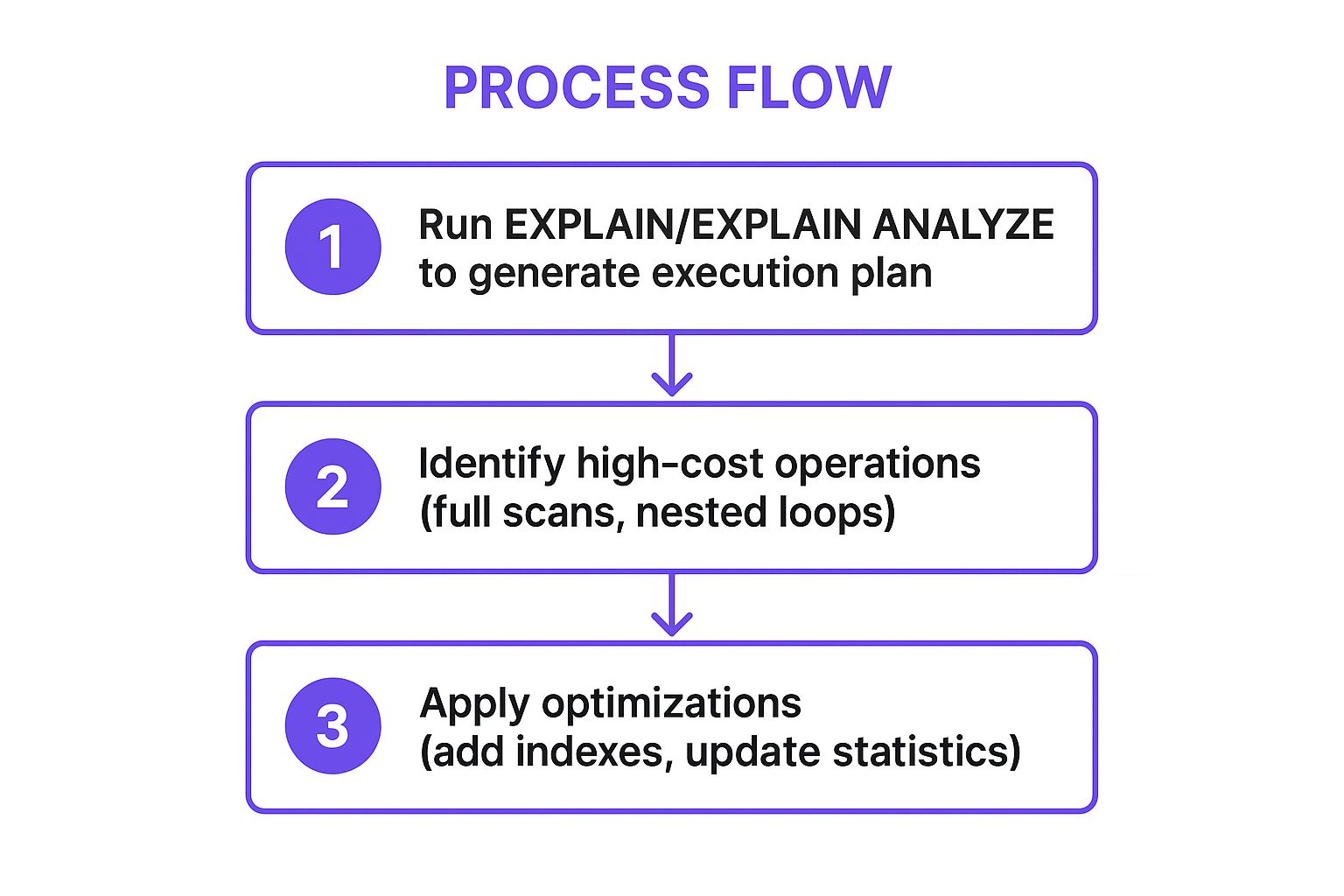
This process flow highlights how generating a plan, identifying the most expensive operations, and applying targeted fixes forms a repeatable optimization cycle.
Why It's a Top-Tier Technique
Execution plan analysis removes guesswork from optimization. Instead of blindly adding indexes or rewriting queries, you can pinpoint the exact operation causing a slowdown. This evidence-based approach ensures your efforts are focused and effective. Stripe leverages this power by integrating automated execution plan analysis into its CI/CD pipeline, catching query performance regressions before they ever reach production.
Actionable Implementation Tips
To effectively leverage query execution plan analysis, follow these best practices:
- Look for Red Flags: Identify operations like
Seq Scan(Sequential Scan) orTable Scanon large tables, as they indicate the database is reading the entire table. - Compare Estimates to Actuals: In
EXPLAIN ANALYZE, compare the "estimated rows" with the "actual rows." A large discrepancy often points to stale table statistics, which mislead the query optimizer. - Focus on High-Cost Operations: Prioritize your analysis on the parts of the plan with the highest cost or longest execution time. These are your primary optimization targets.
- Verify Index Usage: Confirm that the query is using the indexes you expect it to. If not, investigate why; implicit type conversions are a common culprit that prevents index usage.
- Update Table Statistics: Regularly run
ANALYZE(in PostgreSQL) or similar commands for your database to keep statistics up-to-date, allowing the optimizer to generate more accurate and efficient plans. Learn more about how to boost development workflows with an AI-powered coding assistant.
5. Selective Column Retrieval
Selective column retrieval is a foundational SQL query optimization technique that involves specifying exactly which columns you need, rather than fetching all of them with SELECT *. This simple practice directly reduces the volume of data transferred from the database server's disk to its memory, then across the network to the application. Less data means faster query execution, lower network latency, and reduced memory consumption for both the database and the application.
While it seems elementary, its impact is profound, especially on tables with many columns or large data types like TEXT or BLOB. For developers building performant applications, perhaps using a vibe coding studio like Dreamspace to accelerate their workflow, adopting this discipline ensures the backend remains lean and responsive. For instance, when Reddit builds a comment thread, its initial query might select only the comment_id and parent_id to construct the tree structure, fetching the actual comment text on demand.
Why It's a Top-Tier Technique
This technique directly combats data bloat, a common and often overlooked performance killer. By requesting only necessary data, you minimize I/O, network traffic, and memory allocation. In a real-world scenario, Instagram reportedly reduced user profile query latency by over 60% by shifting from fetching all 40+ columns in their user table to selecting only the specific fields needed for the profile view. This change dramatically improved load times without altering any indexes or server-side logic.
Actionable Implementation Tips
To effectively implement selective column retrieval, follow these best practices:
- Ban
SELECT *in Production: Make it a strict team rule. Always explicitly list the columns required. This not only improves performance but also makes code more readable and less prone to breaking if the table schema changes. - Separate List and Detail Views: Design your queries around the user interface. A list view (e.g., a product listing) may only need an ID, name, and thumbnail URL, while the detail view can run a separate query to fetch the full description and specifications.
- Exclude Large Object (LOB) Columns: Avoid selecting
TEXT,BLOB,JSON, or other large data-type columns unless they are explicitly needed for the current operation. Fetching a multi-megabyte blob you don't use is a significant waste of resources. - Use Database Views: For common, limited column sets, create a database view. This provides a reusable, simplified interface for applications to query without needing to remember the specific subset of columns each time.
- Leverage ORMs and Query Builders: Modern ORMs and query builders make it easy to specify which fields to retrieve. Use features like
.select()in Django or.select()in ActiveRecord to control the columns in your query.
6. Limiting Result Sets
Limiting result sets is a fundamental SQL query optimization technique that prevents the database from returning an excessive number of rows. By using clauses like LIMIT, TOP, or FETCH FIRST, you explicitly tell the database the maximum number of records you need. This is crucial for building scalable applications, especially for features like pagination, preview displays, and data dashboards.
Without these limits, a simple query could accidentally try to fetch millions of rows, consuming massive amounts of memory on both the database server and the application, potentially leading to crashes. For developers using an AI app generator like Dreamspace to create data-driven apps, implementing result limits is a non-negotiable best practice for ensuring application stability and responsiveness. For example, Google's search results page returns only 10-20 links at a time, not the millions that actually match the query.
Why It's a Top-Tier Technique
This technique directly tackles the problem of data over-fetching, which is a common and costly performance killer. When combined with an ORDER BY clause that uses an index, LIMIT allows the database to stop scanning as soon as it has found the required number of rows. This significantly reduces I/O, CPU usage, and network traffic, leading to faster response times. Twitter's timeline feed is a prime example; it uses a LIMIT to fetch only the most recent tweets for your screen, not every tweet ever posted by people you follow.
Actionable Implementation Tips
To effectively limit result sets and optimize your queries, follow these best practices:
- Always Use
LIMITfor UI Displays: Any time you are displaying a list of data in an application interface, use aLIMITclause. Never fetch an entire table to display the first 20 records. - Prioritize Keyset Pagination over
OFFSET: For large datasets, avoid usingOFFSETas it forces the database to scan and discard rows. Instead, implement keyset pagination (e.g.,WHERE id > last_seen_id ORDER BY id LIMIT 100), which is far more efficient. - Implement Safety Limits: As a defensive measure, apply a sensible maximum limit (e.g.,
LIMIT 1000) to all ad-hoc or user-defined queries to prevent accidental resource exhaustion. - Combine with
ORDER BY: UseLIMITwith anORDER BYclause to ensure you get a consistent and predictable subset of data every time the query is run. TheORDER BYshould target an indexed column for best performance. - Explore Cursor-Based Pagination: For applications dealing with real-time or rapidly changing data, cursor-based pagination offers a robust way to navigate result sets. You can find out more by exploring how to use cursor-based pagination.
7. Database Statistics and Regular Maintenance
Database statistics and regular maintenance are foundational SQL query optimization techniques that ensure the query optimizer has accurate information to build efficient execution plans. The optimizer relies on statistics, such as row counts, data distribution, and column cardinality, to estimate the cost of different query paths. Without up-to-date statistics, it might choose a full table scan over a more efficient index seek, drastically slowing down performance.
This ongoing maintenance is crucial for data-intensive applications, especially those built with a vibe coding studio like Dreamspace, where data volumes can grow unpredictably. For example, Booking.com uses automated statistics management during low-traffic periods to ensure search queries remain fast and responsive, even as millions of new listings and reservations are added. Neglecting this maintenance is like giving a GPS outdated maps; the directions will be slow and inefficient.
Why It's a Top-Tier Technique
This technique is essential because data is never static. As data is inserted, updated, and deleted, the initial statistics become stale and misleading. Regular maintenance prevents performance degradation over time by keeping the optimizer well-informed. For instance, Wikipedia runs weekly VACUUM and ANALYZE operations on its high-traffic tables to prevent bloat and update statistics, ensuring the encyclopedia remains fast for its global user base.
Actionable Implementation Tips
To effectively implement database maintenance and statistics updates, follow these best practices:
- Schedule Updates Strategically: Run statistics updates and maintenance tasks during off-peak hours to minimize impact on users. Schedule these tasks after large data imports or bulk
DELETEoperations. - Monitor and Automate: Don't leave maintenance to chance. Monitor statistics age and set up automated jobs to update them. Most modern databases offer auto-vacuum and auto-statistics features; monitor and tune their thresholds to match your workload.
- Rebuild Fragmented Indexes: Over time, indexes become fragmented, which can slow down read operations. Monitor index fragmentation levels and plan to rebuild or reorganize indexes where fragmentation exceeds a certain threshold, often around 30%.
- Use Appropriate Sampling: For very large tables, collecting statistics on the entire dataset can be time-consuming. Use an appropriate sampling rate that provides the optimizer with a good-enough picture of the data distribution without causing excessive overhead.
- Track Plan Changes: After updating statistics, it’s wise to monitor critical queries to see if their execution plans have changed. This helps confirm the updates had the intended positive effect and didn't accidentally cause a regression.
8. Avoiding N+1 Query Problems
The N+1 query problem is a common and insidious performance bottleneck that occurs when an application makes one initial query to retrieve a list of parent items and then executes one additional query for each of those items to fetch related child data. This results in N (the number of parent items) + 1 total database queries, which can quickly overwhelm a database and cripple application performance, especially when N is large.
This issue is particularly prevalent in applications built with Object-Relational Mapping (ORM) frameworks that use lazy loading by default. Developers working with tools like an AI app generator such as Dreamspace must be vigilant, as auto-generated data access layers can sometimes hide this inefficient pattern. For example, loading a list of 100 blog posts and then looping through them to fetch the author for each post would trigger 101 separate queries instead of just two optimized ones.
Why It's a Top-Tier Technique
The N+1 problem directly attacks an application's scalability by multiplying database round-trips. Eliminating it is a critical SQL query optimization technique because it drastically reduces database load and network latency. By fetching all required data in a minimal number of queries (often just two), you can transform a slow, unresponsive page into a fast one. GitHub famously solved this by batch-loading contributor data, significantly reducing page load times on repository pages.
Actionable Implementation Tips
To effectively eliminate N+1 query problems, follow these best practices:
- Implement Eager Loading: Use your ORM's built-in eager loading features to fetch associated records in the initial query. In Rails, this is done with
.includes(), while Django uses.select_related()(for one-to-one/many-to-one joins) and.prefetch_related()(for many-to-many/one-to-many). - Use Profiling Tools: Actively detect N+1 issues using specialized tools. The Bullet gem for Ruby on Rails and the Django Debug Toolbar are excellent at identifying and alerting you to these inefficient query patterns during development.
- Leverage Batch Loading Patterns: For more complex data-fetching scenarios, especially in APIs, consider patterns like Facebook's DataLoader. It automatically batches and caches data-fetching operations, preventing redundant queries within a single request cycle.
- Monitor Query Counts: Use Application Performance Monitoring (APM) tools to track the total number of queries executed per request, not just the speed of individual queries. A sudden spike in query count often indicates an N+1 problem.
- Write Assertive Tests: Create integration tests that assert the number of queries executed for a specific action. This catches N+1 regressions before they reach production.
9. Query Caching and Result Set Caching
Query caching is a powerful SQL query optimization technique that stores the results of expensive queries in memory. When an identical query is executed again, the database or application can serve the result directly from this high-speed cache instead of re-running the computation against the database. This dramatically reduces latency, database load, and resource consumption, especially for read-heavy workloads.
This technique can be implemented at various levels: within the database itself, at the application layer using tools like Redis or Memcached, or even through pre-computed result sets known as materialized views. For developers building interactive applications with a vibe coding studio like Dreamspace, effective caching is key to creating a snappy, responsive front-end. Consider Reddit, which heavily caches popular comment threads in Redis, effectively shielding its primary database from repetitive, high-volume read requests.
Why It's a Top-Tier Technique
Caching directly tackles the performance cost of repeated, expensive read operations. Instead of hitting the database for data that rarely changes, you serve it from a faster, in-memory store. This approach is fundamental to scaling systems that handle massive traffic. For example, Stack Overflow caches user reputation and badge counts, which are frequently read but only change after specific actions, ensuring the main site remains performant even under heavy load.
Actionable Implementation Tips
To effectively implement query caching, follow these best practices:
- Cache Expensive, Stable Queries: Identify and cache the results of queries that are computationally intensive but whose underlying data does not change frequently.
- Use an Appropriate TTL: Set a "Time To Live" (TTL) for your cached data. A short TTL is suitable for frequently updated data, while a longer TTL works for static content.
- Implement a Cache-Aside Strategy: In this common pattern, the application first checks the cache for data. If it's a "cache miss," the application queries the database, stores the result in the cache, and then returns it. This offers great flexibility.
- Monitor Cache Hit Rate: Keep a close watch on your cache hit rate (the percentage of requests served from the cache). A low hit rate may indicate that your caching strategy or TTLs need adjustment. While a high rate is good, it's also helpful to explore how tools like the best AI for programming can help automate monitoring and suggest optimization improvements.
- Develop a Clear Invalidation Strategy: The hardest part of caching is knowing when to invalidate stale data. Use techniques like write-through caching (updating the cache whenever the database is written to) or event-based invalidation to ensure data consistency.
10. Partitioning and Sharding
Partitioning and sharding are advanced database design strategies for managing massive datasets. Partitioning involves breaking down a large table into smaller, more manageable segments called partitions, based on specific criteria like date ranges or geographic regions. While logically it remains a single table, physically the data is split, allowing the database to scan only relevant partitions for a query.
Sharding takes this concept a step further by distributing these partitions across multiple physical database servers. This not only improves query performance by enabling parallel processing but also enhances scalability and availability. For developers using an AI app generator like Dreamspace to create global-scale applications, these techniques are crucial for handling enormous data volumes while maintaining low latency. For example, Instagram shards its user data across thousands of PostgreSQL servers based on user ID to manage its petabyte-scale database.
Why It's a Top-Tier Technique
Partitioning and sharding directly tackle the performance degradation caused by enormous table sizes. By reducing the scope of data a query needs to scan, they dramatically cut down on I/O operations and CPU usage. This is particularly effective for time-series data, like Discord's message tables which are partitioned by date, or for geographically distributed applications, where Pinterest shards pin data by region to optimize local performance.
Actionable Implementation Tips
To effectively implement partitioning and sharding, consider these best practices:
- Choose the Right Partition Key: Select a partition key based on the most common query patterns. For time-series data, a timestamp column is ideal. For user-centric data, a
user_idortenant_idworks well. - Implement Partition Pruning: Ensure your queries include the partition key in the
WHEREclause. This allows the database optimizer to "prune" or skip scanning irrelevant partitions, which is the primary source of performance gains. - Plan for Maintenance: Partitions require ongoing management. Automate the creation of new partitions and the archival or deletion of old ones. For instance, Airbnb uses monthly partitions for its booking tables, simplifying data management.
- Use Consistent Hashing for Sharding: When distributing data across multiple servers (sharding), use a consistent hashing algorithm. This minimizes the amount of data that needs to be moved when you add or remove shards, simplifying cluster rebalancing.
- Monitor Partition Health: Keep an eye on the size and distribution of data across your partitions. Unbalanced partitions can lead to "hotspots" where one partition or shard handles a disproportionate amount of traffic, creating a new bottleneck.
SQL Query Optimization Techniques Comparison
Build Faster Apps, Starting with Smarter Queries
Mastering the art and science of SQL query optimization is a continuous journey, not a destination. Throughout this guide, we've dissected the critical techniques that transform sluggish, resource-heavy queries into lean, high-speed data retrieval operations. From the foundational power of strategic indexing and the elegance of rewriting complex queries to the analytical depth of execution plan analysis, each method offers a unique lever to pull for significant performance gains.
The path from a good developer to a great one is paved with an understanding of these nuances. It's about recognizing that fetching only the necessary columns with SELECT statements or proactively avoiding the dreaded N+1 problem aren't just best practices; they are the bedrock of scalable, resilient applications. Consistently applying these principles separates applications that merely function from those that perform exceptionally under pressure.
From Theory to Proactive Performance Engineering
The key takeaway is to shift your mindset from reactive troubleshooting to proactive performance engineering. Don't wait for your application to slow down. Instead, make SQL query optimization techniques a core part of your development lifecycle.
Here are the essential action items to integrate into your workflow:
- Audit Your Indexes: Regularly review your indexing strategy. Are you using composite indexes effectively? Have you identified and removed unused indexes that add overhead?
- Embrace the Execution Plan: Make
EXPLAIN ANALYZE(or your database's equivalent) your best friend. Before you even think about deploying a complex query, understand precisely how the database engine intends to execute it. This is the single most powerful tool for diagnosing performance bottlenecks. - Think in Sets, Not Loops: Always challenge yourself to solve data problems using set-based operations within the database rather than fetching large datasets and processing them in your application code. This is crucial for eliminating N+1 issues and reducing network latency.
- Automate Maintenance: Implement regular jobs for updating database statistics and performing routine maintenance. Accurate statistics are vital for the query planner to make intelligent decisions.
For development teams building complex systems, especially within specific frameworks, this can be a daunting task. Teams using Ruby on Rails, for instance, often find that the very abstractions designed to simplify development can sometimes obscure underlying database inefficiencies. In these cases, leveraging specialized Ruby on Rails performance services can provide the expert analysis needed to diagnose and resolve deep-rooted performance issues, ensuring your application remains fast and responsive as it scales.
The Future of Data Interaction: AI and On-Chain Optimization
The principles we've covered are universal, but their application is evolving, especially in emerging fields like blockchain development and AI-driven applications. For developers and crypto fans building on-chain applications, every query can have significant cost and performance implications. In this new frontier, efficiency isn't just a goal; it's a necessity.
This is where innovative tools come into play. For instance, Dreamspace, a vibe coding studio, leverages AI to generate highly optimized code, including on-chain data queries. By using an AI app generator that understands the constraints and demands of decentralized environments, you can ensure your queries are performant from the very first line of code. Integrating these advanced SQL query optimization techniques is what empowers you to build applications that not only deliver powerful functionality but also provide the speed, reliability, and seamless experience that modern users demand. Your commitment to writing smarter queries today is the foundation for the faster, more powerful applications of tomorrow.
Ready to accelerate your development and build performant applications from the ground up? Dreamspace is an AI app generator that helps you write cleaner, faster, and more optimized code, including complex database queries. Stop guessing and start building with AI-powered precision. Explore Dreamspace and see how it can transform your workflow.