
Mastering Python Coding AI for Real-World Apps
Welcome to your launchpad for Python coding AI. Forget the dry, academic stuff—this is a hands-on guide to building genuinely intelligent applications from scratch. We’ll jump right into why Python is the undisputed king of AI and machine learning, showing you its real-world muscle, not just the hype.
Why Python Is Your Go-To for AI Development
When you kick off a new AI project, the first big decision is your programming language. Time and time again, Python comes out on top for everyone from solo developers to data scientists at major tech companies. But what makes it so dominant?
It really boils down to two things: its beautiful simplicity and its powerhouse community. Python’s code is clean and readable, which means you spend more time solving tough AI problems and less time wrestling with complex syntax. This makes it incredibly easy to get started, prototype ideas, and iterate quickly—a massive advantage in the fast-moving world of AI.
The Power of Python's Ecosystem
The real magic, though, is in Python's incredible collection of specialized libraries. Think of them as pre-built toolkits that handle all the heavy lifting, whether you're doing complex math or building a neural network from the ground up. This lets you stand on the shoulders of giants, adding powerful features to your project with just a few lines of code.
What makes this ecosystem so valuable?
- Warp-Speed Development: Libraries like TensorFlow, PyTorch, and Scikit-learn give you ready-to-use modules for machine learning, slashing your development time.
- A Massive Support Network: If you hit a roadblock, chances are someone has already been there and solved it. The community provides endless documentation, tutorials, and forums.
- The Ultimate "Glue Language": Python is fantastic at connecting different components. It can easily pull together various data sources, APIs, and other systems into one seamless application.
This widespread love for Python has solidified its top spot. By mid-2025, the Python developer community is expected to hit over 8.2 million, blowing past Java’s estimated 7.6 million users. This surge is almost entirely driven by its use in AI and data science, which means faster development and lower costs for anyone building in this space.
Essential Python AI Libraries at a Glance
Before we start building, it's helpful to get familiar with the core tools we'll be using. This table gives you a quick rundown of the essential libraries and why they matter for our project.
Having these libraries in your toolkit is like having a full workshop—you have the right tool for every part of the AI development process, from cleaning your data to deploying a complex model.
From Model to Application
Our goal here isn't just to talk theory. We're going to build something real: a simple Natural Language Processing (NLP) model that can analyze the sentiment of a piece of text. But an AI model sitting on your hard drive isn't very useful on its own.
This is where the game is changing. The focus is no longer just on coding a model, but on rapidly deploying it inside a full-fledged, interactive application.
That’s where Dreamspace comes in. As an intuitive AI app generator, it’s built to close the gap between your Python script and a live, onchain application. We’ll show you exactly how to take your model's output and use it to drive real-world actions, turning your code into an experience people can actually use.
If you want a broader look at the AI landscape and why Python is so central to it, this practical guide to modern AI is a great read.
Crafting Your AI Development Environment
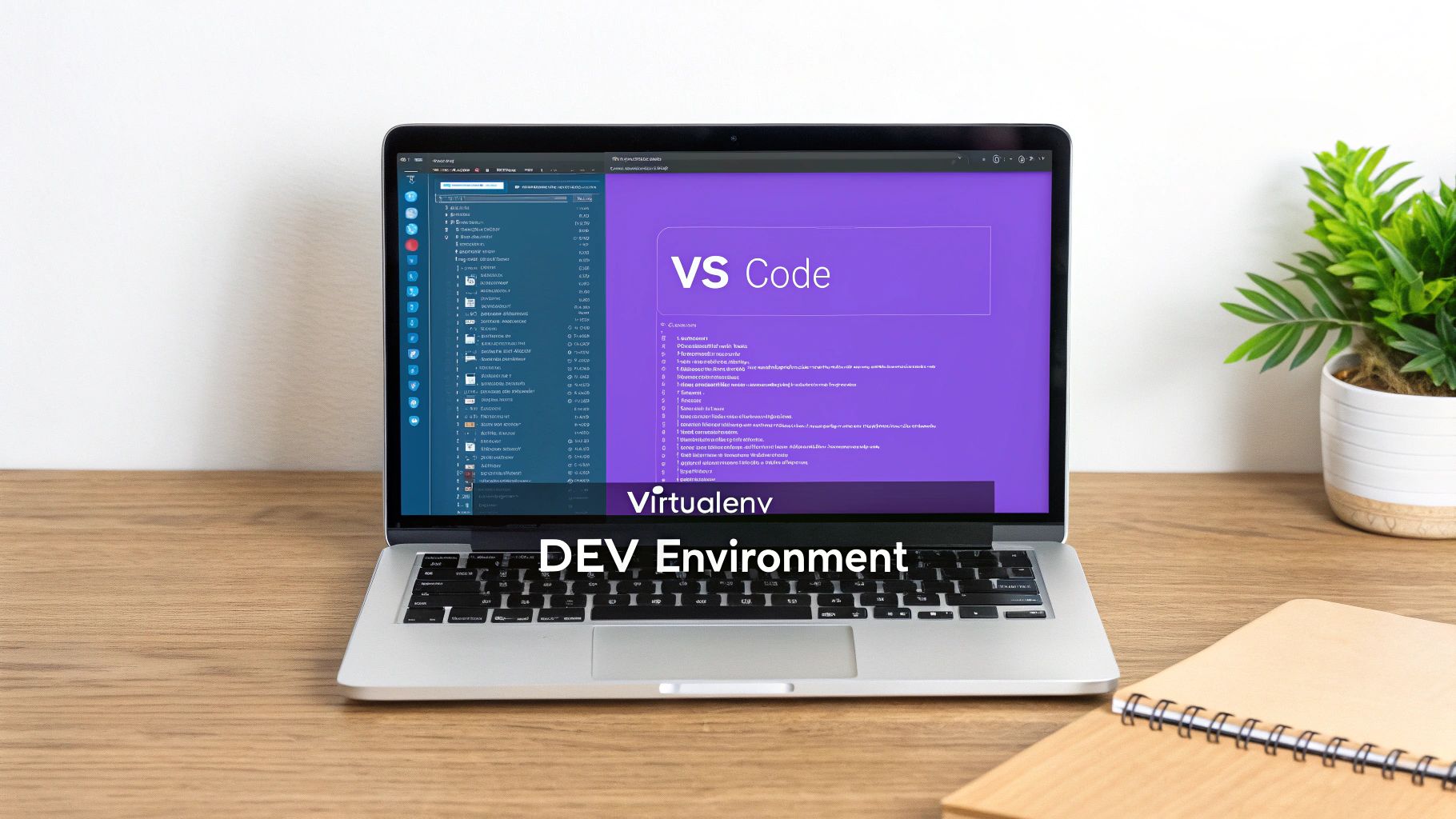
Before you can write a single line of AI code, you have to build your workshop. A messy, disorganized setup is a fast track to dependency nightmares and project-killing bugs. Trust me, getting this foundation right is one of the most important things you can do for any python coding ai project.
The whole point is to create an isolated, reproducible space for your work. This is how you stop projects from stepping on each other's toes, especially when one needs a different library version than another. Think of it like giving every project its own clean, dedicated workbench.
Choosing Your Python Version and Tools
First things first: Python itself. It’s tempting to grab the latest and greatest version, but in the AI world, stability trumps novelty. Major libraries like TensorFlow and PyTorch often need a little time to catch up with the newest Python releases.
A good rule of thumb is to stick with the second-most-recent stable version. Right now, that means something like Python 3.11 or 3.12, as they tend to have the best compatibility across the board. You can use a tool like pyenv to juggle different Python versions on your machine—a real lifesaver when you're working on multiple projects.
When it's time to actually write code, you have a couple of fantastic options:
- Visual Studio Code (VS Code): This isn't just a text editor; it's a powerhouse. With extensions like Python and Jupyter, it transforms into a full-blown development environment perfect for building and debugging serious applications.
- Jupyter Notebooks: Absolutely essential for exploration and prototyping. Jupyter's interactive, cell-by-cell format lets you run small code snippets, visualize data, and see results instantly. It's the go-to for data scientists for a reason.
The Power of Virtual Environments
Now for the most critical piece of the puzzle: virtual environments. This is a non-negotiable practice for any professional developer. A virtual environment is just a self-contained directory that holds a specific Python interpreter and all the libraries your project needs.
The standard approach is using Python's built-in venv module. By creating a unique environment for each project, you guarantee that installing a package for one AI model won't mysteriously break another one. It keeps your main Python installation pristine and your project dependencies clear and manageable. For a deeper dive, our guide on Python for AI coding has you covered.
A project without a virtual environment is like a ship without a manifest. You have no clear record of what's on board, making it nearly impossible to replicate your setup or collaborate with others effectively.
Installing Your Core AI Libraries
With your new environment activated, it's time to bring in the heavy hitters. Using pip, Python's package installer, you can quickly pull in the foundational libraries for modern AI work.
For most projects, you’ll want to start with these three:
- TensorFlow or PyTorch: These are the two giants of deep learning. You'll typically pick one and stick with it for a given project.
- Transformers: This library from Hugging Face is a game-changer. It gives you access to thousands of pre-trained models for NLP, computer vision, and more, which dramatically speeds up development.
- NumPy and Pandas: The absolute bedrock of data science in Python. You'll use them constantly for numerical operations and data wrangling.
Once these are installed, your environment is officially ready for action. You've built a stable, isolated, and powerful setup primed for your first AI model. This deliberate prep work pays off big time, letting you focus on the creative side of AI—much like how a vibe coding studio like Dreamspace lets you focus on your idea instead of the boilerplate code.
Building Your First NLP Sentiment Analyzer
Alright, with your environment all set up, it's time for the fun part: actually building something with Python coding AI. We're going to put together a simple Natural Language Processing (NLP) model to handle sentiment analysis. That's just a straightforward way of saying it can figure out if a sentence is positive or negative.
Now, we could spend weeks building a massive neural network from the ground up, but that's not how modern AI development usually works. Instead, we'll stand on the shoulders of giants and use a powerful, pre-trained model from the Hugging Face Transformers library. This approach saves an incredible amount of time and computing power by using a model that's already been trained on mountains of text data.
Loading a Pre-Trained Model
First things first, we need to pick and load our model. Hugging Face is like a massive library for AI models, and for what we're doing, we want one that's already been fine-tuned for sentiment analysis. A fantastic choice for getting started is distilbert-base-uncased-finetuned-sst-2-english. It’s powerful but not overly resource-hungry.
Getting this model ready involves two key pieces:
- The Tokenizer: This is what translates our human-readable text into a format the model can understand. It takes a sentence and breaks it down into numerical "tokens," handling all the messy bits like punctuation and capitalization along the way.
- The Model: This is the neural network itself, the engine that does the heavy lifting of figuring out the sentiment.
Here’s the surprisingly simple code to load both using the transformers library we installed.
from transformers import pipeline
Load the sentiment analysis pipeline
This one line takes care of loading the tokenizer and the model for us
sentiment_analyzer = pipeline("sentiment-analysis", model="distilbert-base-uncased-finetuned-sst-2-english")
And that’s it. Seriously. With just those two lines of Python, you've pulled a sophisticated AI model right into your script. This kind of simplicity is exactly why Python has become the undisputed champion for AI development.
Making Your First Prediction
With the model loaded, we can now run "inference"—which is just the term for asking the model to make a prediction on new data. Let's feed it a sentence and see what it comes back with.
You just pass a string directly to the sentiment_analyzer object you created. The model crunches the text and spits out its analysis, usually a label ('POSITIVE' or 'NEGATIVE') and a confidence score.
Here's some sample text to analyze
text_to_analyze = "Dreamspace is an amazing ai app generator that makes building onchain apps feel effortless."
Let's get the sentiment prediction
result = sentiment_analyzer(text_to_analyze)
And print the result
print(result)
Expected output: [{'label': 'POSITIVE', 'score': 0.999...}]
As you can see, it nailed it, correctly identifying the sentence as positive with an extremely high confidence score. This ability to get instant feedback is what makes tools like Python and Jupyter Notebooks so incredibly powerful for quickly prototyping AI features.
The real power here isn't just getting a single prediction. It's about building a repeatable function that you can integrate into a larger application, turning a simple script into a valuable tool.
This accessibility is a huge driver of industry trends. By 2025, Python's role in AI became undeniable. The 2025 Stack Overflow Developer Survey showed Python usage jumped by 7 percentage points from 2024 to 2025 alone. That's a massive leap, cementing its status as the language for AI. The survey also found that 82% of developers were using OpenAI's GPT models, which just underscores how central Python is to this entire ecosystem. You can dig into the numbers yourself in the full Stack Overflow survey findings.
Integrating the Model into a Workflow
Having a model that can make predictions is a great start, but the magic happens when you connect its output to a real workflow. Think about it: you could use this sentiment analyzer to automatically tag customer feedback, moderate comments on a website, or even trigger specific onchain actions based on community sentiment.
This is where a vibe coding studio like Dreamspace becomes a game-changer. You can take this little Python function we just built and use it as the "brain" for a full-fledged application, without getting stuck dealing with all the complex backend plumbing. In the next section, we’ll show you exactly how to do that.
Deploying Your AI Onchain with Dreamspace
Okay, so you’ve done the hard part. You’ve wrangled the python coding ai concepts, built a sharp sentiment analyzer, and now you have a script that can tell you if a piece of text is happy, sad, or somewhere in between. That’s awesome. But right now, it’s just a script living on your computer. Its real power is unleashed when you can actually do something with its predictions.
This is where most projects hit a wall. You have to figure out how to connect your model to a live application. That usually means diving into the deep end with servers, APIs, databases, and front-end frameworks. And if you want to bring blockchain into the mix? The complexity just explodes.
This is exactly the kind of friction an AI app generator like Dreamspace is built to eliminate. It helps you get your model’s intelligence out into the world without getting bogged down in backend hell.
From Python Script to Interactive App
The whole point is to take the sentiment scores from our model and use them to power real, onchain actions. Think about it: what if your AI's analysis could automatically trigger a smart contract? Or maybe generate a SQL query to a decentralized database based on user input? That’s how you go from a cool coding experiment to a genuinely useful tool.
Dreamspace essentially acts as your vibe coding studio. Instead of you having to manually write all the boilerplate for databases, APIs, and smart contracts, you just describe what you need the app to do. The platform handles the heavy lifting, generating the infrastructure that lets your Python AI model be the brains of the operation.
This visual breaks down the simple flow our NLP model uses to make a prediction.
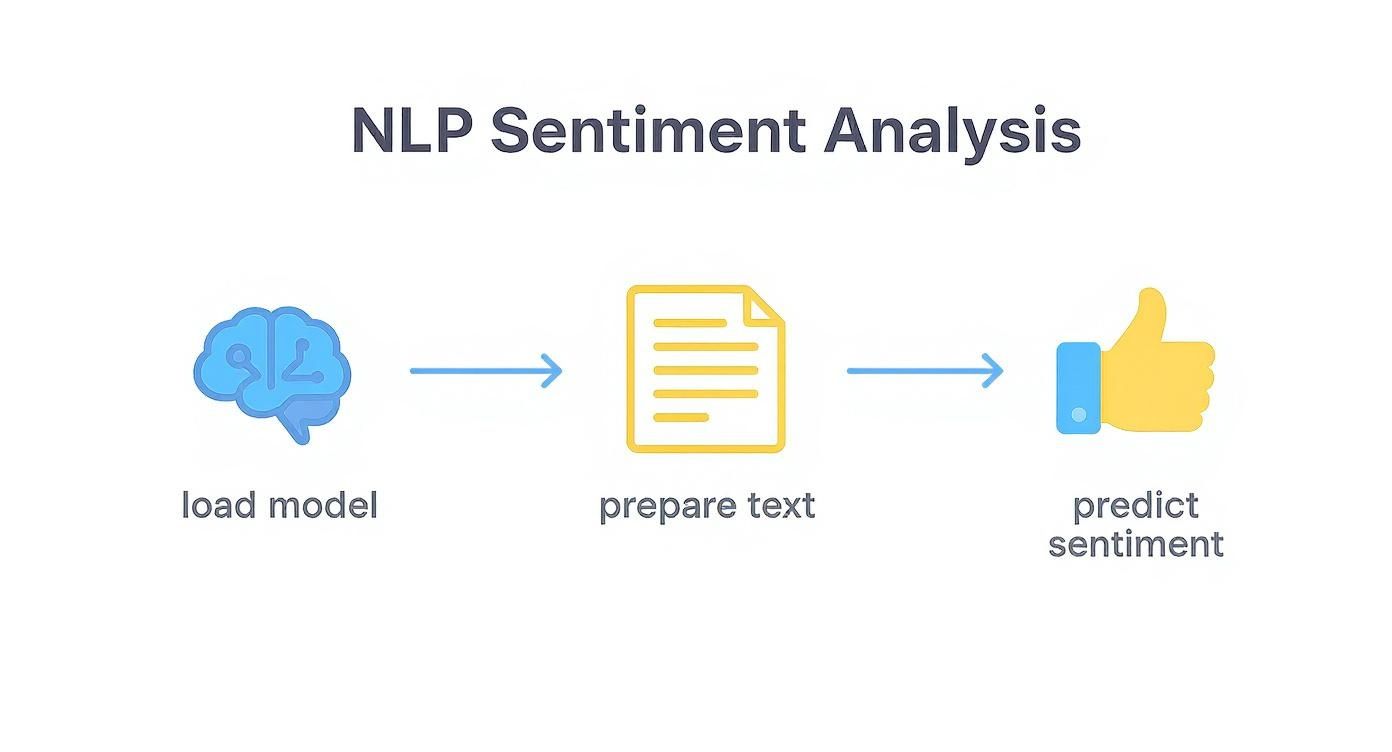
This process—loading the model, prepping the text, and predicting the sentiment—is the engine we’re about to plug into a live onchain application.
A Practical Onchain Workflow
Let's make this real. Imagine you build a decentralized app to track community feedback on a new proposal. Here’s how it could work:
- Input: Users drop their opinions into a simple web form.
- Analysis: Your Python sentiment model, hooked up through Dreamspace, chews on each submission and spits out a score.
- Action: This is where the magic happens. A super positive score could trigger a "vote of confidence" transaction onchain. Negative feedback? It could be logged to decentralized storage for the team to review.
The core idea is to let the AI's intelligence drive automated, transparent actions on the blockchain. This integration turns a simple predictive model into an active participant in a decentralized system.
Dreamspace makes this happen by generating all the connective tissue for you. You can learn a lot more about how to code with AI in a way that automates these tricky integrations. The platform can spin up the smart contract logic and even the SQL queries needed to interact with blockchain data, all from your high-level prompts.
The platform is all about a simple, prompt-based workflow. This means you don’t need a deep background in web or blockchain development to get your project off the ground.
Finally, you can even have it generate a shareable web interface to show off your AI's results. Just like that, your Python script becomes a complete, interactive onchain application that anyone can actually use.
Writing Production-Ready AI Code
https://www.youtube.com/embed/3YXFcnSLN40
Getting your AI model to work is one thing. Turning that functional prototype into a production-grade application is a whole different ball game. Code that just "works" on your local machine is a great start, but professional python coding ai has to be efficient, scalable, and easy to maintain. This is the real divide between a hobby project and a professional tool.
Think of your first working model as a powerful, raw engine. Production-ready code is everything else: the chassis, the transmission, and all the safety systems that make that engine reliable and useful out on the road. This means you need to start writing your code in a modular, reusable way.
Forget about massive, monolithic scripts. The key is to break your logic down into smaller, single-purpose functions. Not only does this make your code infinitely easier to read and debug, but it also lets you reuse those components in other parts of your app—or even in future projects. To build AI that's truly robust, you'll want to lean on established AI Best Practices.
Ensuring Model Reliability and Performance
One of the biggest hurdles in production is dealing with the unexpected. Your AI model will eventually get thrown a curveball—an input you never anticipated. That's where rigorous testing and solid error handling come in. You need to build a system that doesn't just crash when something goes wrong but manages those edge cases gracefully.
A well-defined testing strategy is just as critical. You have to be confident that your model's predictions are consistently accurate and reliable before you let it loose in the wild.
Writing production code is less about clever algorithms and more about building a resilient system. It’s about anticipating failure points and engineering your application to handle them gracefully, ensuring a stable experience for the user.
Performance is the other side of the coin. This often comes down to choosing the right model size for the job. Bigger isn't always better. In many cases, a smaller, fine-tuned model can outperform a massive, general-purpose one, all while being faster and cheaper to run. And when you're looking for ways to speed up the coding itself, our guide on using an AI-powered coding assistant can show you the ropes.
Model Testing and Validation Checklist
A structured approach to testing is non-negotiable for production AI. This checklist covers the essential phases to ensure your model is ready for real-world deployment, moving from basic unit tests to comprehensive system-level validation.
Following these steps methodically will help you catch issues early and build confidence that your AI application will perform reliably once it's live.
Staying Current with Python's Evolution
The Python ecosystem moves at a blistering pace, and keeping your stack updated is a simple way to get free performance gains. By 2025, data science is expected to account for over half of all Python development, highlighting its absolute dominance in the AI world.
The State of Python 2025 report reveals that 51% of developers now use it for data-related tasks. We're also seeing a massive shift to newer versions, with the adoption of Python 3.11 already at 48%. Just upgrading from an older version can boost performance by around 42% without a single code change. When you're ready to deploy, a platform like Dreamspace, as an ai app generator, handles the infrastructure so you can focus on building great models.
Got Questions About Building AI with Python?
As you start your journey into python coding ai, you’re bound to hit a few common roadblocks. Everyone does. Let's walk through some of the questions that come up time and time again so you can keep your momentum going.
TensorFlow or PyTorch? The Million-Dollar Question
First up, the big one: which library should you use? TensorFlow or PyTorch? The honest truth is, for someone starting out, it doesn't matter as much as you'd think.
PyTorch often gets the nod for feeling more "Pythonic" and is a huge favorite in the academic and research communities. On the other hand, TensorFlow is known for its incredible stability and power when you're deploying massive models into production.
My two cents? Don’t let this choice paralyze you. Just pick one and run with it for your first project. The fundamental concepts you’ll learn—like tensors, gradients, and model layers—are almost identical and will transfer easily if you decide to switch later.
"My Data Is Too Big!" - Taming Large Datasets
Okay, so what do you do when your dataset is so massive it won't even fit into your computer's memory? This is a super common problem, but thankfully, one with a solution. You don't load it all at once. Instead, you stream it.
Both tf.data in TensorFlow and DataLoader in PyTorch are built for this exact scenario. They let you feed your model data in small, manageable pieces called batches. This approach comes with some serious perks:
- Batch Processing: Your machine only needs to handle one small chunk at a time, preventing memory crashes.
- On-the-Fly Augmentation: You can apply random transformations to each batch as it's loaded, which is a fantastic way to make your dataset bigger and your model more robust.
- Parallel Loading: These tools are smart. They can get the next batch ready in the background while your GPU is busy training on the current one, which dramatically cuts down on training time.
From Model to Magic: The Deployment Hurdle
Finally, the question that trips up so many developers: "I built my model... now what?" An AI model sitting on your laptop isn't very useful. You need to get it out into the world where it can be part of a real application.
This is where things can get complicated fast, but it's also where a tool like Dreamspace really changes the game. As a vibe coding studio, it handles all the messy backend stuff—like server setup and API endpoints—for you. You can focus on what your model does best and let Dreamspace connect its output to a real-world application, without needing a degree in DevOps. It’s all about making your AI creations accessible.
Ready to see your Python model power a live onchain app? With Dreamspace, you can generate everything from smart contracts and SQL queries to a shareable website with just a simple prompt. Ditch the infrastructure headaches and get back to creating. See what's possible at https://dreamspace.xyz.