
A Developer’s Guide to Execute Function in SQL

When you need to execute a function in SQL, you'll typically just call it within a SELECT statement or maybe a WHERE clause. It all depends on what the function is designed to do. If it's a function that spits out a single value (what we call a scalar function), you can pretty much treat it like any other column or value in your query.
Why Bother With SQL Functions Anyway?
Before we jump into the "how," let's talk about the "why." You really need to get why SQL functions are such a big deal for any modern database setup. Think of them as little, reusable blocks of code that live right inside your database server.
Instead of your application grabbing a bunch of raw data and then crunching the numbers, you can just tell the database to do the heavy lifting. The database is already built for this kind of work, so it's way more efficient.
This simple shift dramatically cuts down on the back-and-forth chatter between your app and the database. Plus, when you centralize your business logic this way, everything stays consistent, and updates become a whole lot less painful.
The Two Main Flavors of Functions
When you execute a function in SQL, you’re almost always dealing with one of two types:
- Scalar Functions: These are your everyday workhorses. They take some input, maybe one or more parameters, and return a single, solitary value. A classic example is a function that takes a birthdate and spits out a person's current age.
- Table-Valued Functions (TVFs): Just like the name implies, these functions return an entire table. You can drop them right into the
FROMclause of a query, which makes them incredibly powerful for creating dynamic, reusable sets of data on the fly.
The bottom line is this: a function is just a named chunk of code that does a specific job. By running these functions on the server, you can build applications that are faster, more scalable, and have a much cleaner codebase.
Wait, Aren't These Just Stored Procedures?
It’s a common point of confusion, but functions and stored procedures are definitely not the same thing. They both wrap up SQL code, sure, but there’s a key difference.
Functions must return a value, and because of that, you can call them directly inside statements like SELECT. Stored procedures, on the other hand, are all about performing actions—they don't have to return anything at all. Stored procedures have been a core part of systems like the PostgreSQL database for a long, long time, giving developers a way to package up SQL statements for reuse. You can get more details on how stored procedures work on W3Schools.
Ultimately, knowing how to properly execute a function in SQL is a fundamental skill. Whether you’re working in a collaborative vibe coding studio or using an AI app generator like Dreamspace, getting a handle on these database tools is non-negotiable for building high-performance, data-driven apps.
Putting Built-In SQL Functions to Work in Your Daily Queries
Every SQL dialect you'll encounter—whether it's SQL Server, MySQL, or PostgreSQL—is loaded with a powerful set of built-in functions. Think of them as pre-built tools that save you from writing complex logic from scratch. Everyone knows the basics like COUNT() and SUM(), but the real magic happens when you dig into the string, date, and math functions.
When you need to execute a function in SQL, you simply weave it into your queries. This lets you manipulate and transform data right as you select it, making your queries far more powerful.
A Look at the Most Useful Function Groups
Let's take a common scenario: cleaning up messy user-generated text. Instead of pulling the raw data and cleaning it in your application, you can do it all directly in the database.
- String Functions: Need to standardize data?
UPPER()converts text to uppercase,SUBSTRING()lets you slice out part of a string, andTRIM()cleans up leading or trailing spaces. These are lifesavers for data consistency. - Date and Time Functions: Ever need to calculate an age or find out how long a user has been active? Functions like
DATEDIFF()andGETDATE()(orNOW()in other dialects) are your go-to tools for any kind of time-sensitive analysis. - Numeric Functions: From simple rounding with
ROUND()to getting the absolute value withABS(), these functions cover all the mathematical operations you'd need to perform inside a query.
The image below shows a simple stored procedure, which is a perfect example of where you'd combine multiple built-in functions to get a job done.

The real trick is learning to chain these functions together. You can solve surprisingly complex problems with just a single, well-crafted SQL statement.
By embedding these functions directly into your
SELECT,WHERE, and evenGROUP BYclauses, you keep your data logic in one place. This cuts down on the back-and-forth between your app and the database, which is a best practice for any project, including specialized fields like blockchain data analysis.
This strategy keeps your application code cleaner and shifts the heavy lifting of data transformation to the database server, which is exactly what it's designed for. It’s a foundational skill for any developer, whether you’re part of a vibe coding studio or using an AI app generator like Dreamspace to build your next project.
Running Your Own Custom SQL Functions
Sooner or later, you'll hit a wall with built-in functions. They're great, but they can't possibly cover every unique business rule you need. That's when you roll up your sleeves and write your own user-defined scalar functions (UDFs). It's a huge step forward in your database skills, letting you package up custom logic that spits out a single value.
Once you’ve created a UDF, you can execute the function in SQL just like any other. They fit right into your SELECT statements to create a new calculated column or in a WHERE clause to filter your data based on that custom logic. The beauty is that it keeps your queries clean and your complex calculations neatly tucked away.
A Real-World Example: Calculating Customer Lifetime Value
Let's say you need to figure out the lifetime value (LTV) for your customers. Your database has an Orders table, but nothing that sums it all up for you. This is a perfect job for a scalar function.
You could build a function called udf_CalculateCustomerLTV that takes a CustomerID as its input.
Internally, the function's logic would simply sum all the order totals for that specific customer. When it's done, it returns that single number.
Now, putting it to use is dead simple:
SELECTCustomerID,FirstName,LastName,dbo.udf_CalculateCustomerLTV(CustomerID) AS LifetimeValueFROMCustomers;Look how clean that is. The query gives you each customer's LTV without jamming up the main statement with all the messy aggregation logic. You could just as easily pop it into a WHERE clause to, say, find all customers with an LTV over $1,000.
The real win here is reusability. By centralizing the LTV calculation, you guarantee that every single query calculates it the exact same way. No more inconsistencies. And if you ever need to change the logic, you only have to do it in one place.
A Few Pro Tips for Your Functions
To keep your codebase from becoming a tangled mess, it pays to stick to a few simple rules of thumb.
- Be Consistent with Naming: Pick a prefix you like, such as
udf_orfn_, and stick with it. It tells anyone reading the code that they're looking at a custom function. - Keep Them Small and Focused: Each function should have one job. Don't try to build a Swiss Army knife that handles a bunch of unrelated tasks.
- Plan for NULLs: Always think about what happens if your function gets a
NULLvalue as an input. Handle it gracefully instead of letting it blow up your query.
Following this path makes your functions way easier to understand and maintain down the road. And for developers looking to speed up their workflow, an AI-powered coding assistant can be a huge help in drafting and refining this kind of complex SQL.
Working with Powerful Table-Valued Functions
Scalar functions are great for returning a single value, but if you want to see where the real power is, you need to look at Table-Valued Functions (TVFs).
Think of a TVF as a parameterized, dynamic view. Instead of just a static SELECT statement, you get to pass in variables to shape the entire dataset it returns. This makes them incredibly flexible for packaging up complex logic that needs to spit out a full result set.
Unlike a scalar function that you’d stick in your SELECT list, you call a TVF right in the FROM clause. This is the key. It lets you treat the function's output just like any other table. You can join to it, filter it with WHERE, and run aggregations on it. It’s a beautifully clean way to keep reusable data logic tucked away and your main queries tidy.
Joining TVFs with Your Tables
Let's imagine a classic e-commerce scenario. You find yourself constantly needing to pull a list of top-selling products for a specific category. Instead of rewriting that logic over and over, you could build a TVF called fn_GetProductsByCategory that takes a CategoryID as its input.
When you need the data, you just call it in your query like this:
SELECTp.ProductName,p.UnitPrice,cat.SalesAmountFROMProducts pINNER JOINdbo.fn_GetProductsByCategory(5) AS cat ON p.ProductID = cat.ProductID;See how clean that is? All the messy logic for calculating sales figures is hidden away inside the function, keeping the main query focused and easy to read.
When you're deciding between methods like TVFs, it's always smart to think about performance. The visual below highlights some of the key differences between static and dynamic SQL execution, especially around how the database reuses query plans.
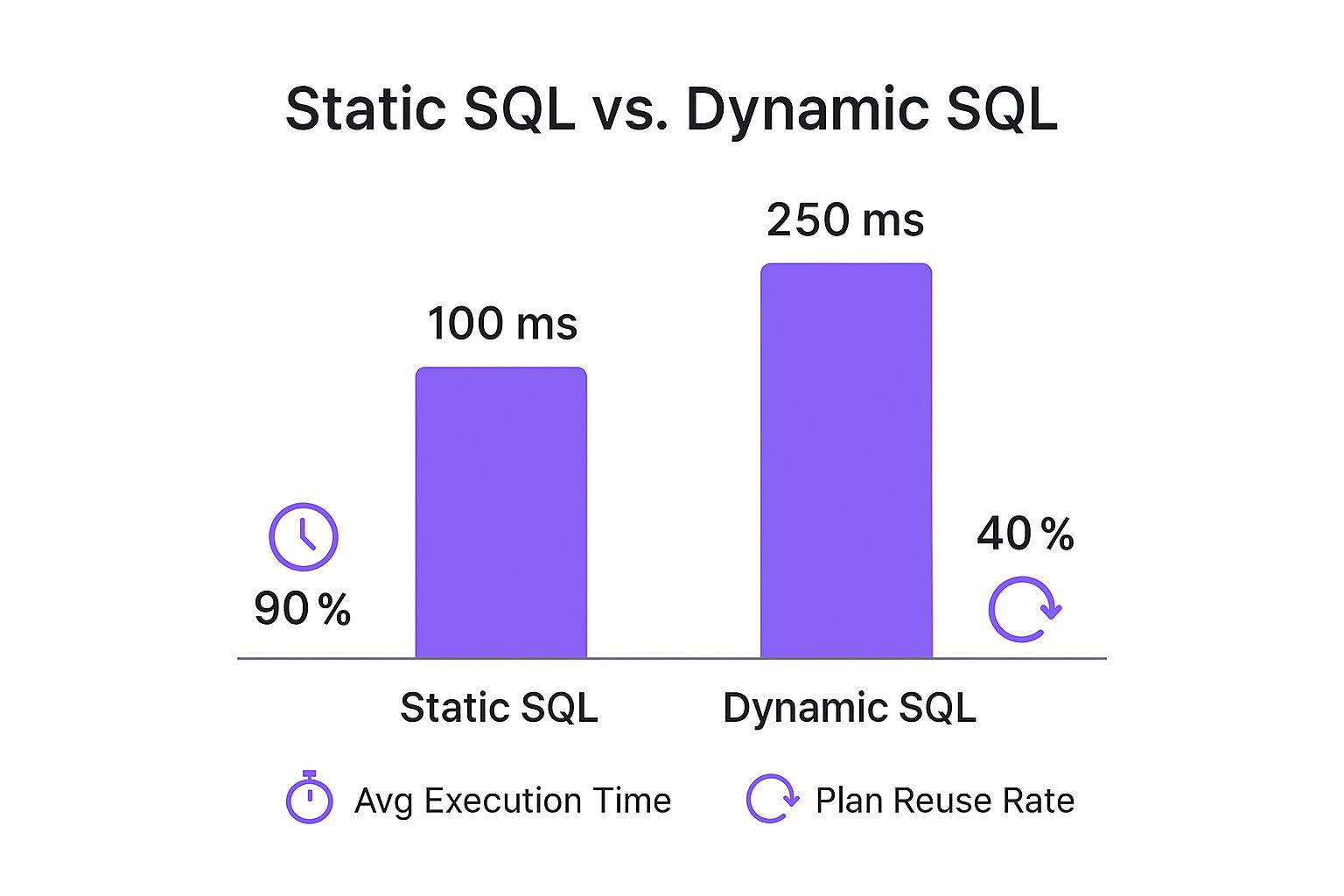
This data shows that your choice of SQL approach can seriously impact execution time and plan reuse, which are both huge factors in optimizing database performance.
Making the right call between a function and a stored procedure is a common decision point for developers. It really boils down to what you need the code to do.
When to Use a Function vs a Stored Procedure
Ultimately, a function is your go-to for encapsulating calculation logic that returns a result, while a stored procedure is the tool for executing actions and more complex data modification workflows.
Keeping Your Functions Running Smoothly
So, you’ve written your function. Great. But is it actually fast? That's a whole different ball game.
When you execute a function in SQL, it can sometimes become a secret performance hog, especially a scalar function that has to run for every single row in a huge result set. Finding these bottlenecks before they cause real trouble is a critical skill for building applications that can handle real-world data loads.
The biggest issue with many scalar functions is that they can force the query plan to process everything row-by-row, which feels a lot like using a cursor. This completely ties the hands of the optimizer, preventing it from using much faster, set-based operations. We actually have a detailed guide on how to use cursors in SQL that dives into why this can be such a performance killer.
Finding the Slowpokes
Luckily, modern database systems give us the tools to hunt down these resource-draining functions. If you're using SQL Server, Dynamic Management Views (DMVs) are your best friend here.
For example, sys.dm_exec_procedure_stats is a goldmine for aggregate performance data on cached procedures, and this often includes functions. It gives you a breakdown with one row for each execution plan sitting in the cache, letting you see crucial metrics like CPU time and how many times it's been run. To peek at this data, you'll need the right permissions, like VIEW SERVER STATE on your server instance. Redgate has a great resource on monitoring procedures that's worth a look.
The big takeaway here is to be really deliberate about where and how you use functions. A simple function that flies through tests in a development environment can absolutely cripple a production server when it's unleashed on a table with millions of rows.
Whether you're coding solo or in a collaborative vibe coding studio like Dreamspace, getting good at performance tuning is non-negotiable. More often than not, the best fix is to refactor a slow scalar function into an inline Table-Valued Function (TVF). TVFs are much more cooperative with the query optimizer and can make a world of difference.
Common Questions About Executing SQL Functions
Even after you get the hang of executing functions in SQL, a few tricky questions always seem to pop up. Let's tackle some of the most common ones I've seen trip up developers, so you can sidestep these issues and write cleaner, more effective database code from the get-go.
Can Functions Handle Errors Like Stored Procedures?
This is a big one. Can you wrap your function logic in a TRY...CATCH block? Generally, the answer is no—especially for simple inline functions. While some database systems like SQL Server allow limited support for this in multi-statement functions, it's not what they're built for.
Functions are designed for calculations and returning a value, not for managing complex transactions or robust error handling. If you need that level of control, a stored procedure is almost always the right tool for the job.
Deterministic vs. Non-Deterministic: Why Does It Matter?
You'll often hear the term deterministic thrown around. It’s a simple concept with big implications. A deterministic function, like SUM(), will always return the exact same result if you give it the same inputs.
On the other hand, a non-deterministic function like GETDATE() can (and will) return a different value every time you call it. This distinction is critical when it comes to performance. For instance, you can't create an index on a computed column that relies on a non-deterministic function. The database can't guarantee a consistent value, so indexing becomes impossible.
How Can I See Which Functions Are Being Called?
When you’re trying to squeeze every last drop of performance out of your database, you need to know what’s running under the hood. In high-traffic systems, monitoring every function and procedure call is non-negotiable.
Since SQL Server 2012, the go-to tool for this has been Extended Events (XEvents). It's a lightweight tracing system that has a much lower performance impact—we're talking 50-70% less overhead compared to the old SQL Server Profiler. For a deeper dive, check out this great guide on capturing SQL Server procedure executions on mssqltips.com.
The key takeaway is to choose the right tool for the job. Use functions for reusable calculations and TVFs for parameterized data sets. Reserve stored procedures for actions, data modifications, and complex logic requiring robust error control.
Getting these distinctions right is what separates good database design from great. It helps you build applications that are not just functional but also efficient and easy to maintain down the line.
Ready to build powerful onchain apps without the complexity? Dreamspace is an AI app generator that helps you create smart contracts, query blockchain data with SQL, and launch your project in minutes. Take your ideas from concept to reality at https://dreamspace.xyz.