
Claude vs ChatGPT for Coding an Ultimate Guide
When you're trying to decide between Claude vs ChatGPT for coding, it really boils down to what you need to get done right now. Think of it this way: Claude is your meticulous senior developer, the one you go to for deep dives into a massive codebase or for painstakingly careful debugging. It prioritizes precision and thoughtful analysis.
On the other hand, ChatGPT is more like your fast-moving, creative prototyper. It’s brilliant for banging out a quick script, exploring different solutions to a tricky problem, or tapping into a vast ecosystem of developer tools. This guide isn't about crowning a single winner; it’s about figuring out which AI is the right tool for your specific job.
A High-Level Look at Claude vs ChatGPT
To really get a feel for these two, you have to understand where they're coming from. Anthropic built Claude with a focus on being methodical and cautious. The code it generates often feels safer and clearer, which is a huge plus for projects where getting it right the first time is non-negotiable.
Meanwhile, OpenAI’s ChatGPT is all about speed and flexibility. It has been trained on an absolutely colossal amount of data and has a massive community constantly pushing its limits. That means it’s seen almost everything and can often spit out a working solution for even the most obscure coding problems, integrating smoothly into the tools you already use.
For a broader view of how these models perform outside of just coding, this comparison of ChatGPT and Claude models offers some great insights. The choice is a lot like picking between a specialized tool and a multi-tool—sometimes you need a scalpel, and other times you need a Swiss Army knife.
Let's break down their core coding capabilities to give you a clearer picture.
Core Coding Capabilities at a Glance
This table gives you a quick, at-a-glance summary of where each model typically shines. Use it to get a baseline understanding before we dive into the nitty-gritty details of performance and specific use cases.
Ultimately, this table highlights the fundamental trade-off: Claude’s cautious precision versus ChatGPT’s rapid, wide-ranging versatility. Now, let's explore how these differences play out in real-world coding scenarios.
Comparing Head-To-Head Coding Performance
When you get down to the brass tacks of Claude vs. ChatGPT for coding, all the theory goes out the window. This is where you see which model actually helps you ship better code, faster. It’s not just about who can churn out a function quicker; it’s about the quality, the accuracy, and whether that code will be a nightmare to maintain six months from now.
We need to dig into how each model handles the messy reality of development: wrestling with complex logic, refactoring someone else’s spaghetti code, and hunting down those bugs that make you question your life choices.
This direct comparison really highlights a fundamental trade-off. ChatGPT often feels faster and more versatile, making it my first thought for quick prototypes or getting boilerplate code on the page. But when the stakes are higher and the programming challenges get gnarly, the data tells a different story.
Code Generation and Accuracy
At the end of the day, a coding assistant has to generate correct and efficient code. Both models are incredibly good at this, but benchmarks reveal a key difference. Claude’s latest models, for instance, have shown a small but significant edge in tests designed to mimic real-world programming problems.
This small difference can have a big impact on your workflow. Both Claude and ChatGPT are at the top of their game, but their strengths pull in different directions. Claude, from Anthropic, really leans into accuracy and meticulous debugging. It scored 92% on the HumanEval benchmark, inching just ahead of ChatGPT's 90.2%. This suggests Claude is more likely to give you context-aware code that just works.
Meanwhile, ChatGPT from OpenAI is known for its sheer speed and incredible flexibility. With custom GPTs and a massive plugin ecosystem, it’s a powerhouse for integrating into different workflows. But Claude has a trump card for large projects: its massive 200,000-token context window, which absolutely dwarfs ChatGPT’s typical 128,000 tokens, letting it handle much larger codebases. You can find more details on these AI model comparisons over on neontri.com.
Key Takeaway: When I’m working on a complex algorithm or a critical piece of infrastructure, Claude’s habit of producing more accurate code on the first try saves a ton of debugging time later. It feels more like a careful architect, whereas ChatGPT is more of a rapid builder.
Debugging and Code Refactoring
Writing new code is the fun part. The real work often lies in fixing and improving what’s already there. This is where an AI’s approach to problem-solving really shows its true colors.
ChatGPT’s biggest strength in debugging is its incredible pattern recognition. It can spot common mistakes and suggest standard fixes almost instantly, which is perfect for hammering out simple syntax errors or common logic flaws. You get a potential solution on your screen in seconds.
Claude, on the other hand, takes a more methodical approach. It often tries to reason through the code's logic step-by-step, explaining why it thinks a bug is happening. I’ve found this to be a game-changer for:
- Complex logical errors where the root cause is buried deep in the code.
- Refactoring legacy code by first understanding the original developer's intent before suggesting safer improvements.
- Spotting security vulnerabilities that require a deep, contextual understanding of the entire application.
This difference is everything when you're working on a sophisticated project. It’s the kind of deep, context-aware analysis that platforms like Dreamspace, a vibe coding studio, are trying to automate—turning complex logic into functional apps. When a bug is subtle, Claude's thoughtful, explanatory style consistently gives me more useful insights than ChatGPT’s quick-fix suggestions, ultimately helping me learn and avoid the same mistake down the road.
Code Style and Readability: Is It Written for a Human or a Machine?
Getting the code to work is only half the battle. The real test is whether a human can understand, maintain, and build on it weeks or months later. This is where Claude and ChatGPT show their distinct personalities. It's not just about correct syntax; it's about their "authorial voice."
Choosing between them is like hiring two different kinds of developers. One is the hotshot coder who writes slick, modern, and incredibly efficient code. The other is the seasoned senior dev who writes everything with the next person in mind, adding comments and clear logic. Neither is wrong, but one is probably a better fit for your team.
This philosophy of producing clean, maintainable code right from the start is what drives tools like Dreamspace, a vibe coding studio that focuses on generating applications built to last.
ChatGPT: The Modern and Concise Coder
ChatGPT writes code that feels like it belongs in 2024. It’s lean, uses modern idioms, and gets straight to the point. If you value brevity and trust your team to understand up-to-the-minute conventions, ChatGPT’s style is a huge plus.
This makes it a powerhouse for a few key scenarios:
- Rapid Prototyping: When you need to spin up a proof-of-concept fast, lean code is your best friend.
- Simple Scripting: For one-off tasks or simple automation, you don't need a novel's worth of comments.
- Seasoned Developers: It produces code that experienced devs can appreciate and work with immediately.
The only catch? That conciseness can sometimes feel a bit cryptic, especially for junior developers who might need more hand-holding.
Claude: The Thoughtful, Well-Documented Mentor
Claude, on the other hand, often acts more like a patient teacher. Its code tends to be more verbose, but for good reason. It uses descriptive variable names and sprinkles in helpful comments that explain why a certain approach was taken, not just what the code does.
One head-to-head comparison put it perfectly. While both models were neck-and-neck on accuracy, Claude consistently shined at explaining programming concepts and generating detailed documentation like READMEs. ChatGPT, meanwhile, was the master of the quick, clean, and concise fix. For more on this, check out the analysis at TechPoint.africa.
This educational approach makes Claude invaluable for complex, long-term projects where new team members will eventually need to get up to speed. For a closer look at how these tools fit into a modern workflow, see our guide on AI for code generation.
Key Insight: ChatGPT writes for the machine first, but makes it readable for humans. Claude writes for the human first, knowing the machine will understand it anyway. Its code feels like it was written by a senior developer who anticipates that someone else will have to maintain it.
So, which is better? It’s all about context. If you're a nimble startup racing to a deadline, ChatGPT’s speed and modern flair might be exactly what you need. But if you're an enterprise team building a mission-critical system, Claude’s clear, well-documented, and maintainable code is almost certainly the smarter bet.
Finding the Right AI for Real-World Coding Tasks
Benchmarks are a good starting point, but let's be honest—a developer's real work happens in the trenches. The true test in the "Claude vs ChatGPT for coding" debate comes down to how each AI handles the messy, specific, and often frustrating challenges we face every day. The best tool isn't the one with the highest score; it's the one that actually helps you get the job done right now.
Choosing your AI partner means matching its core strengths to your immediate needs. You wouldn't use a sledgehammer to crack a nut, and the same idea applies here. Each of these models has a distinct personality and a knack for different kinds of coding work.
Mapping AI Strengths to Developer Scenarios
Think about a common but dreaded task: auditing a massive, ancient monorepo. This thing is probably a spaghetti monster of tangled logic, hidden dependencies, and years of technical debt. Claude's massive context window makes it the perfect candidate for this sort of digital archaeology. It can swallow huge chunks of code in one go, spotting patterns and potential time bombs that would be completely invisible to an AI with a smaller memory.
Now, flip the script. Imagine you need to spin up a quick prototype for a new microservice. The name of the game is speed, creativity, and maybe wiring up a few external services. This is where ChatGPT shines. Its huge plugin ecosystem and talent for spitting out clean, idiomatic code make it the go-to. It can help you scaffold the service, connect to a database, and even draft some basic API docs in a fraction of the time it would take to do it manually.
This infographic breaks down our top picks for a few common development scenarios.
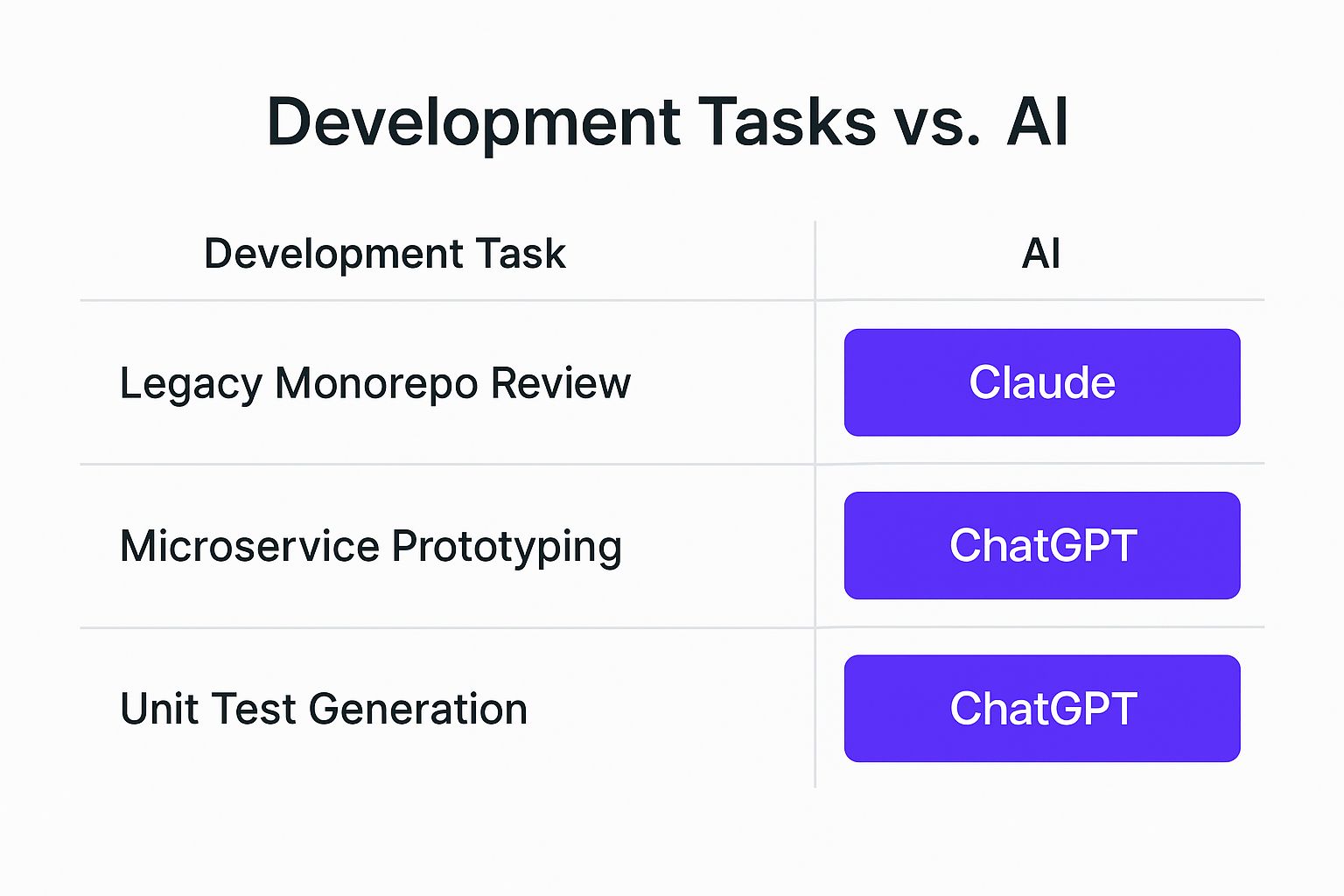
As you can see, the theme is clear: Claude excels at deep, analytical tasks that require a lot of context, while ChatGPT is your best bet for rapid, iterative development where speed is key.
Practical Use Cases and Recommendations
Let's get even more specific to help you decide which AI assistant to pull into your workflow. Adopting this strategic approach means you're always using the sharpest tool in your shed.
When you're trying to figure out which model to use, it helps to have a clear mental model for their strengths. The table below offers some quick guidance for common coding tasks.
Situational Recommendations for Common Coding Tasks
This isn't an exhaustive list, but it gives you a solid framework for making a quick decision based on what you're trying to accomplish.
When the goal is to think through a problem with an AI partner, Claude’s approach feels more collaborative. Even when it fails, its explanations often provide a valuable insight that helps you solve the problem yourself, acting as a true AI-powered coding assistant.
Ultimately, integrating these tools is about making your development process smoother and more efficient. This is the same principle behind an AI app generator like Dreamspace, which orchestrates different AI capabilities to streamline the entire application development lifecycle. For a deeper dive into this, you can learn more about what an AI-powered coding assistant can do for you.
A Look at the Broader Developer Ecosystem
A great coding assistant does more than just spit out code. It needs to fit into your world, your workflow, and your toolchain. This is where the Claude vs ChatGPT for coding debate gets really interesting, moving beyond raw performance and into the practical, day-to-day reality of building software.
You can almost think of Claude's massive 200K token context window as an ecosystem feature in its own right. If you’re wrestling with a huge, monolithic application, this is a lifesaver. It lets the AI hold the entire codebase in its "mind," grasping complex dependencies and offering insights that models with smaller context limits just can't manage. Think deep refactoring, comprehensive security audits, or just maintaining a high-level architectural view without spoon-feeding the model tiny chunks of code.
ChatGPT: The Integration Powerhouse
On the other side of the coin, ChatGPT’s power comes from its sheer maturity and the incredible breadth of its integrations. Its API has been through the wringer, tested and trusted by millions of developers. Plus, its plugin store opens up a world of connections to hundreds of other services.
- Vast Plugin Store: Hook directly into tools like GitHub, Jira, and countless others to automate your grunt work.
- Mature API: The API is well-documented and stable, making it easy to build custom solutions and embed ChatGPT’s brain directly into your own apps.
- Massive Community: The global community is a huge asset, offering up shared resources, custom GPTs, and a ton of example projects to learn from.
Thinking about the ecosystem is critical. For instance, exploring real-world OpenAI integrations shows just how flexible models like ChatGPT can be in different applications. This network effect gives it a clear edge for teams who need to glue together their entire toolchain.
A seamless developer environment relies on powerful and flexible integrations. The goal is to create a fluid experience where the AI feels like a natural extension of your toolchain, not a separate destination you have to constantly switch to.
Claude's API Is Catching Up
While ChatGPT had a big head start, Claude’s API is quickly becoming a serious contender. It’s gaining a lot of traction in enterprise settings where safety and reliability are paramount. Anthropic has clearly focused on delivering a robust API that’s built for dependable, production-ready applications. If you’re building tools that need to reason over enormous documents or codebases, Claude's API brings some unique advantages to the table.
Ultimately, it comes down to what you’re trying to build. If you need an AI to act as the central nervous system for a highly automated workflow, ChatGPT’s mature ecosystem is tough to top. But if your biggest headache is untangling massive, complex codebases, Claude’s context window is your best friend.
Making Your Final Decision
So, when it comes to Claude vs. ChatGPT for coding, who wins? The truth is, it's not a simple knockout. The right choice really comes down to what you're trying to accomplish and who you are as a developer. There’s no silver bullet, just the right tool for the job at hand.
If you're a junior developer still getting your sea legs, Claude’s patient, explanatory style is a game-changer. It acts like a built-in mentor, breaking down complex code and explaining the why behind it. On the other end of the spectrum, a senior architect wrestling with a massive, sprawling codebase will also find a friend in Claude, thanks to its knack for deep analysis and maintaining architectural integrity.
But what if you're a full-stack dev with a deadline breathing down your neck? You'll probably lean on ChatGPT. Its raw speed and massive ecosystem of plugins are built for getting things done now, making it perfect for rapid-fire prototyping and crushing bugs. Similarly, data scientists will love its ability to iterate on algorithms and test different hypotheses in a flash.
Final Verdict: Go with Claude when you need deep analysis, pristine code quality, and a learning companion. Pick ChatGPT for its sheer speed, powerful integrations, and creative, off-the-cuff problem-solving.
At the end of the day, the goal is to find an AI partner that makes you a better, faster developer. This is the whole philosophy behind advanced tools like the Dreamspace AI app generator, which bakes powerful AI right into the development workflow.
For a deeper dive into this, check out our full guide on the best AI for programming to find the perfect fit for your setup.
Frequently Asked Questions
When you're trying to figure out which AI to slot into your development workflow, a few key questions always pop up. Here’s a no-nonsense look at the common sticking points when comparing Claude vs. ChatGPT for coding.
Which One is Easier on the Wallet?
Honestly, "cost-effective" really depends on what you're doing. ChatGPT has a solid free tier that's great for quick coding questions and general tasks. Its paid plans unlock more power and higher usage caps. Claude also comes with a pretty generous free offering and a competitively priced Pro plan.
But here’s where the real difference comes in: if your work involves digging through massive codebases, Claude often comes out ahead. Its bigger context window means you don't have to chop up your files into smaller pieces, which can actually reduce your total token count. For really big projects, that can make Claude the smarter financial choice.
How Do They Handle Obscure or Niche Languages?
Both models are pretty versatile and can handle a surprising range of languages. ChatGPT has been around longer, so it naturally has a larger community and more training data for those weird, less-common languages you might be working with.
That said, don't count Claude 3 out. It’s shown some seriously impressive chops in this area. The best way to know for sure? Throw a real problem from your language of choice at both of them. See which one spits out code that’s not just correct, but actually feels like it was written by someone who knows the language well.
Can I Trust Them With My Proprietary Code?
Security is a huge deal, and both OpenAI and Anthropic have strong, enterprise-level security measures in place, especially for their paid API and business plans. They're clear that data sent through their APIs isn’t used to train their models.
But—and this is a big but—the rules for their free, public-facing versions can be different. Always, always read the latest terms of service and privacy policies before you paste in anything sensitive. For any confidential work, stick to the API or enterprise versions. It's just not worth the risk otherwise.
Ready to see what the next generation of development looks like? With Dreamspace, you can generate production-ready onchain applications using AI. Go from idea to a live app, complete with smart contracts and a shareable website, no code needed. Start building with Dreamspace today!