
Finding the Best AI for Writing Code in 2024
Trying to find the best AI for writing code really comes down to what you need. Tools like GitHub Copilot, Tabnine, and Amazon CodeWhisperer are at the top of most lists for a reason—they're fantastic at code completion and slot right into your IDE to make you faster.
The New Era of AI-Powered Development
We’re in the middle of a massive shift in software development, and it’s all being driven by AI coding assistants. Picking the right one isn't just a nice-to-have anymore; it’s a critical decision for any team that wants to keep up.
The market numbers back this up. The AI Code Assistant market is set to explode, growing from USD 5.5 billion in 2024 to a projected USD 47.3 billion by 2034. That’s a clear signal that these tools are becoming standard issue for developers.
Key Players in the AI Coding Space
Modern AI assistants do way more than just finish your lines of code. They can spit out entire functions, spot bugs before you do, and even suggest better architectural patterns. The developer’s job is evolving from just writing code to guiding and refining what the AI produces.
This surge in AI's role means the demand for specialized talent is also growing, which is a whole other conversation when it comes to hiring AI developers.
The best AI tools feel like a true pair programmer. They handle the boring, repetitive stuff so you can stay focused on the creative, big-picture problems.
While a tool like Copilot is amazing for in-line suggestions, others are thinking bigger. Dreamspace, for example, is less of a code completer and more of an AI app generator. It’s a "vibe coding studio" built to take you from a rough idea to a deployed app, fast.
Top AI Coding Assistants at a Glance
To help you get a quick lay of the land, here’s a look at the heavy hitters, what they do best, and who they’re for.
This table gives you a starting point. Your choice will ultimately depend on your stack, your team's workflow, and whether you need a coding assistant or a full-on application generator.
Here you can see GitHub Copilot in action, suggesting a multi-line block of code right inside the VS Code editor.

This is what makes these tools so powerful. The AI understands the context from your comments and existing code to generate something genuinely useful, saving you a ton of time.
How AI Is Changing Modern Codebases
AI’s impact on software development is no longer a "what if" scenario—it's happening right now, fundamentally changing how we build and manage code. We've moved past simple autocompletion. Developers are now orchestrating, guiding, and refining the output of incredibly capable AI assistants. It’s a new partnership where the programmer sets the vision—the architecture, the logic—and the AI handles the grunt work.
This isn’t some niche trend, either. The numbers are staggering. By 2025, it’s predicted that AI-generated code will make up about 41% of all new code written worldwide. That’s an estimated 256 billion lines of code. Surveys show 82% of developers are already using AI tools weekly, and nearly 59% are running three or more at once to stay ahead.
The Rise of the AI Pair Programmer
The new workflow feels a lot like having an intelligent pair programmer by your side. AI is brilliant at churning out routine, boilerplate code, which frees up developers to focus on the genuinely hard problems. Instead of manually writing yet another standard function, you can just describe it in a comment and let the AI build it.
This approach is a massive time-saver, but more importantly, it reduces the mental tax of repetitive tasks. The result? A more streamlined and focused development cycle, where human ingenuity is aimed at innovation, not just syntax.
The real shift isn't just about speed. It's about elevating the developer's role from a simple coder to a strategic architect. The AI lays the bricks; the human designs the building.
This collaborative model is where platforms built specifically for this new reality shine. Dreamspace, for example, acts as an AI app generator—a "vibe coding studio" where you define the high-level logic and feel of your app. The AI then handles the complex implementation, turning your idea into a working product at an incredible pace.
AI tools are also becoming essential for maintaining code quality. They help teams stick to best practices and spot potential bugs before they become a problem. To get a sense of how these standards are evolving, it’s worth checking out an ultimate code review checklist to see where AI can fit in.
Comparing The Top AI Coding Assistants
Choosing the best AI to write code is about more than just marketing hype. Lots of tools promise a productivity boost, but how they actually perform depends on things like context awareness, how well they integrate into your workflow, and the models they're built on. Let’s break down the real differences between the top players.
This chart gives you a bird's-eye view of where the leading tools stand on key metrics like accuracy, speed, and language support.
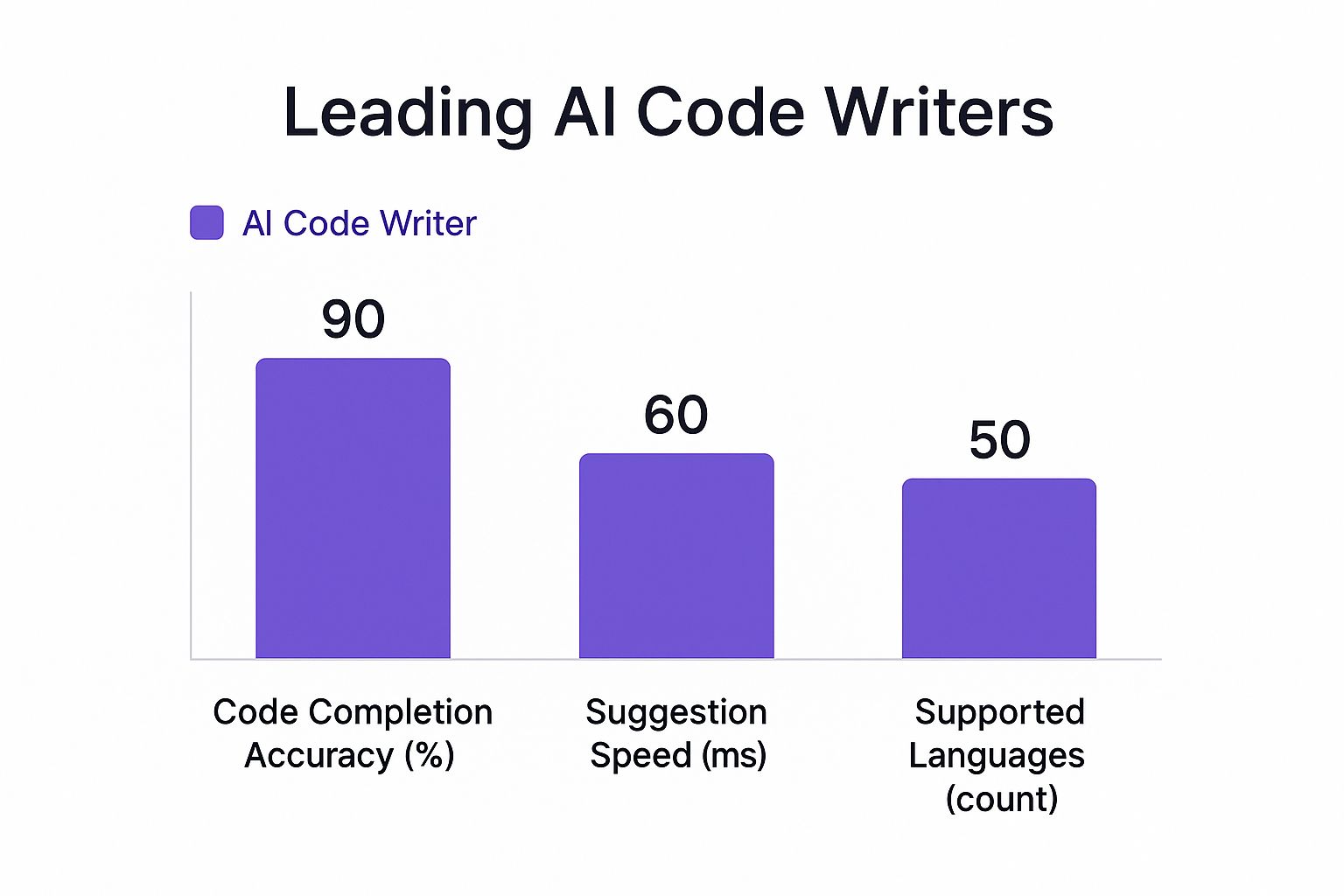
As you can see, it's a tight race. Each assistant has its own strengths, which really drives home the point that you need to match the tool to your specific needs.
GitHub Copilot: The Ecosystem Champion
GitHub Copilot is king when it comes to deep integration with the GitHub ecosystem. It was trained on an absolutely massive amount of public code from GitHub repos, so it has an incredible grasp of countless coding patterns and open-source libraries. This training is why it’s so good at spitting out idiomatic, context-aware suggestions.
Its real magic is its knack for understanding the entire project, not just the file you're currently in. If you're already living in the GitHub world—using Actions, Issues, and PRs—Copilot feels less like an add-on and more like a core part of the environment.
Tabnine: The Privacy-Focused Powerhouse
Tabnine comes at the problem from a totally different angle, putting enterprise-grade security and privacy first. While it has a powerful cloud model, its killer feature is the option to self-host. For any company in a regulated field or with strict IP rules, this isn't a "nice-to-have," it's a dealbreaker.
Tabnine lets your team train the AI on your own private codebases. This means you get hyper-relevant suggestions tailored to your work, all without a single line of code leaving your servers. That focus on security and customization makes it the go-to for big companies that can't afford to risk exposing sensitive data.
Amazon CodeWhisperer: The AWS Native
If you're building on Amazon Web Services, CodeWhisperer is a no-brainer. Its core strength is its deep, native understanding of the entire AWS SDK and all its APIs. It generates freakishly accurate code for services like Lambda, S3, and DynamoDB.
This isn't just about finishing your sentences; it’s about suggesting AWS best practices as you type. It also comes with built-in security scans to flag vulnerabilities and can even handle attribution for open-source libraries, which is a huge help for staying compliant.
Choosing between these tools often comes down to a single question: Is your primary constraint ecosystem integration, data privacy, or cloud-native development? Your answer will point you to the right assistant.
Dreamspace: The AI App Generator
While the others are assistants, Dreamspace is in a category of its own as an AI app generator. It isn't trying to help you write code line by line. Instead, it’s built to spin up an entire application from your high-level ideas. This makes it less of a direct competitor and more of a powerful alternative for a different kind of builder.
As a "vibe coding studio," Dreamspace is perfect for founders, creators, and developers who need to get from a concept to a deployed product as fast as humanly possible. You bring the vision, and the AI handles the scaffolding, boilerplate, and initial code.
To get the full picture, it helps to understand the wider AI landscape. Beyond a simple feature list, seeing how different tools fit specific company needs is key. You might look at the best AI tools for small business to see what aligns with your team size and goals. For an even deeper dive into coding tools, check out our guide on the best AI for programming.
Practical Use Cases for AI Code Generators
Theory is one thing, but seeing how these tools handle real-world problems is where things get interesting. The best AI for writing code really depends on the job at hand. For developers, founders, and entire teams, the value comes from solving tangible, everyday challenges.
Let's say you're a junior developer thrown into a project using a framework you've never touched. It's a classic sink-or-swim moment. This is where GitHub Copilot shines. It acts like a senior dev looking over your shoulder, offering idiomatic suggestions in real-time. You end up absorbing best practices and common patterns right inside your editor, making every coding session a practical lesson.
From Data Pipelines to Rapid Prototyping
Now, picture a data scientist in a big company. Their task is to build a gnarly data processing pipeline using a bunch of AWS services. This is a perfect match for Amazon CodeWhisperer. Because it lives and breathes the AWS ecosystem, it spits out accurate, context-aware code for services like Lambda and S3, which means way less time digging through documentation.
This lets the data scientist stay focused on the actual logic of the pipeline, not the nitty-gritty syntax of some obscure AWS API call.
The right AI tool acts as a specialist, perfectly suited for the task at hand. It's not about finding a single tool that does everything, but about deploying the right expert for the job.
This idea of specialized tools gets really powerful when we talk about startups. A founder has a killer app idea but is strapped for cash and engineering talent. They need to get a Minimum Viable Product (MVP) out the door in days, not months, to see if the idea has legs.
The Founder's Accelerator: Dreamspace
This is where an AI app generator like Dreamspace completely changes the game. Instead of grinding out code line-by-line, the founder can just describe the core features and what they want the user experience to feel like. Dreamspace handles the heavy lifting—generating the foundational code, database schemas, and front-end components.
It’s the ultimate 'vibe coding studio,' shifting the focus from manual implementation to creativity and vision. A non-technical founder can actually bring a product to life at lightning speed, validating their concept without needing to hire a full dev team upfront. Digging into different methods of code generation with AI shows just how much these tools are reshaping development. The move from granular coding to high-level direction isn't just a trend; it's the future.
So, How Do You Pick the Right AI Coding Tool?

Choosing the best AI to help you write code isn't about jumping on the most popular option. It’s a gut-check on what you or your team actually needs. The right tool should feel like a natural extension of your workflow, not another piece of software you have to fight with.
So before you dive in, let’s build a quick framework for making a smart decision. Asking a few key questions upfront will cut through the noise and guide you to a tool that genuinely helps you code better and faster.
First Things First: What Do You Really Need?
Before you even think about a free trial or subscription, get clear on your own situation. In a market this crowded, that clarity is your best friend.
Ask yourself these questions:
- What's my daily tech stack? Some tools are just plain better with certain languages and frameworks. Think CodeWhisperer for AWS services.
- How sensitive is my data? If you're working with private codebases or need an on-premise solution, something like Tabnine and its self-hosting options might be the only way to go.
- What's my budget? Be realistic. Compare the free tiers against the paid plans to see what makes sense for your wallet.
- Am I looking for a co-pilot or a builder? This is the big one. Do you need help with your existing code, or do you want to generate entire applications from an idea?
The market for these tools is exploding. Generative AI is expected to become a $98.1 billion industry by the end of 2025. That money is fueling a ton of specialized tools, which is great, but it also means you have to be deliberate in matching features to your actual work.
The best AI coding tool isn't the one with the longest feature list. It's the one that melts into your workflow and takes the most friction out of your day.
The Right Tool for the Right Job
Once you've answered those questions, you'll see a few clear winners emerge for different kinds of developers. There’s no "one-size-fits-all" here, only the best fit for your specific scenario.
A freelance dev bouncing between different client projects will probably love the sheer versatility of GitHub Copilot. It’s a generalist that adapts quickly to new contexts. On the other hand, an enterprise team working on a huge, proprietary codebase would get far more value from Tabnine's security and its ability to train on their private repos.
But for founders, creators, and entrepreneurs, the game is entirely different. Your goal is speed-to-market. You need to turn an idea into a real, working application as fast as humanly possible.
This is where an AI app generator like Dreamspace comes in. It's built from the ground up to be a "vibe coding studio," taking your high-level concepts and turning them into functional apps. It’s all about shrinking that development timeline from months to days. If that sounds like you, understanding the benefits of an https://blog.dreamspace.xyz/post/ai-powered-coding-assistant built for rapid development is your next step.
A Few Common Questions About AI Coding Tools
It's only natural to have questions as these AI coding assistants become a bigger part of our daily work. We're all trying to figure out their real-world impact, where they fall short, and how to use them best.
Let's clear up some of the most common questions developers ask when deciding if—and how—to bring AI into their projects.
Is AI Going to Take My Job?
Nope. AI isn’t coming for your job, but it is changing it. Think of these tools as the world's most capable pair programmer, not a replacement. They absolutely crush repetitive, boilerplate tasks, which frees you up to tackle the bigger, more interesting problems.
You still need a human for strategic thinking, creative architecture, and understanding the subtle needs of a business. The AI is fantastic at the "how," but the "what" and "why" still come from you.
AI doesn't make developers obsolete; it makes great developers even better. The real skill is learning how to work with AI—guiding its output to build smarter and faster.
This is the new workflow. We're becoming less about typing every single line and more about orchestrating AI, using its incredible speed to amplify our own abilities.
Can I Trust AI-Generated Code?
You can trust it, but you have to verify it. Treat code from an AI just like you would from a new junior developer on your team. It needs a solid review, thorough testing, and your final sign-off.
Ultimately, you are responsible for the code that gets shipped. That means you own its security, efficiency, and reliability. Blindly accepting AI suggestions without a proper review process is a recipe for disaster. Quality control is still a human's job.
How Do I Start Using an AI Coding Assistant?
Getting started is easier than you think. The simplest way in is to install an extension for your IDE, like Visual Studio Code. Most of the big names, like GitHub Copilot or Tabnine, offer free trials so you can test the waters without any commitment.
A good way to ease into it:
- Install the extension: Just search for it in your IDE’s marketplace.
- Start small: Don't try to build a whole feature with it on day one. Use it for small, low-risk things like writing utility functions or generating unit tests. This lets you get a feel for how it "thinks."
- Give it clear context: The AI isn't a mind reader. Write descriptive comments and clear function names. The better your prompts, the better its suggestions will be.
If you're looking for something that does more than just complete lines of code, a platform like the Dreamspace AI app generator takes a different approach. As a vibe coding studio, it’s built to take your high-level ideas and turn them into a working app, handling a lot of the initial setup for you. It's a great option if your main goal is to build and launch fast.
Ready to turn your idea into a real application in record time? Dreamspace is the AI app generator and vibe coding studio that helps you build and deploy your vision. Start creating today.