
A Practical Guide to User Interface Design Frameworks

When you're building an app, you don't start by forging the screws and milling the wood. You start with a plan and a set of high-quality, pre-made parts. That's exactly what a user interface design framework gives you—a ready-to-go collection of code, components, and guidelines to build your app's front-end quickly and consistently.
It’s the architectural blueprint and the toolkit all in one.
What Is a User Interface Design Framework Anyway?
Let's ditch the jargon for a second. Think about building with LEGOs.
A UI library is like getting a big bucket of assorted bricks. You have all the individual pieces—buttons, sliders, inputs—but you’re on your own to figure out how they should all fit together into a cohesive, stable structure.
A user interface design framework is more like a complete LEGO Technic set. You get the specialized components, a sturdy baseplate to build on (the grid system), a detailed instruction manual (documentation), and a clear set of rules ensuring every piece connects perfectly. You’re not just handed the parts; you’re given a proven system for assembling them.
This approach saves you from reinventing the wheel on every single project.
Frameworks vs. Libraries vs. Design Systems
It's really easy to get these terms mixed up. They all help streamline the creative process, but they operate on different scales. Nailing down the difference is crucial for picking the right tool for your specific needs.
To make it crystal clear, let's break down how these concepts stack up against each other.
Frameworks vs Libraries vs Design Systems
As you can see, it's a matter of scope. A design system is the entire city's architectural code, while a framework is the prefabricated kit for one skyscraper in that city.
For anyone building mobile apps, learning how these pieces fit together is key. Resources on Mastering React Native UI Libraries offer a great deep-dive into how this plays out in the real world.
The real power of a framework is its opinionated structure. It provides a battle-tested foundation so your team can focus on building unique features instead of solving the same old UI problems from scratch.
Ultimately, a framework is the bridge between a great design concept and a functional, coded product. It allows teams to build complex, scalable apps much faster than if they started from a blank page.
This foundational consistency is a lifesaver as projects get bigger. It’s also what allows modern tools like Dreamspace, an AI app generator, to take a concept and rapidly spin up a production-ready application. A solid framework makes everything that comes after it faster, easier, and better.
Exploring the Anatomy of a UI Framework
Ever popped open the hood of a perfectly organized toolbox? That’s what it feels like to unpack a good UI framework. Instead of a jumble of loose screws and mismatched wrenches, you get a system of neatly arranged trays where every single piece is designed to fit together. That’s the magic—this internal structure is what gives frameworks their power, speed, and consistency.
The absolute heart of any framework is its component library. This is your stash of pre-built, battle-tested UI elements that serve as the visual nuts and bolts of your app. We're talking about all the usual suspects:
- Buttons for every occasion (primary, secondary, disabled, you name it).
- Forms complete with inputs, labels, and built-in validation styles.
- Navigation bars and menus to guide users.
- Modals and alerts to communicate important info.
Having these ready to go means you're not reinventing the wheel every time you need a button. Seriously, studies show this can speed up development by 30-50%. By handing you the basic building blocks, a framework frees you up to sweat the details that make your application unique.
The Responsive Backbone
Supporting all those visible components is an invisible but critical layer: the grid system. Think of it as the skeleton that gives your layout its shape and allows it to adapt gracefully to any screen size. A solid grid is the difference between an app that looks great on a desktop but breaks on a phone, and one that feels native everywhere.
It turns the often-chaotic process of responsive design into a predictable, systematic exercise. No more guesswork.
Enforcing Visual Consistency
So, how do you make sure every one of those dozens of components actually looks like it belongs in the same app? That's where global style guides and design tokens come in. These are essentially centralized variables that define all your visual rules—colors, fonts, spacing, shadows—for the entire project.
Imagine you have a design token for your primary brand color, say
primary-blue: #007bff. If you need to update it, you change it in one place, and that new color instantly cascades across every button, link, and header using it. This is a game-changer for making quick style updates or even full rebrands.
This is exactly how a vibe coding studio like Dreamspace can spin up a cohesive, professional-looking app in minutes. It's all built on this systematic foundation.
Finally, any framework worth its salt comes with accessibility standards baked right in. Many are designed from the ground up to comply with the Web Content Accessibility Guidelines (WCAG), giving you a massive head start on building inclusive products. Components often ship with proper ARIA labels and keyboard navigation support, meaning your app is usable by a much wider audience right out of the box.
How to Choose the Right UI Design Framework
Picking a user interface design framework is one of those foundational decisions that can make or break a project. Think of it like choosing the chassis for a car; get it right, and you have a solid base for performance and growth. Get it wrong, and you'll be dealing with structural problems for the entire lifecycle of the app. Your choice here has a direct ripple effect on development speed, app performance, and your ability to scale down the road.
Forget the popularity contests. The "best" framework is the one that fits your specific project needs. A framework that’s perfect for a startup's quick-and-dirty MVP might feel like a straitjacket for a massive enterprise application that needs deep, granular control.
At their core, all UI frameworks are built on the same three pillars: their library of components, a grid system for layout, and a set of styling rules.
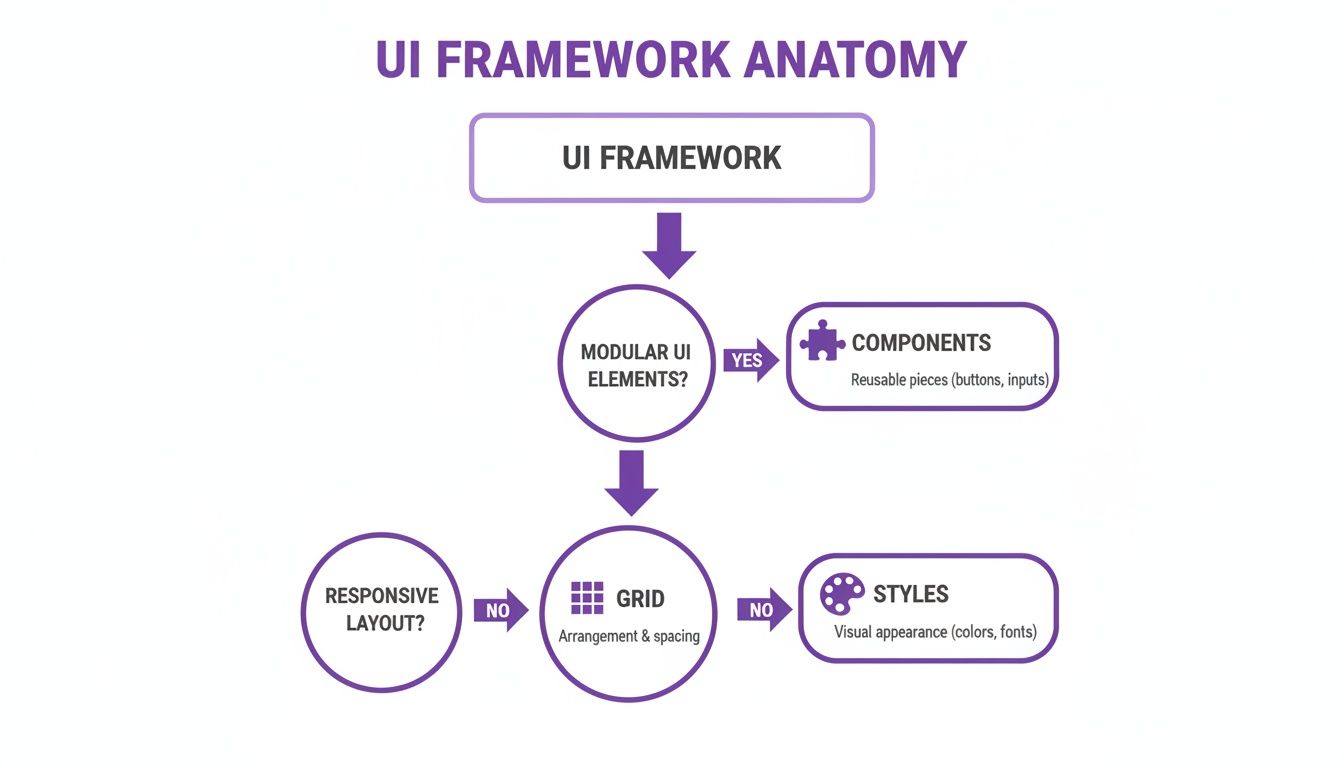
This flowchart really breaks down how those pieces fit together to create a cohesive system for building interfaces. Once you get this structure, you can start to see how a particular framework’s philosophy aligns (or doesn't) with what you’re trying to build.
Assess Your Project Scope and Scale
First things first: what are you actually building? Is it a simple landing page, a content-heavy marketing site, or a complex web app that will be swimming in data? The scale of your project is hands-down the biggest factor in this decision.
- For small projects or MVPs, a framework like Bootstrap is often a no-brainer. It gives you a massive box of pre-built LEGOs that let you snap a functional front-end together in hours, not weeks.
- For large, scalable applications, you'll want something more robust. Frameworks like Material-UI (MUI) or Ant Design are built for the big leagues, offering enterprise-grade components that ensure consistency and can handle complex data and user interactions without breaking a sweat.
The trick is to match the framework's weight class to your project's. Using a heavy-duty framework for a simple site is like using a sledgehammer to crack a nut—it just adds unnecessary bloat. On the other hand, trying to build a complex app on a lightweight framework is a recipe for technical debt. This same principle of right-tool-for-the-job is why modern no-code development has become so popular for getting initial builds off the ground fast.
Evaluate Team Expertise and Learning Curve
The most powerful framework on the planet is worthless if your team can't use it. You have to be realistic about your team's existing skills. If your devs live and breathe JavaScript and React, a framework like MUI is a natural fit that will feel like coming home.
But a steep learning curve can absolutely murder a project with a tight deadline. Some frameworks are incredibly powerful, but they demand a serious time investment to get up to speed. You always have to weigh the long-term power of a framework against the short-term pain of the learning curve.
A framework should be a force multiplier for your team, not a roadblock. If the documentation is a mess or the community is a ghost town, even a simple bug can turn into a week-long headache. A thriving community means more tutorials, faster bug fixes, and a whole world of shared knowledge to tap into.
As you weigh your options, getting an outside perspective can be incredibly helpful. This guide on Choosing User Interface Frameworks for Modern Apps offers some fantastic insights that can add clarity to your decision.
Ultimately, you're looking for that sweet spot. You need a user interface design framework that’s powerful enough to support your future ambitions but simple enough for your team to master quickly. Making this strategic choice is exactly how a vibe coding studio like Dreamspace can take an idea and turn it into a production-ready application that is both scalable and a dream to maintain.
A Look at Popular UI Frameworks in Action
Theory is great, but seeing how these tools work in the real world is where it all clicks. Every UI framework has its own personality and philosophy, kind of like a painter's signature style. Some are all about speed, while others are obsessed with pixel-perfect design.
Let's dive into a few of the big names to see how they actually help people build great-looking, functional apps. Seeing them in action is the best way to figure out which one might be the right fit for what you're trying to build.
Bootstrap: The Rapid Prototyper
If you've been around web development for more than a minute, you've heard of Bootstrap. It’s a legend, and for good reason: its entire reason for being is speed. Bootstrap gives you a massive toolbox of pre-built, responsive components that let you slap together a working layout in record time.
It's the perfect choice for:
- Minimum Viable Products (MVPs): When you just need to get a prototype in front of users, like, yesterday.
- Internal tools & admin dashboards: Function over high-end fashion. You need it to be clean, clear, and working.
- Projects on a tight deadline: When you can't afford to sweat the small stuff and just need to ship.
This is Bootstrap’s own homepage. It’s a perfect showcase of the clean, no-nonsense, component-driven approach it’s famous for.
You can see how everything from the navigation to the buttons is ready to go, right out of the box. It’s all about rapid assembly.
Material-UI (MUI): The Design Purist
For developers working with React, Material-UI (MUI) is often the default choice for building something that looks and feels incredible. MUI is the go-to implementation of Google's own Material Design system. It’s less of a component library and more of a complete design philosophy focused on creating a consistent, intuitive, and beautiful user experience.
MUI shines when a premium, modern look is a top priority. The components feel tangible and alive, with built-in animations and depth that make interacting with the app genuinely satisfying. It’s what you reach for when you want your React app to have that polished, native-Google-product feel.
Use MUI for customer-facing apps where your brand's image and a top-tier user experience are absolutely critical. Its theming system is powerful, letting you customize everything while still benefiting from the solid foundation of Material Design.
Ant Design: The Enterprise Powerhouse
What happens when your app is less about a pretty landing page and more about wrangling massive amounts of complex data? That’s where Ant Design (AntD) comes in. Originally built for internal use at Alibaba, AntD is engineered from the ground up to handle the heavy lifting of sophisticated enterprise software.
It comes packed with over 50 high-quality components designed for the tough stuff: rich data tables, complex forms, and detailed data visualizations. The whole aesthetic is clean, professional, and built for usability, making sure users can make sense of dense information without getting overwhelmed. If you're building a CRM, a financial dashboard, or any complex back-office system, AntD is your workhorse.
Of course, picking the right framework is just the first step. The real magic happens when you pair these powerful tools with a modern workflow. For example, an AI app builder can take designs inspired by these frameworks and turn them into working code, massively cutting down on development time. This is exactly how a vibe coding studio like Dreamspace approaches building powerful onchain applications.
Integrating UI Frameworks Into a Modern Workflow

Picking a UI design framework is a great start, but it's only half the battle. A framework sitting on its own doesn't do much. You only see its real magic when it’s woven into your entire development process, connecting with the tools your team uses every day to build something great.
This is what separates a clunky, frustrating workflow from a smooth, efficient one. When your tools talk to each other, you get rid of friction and cut down on tedious manual tasks. The goal is simple: create a seamless pipeline from that first sketch in a notebook all the way to a live, deployed app.
Bridging the Gap Between Design and Code
For years, the biggest headache in app development has been the "handoff." You know the drill: a designer crafts a pixel-perfect mockup in a tool like Figma, and then a developer has to painstakingly rebuild it, component by component, in code. It’s slow, error-prone, and almost guarantees that what gets built won't perfectly match the original vision.
Thankfully, that’s changing. AI-powered tools are now stepping in to automate this translation. An AI app generator, for instance, can look at a design file and spit out the code for your chosen framework, collapsing what used to take days into a matter of minutes.
A vibe coding studio like Dreamspace can take a design concept and generate clean, production-ready code from it. This doesn't just speed up the first build—it ensures the final product is a perfect reflection of the design.
This completely changes the game. Design tweaks can be turned into functional code almost instantly, making rapid iteration a reality. To see how this approach stacks up against others, check out our guide on the best low-code development platforms.
Creating a Collaborative and Efficient Pipeline
Beyond just generating the initial code, a modern workflow demands that all your tools are deeply connected. This creates a single, cohesive system where every step of the process is linked and easy to track.
A few integrations are absolutely essential for a successful setup:
- Design Tool Plugins: Many frameworks have plugins for tools like Figma or Sketch that let designers use the actual framework components in their mockups. This means everyone is working from the same set of building blocks from the very beginning.
- Version Control Systems (VCS): Connecting your project to Git is non-negotiable. It acts as the single source of truth for your entire codebase, making collaboration, change tracking, and deployment a breeze.
By plugging these pieces together, you create an AI-driven pipeline that turns your UI framework from a simple library of components into a powerful engine for building better apps, faster.
UI Frameworks: Your Questions Answered
Diving into UI frameworks can feel like a big commitment, and it's natural to have questions before you pick the foundation for your next project. Let's clear up some of the most common ones so you can move forward with confidence.
Can I Actually Customize a UI Framework?
Yes, and you absolutely should. Think of a framework as a high-quality starting point, not a restrictive box. They're built with customization in mind. Most have a theming system that lets you dial in your brand's colors, fonts, and spacing with just a few lines of code.
Need to go deeper? You can always override the styles of specific components or even build entirely new ones using the framework's core logic. You get the speed and reliability of a proven system without sacrificing a unique, polished look.
What’s the Performance Hit from Using a Framework?
This is a common worry, but modern frameworks are surprisingly light on their feet. They use smart techniques like "tree-shaking," which is a fancy way of saying it only packs the components you actually use into the final code. Anything you don't use gets left behind.
The result is a minimal file size. Honestly, the development time you save and the built-in performance optimizations usually far outweigh any tiny overhead. Just stick to best practices like splitting your code and importing components selectively, and you’ll be fine.
How Do UI Frameworks Handle Web Accessibility?
The best frameworks take accessibility very seriously. They build their components to follow the Web Content Accessibility Guidelines (WCAG) from the get-go. This means things like keyboard navigation, screen reader support (using ARIA attributes), and proper color contrast are already baked in.
This gives you a huge head start on building an inclusive product. Of course, the responsibility is still on you to use the components correctly, but you’re building on a rock-solid, accessible foundation instead of starting from scratch.
A strong user interface design framework doesn't just make development faster; it makes building a more inclusive and user-friendly web a more achievable goal for every team. It’s a commitment to a better user experience from the ground up.
Is It Better to Use a Framework or Build Everything Custom?
For the vast majority of projects, grabbing an established framework is the smarter move. You get a battle-tested, well-documented, and community-supported toolkit that lets you build faster and with more confidence.
Building a custom system from the ground up is a massive undertaking—we're talking serious time, money, and expertise. That path really only makes sense for huge companies with incredibly specific UI needs that no existing framework can meet.
Choosing a framework is a strategic decision that enables a more agile workflow, especially when you pair it with other modern tools. For instance, a vibe coding studio like Dreamspace can interpret the structure of a framework to generate production-ready onchain apps with AI, instantly connecting design to deployment. This kind of synergy lets your team focus on what really matters: creating something amazing, not reinventing the wheel.
Ready to see how a structured UI approach can supercharge your development process? Dreamspace is an AI app generator that transforms your ideas into production-ready onchain applications, no code needed. Generate smart contracts, query blockchain data, and launch your next project faster than ever.