
Turn Your Site Into an App A Practical Guide
Absolutely. You can turn your site into an app and land a permanent spot on your user's home screen. The idea is to package everything you’ve already built—your content, your features, your brand—into a format that feels native to a phone, whether that’s a Progressive Web App (PWA) they can install right from the browser or a webview wrapper you submit to the app stores.
Why Bother Turning Your Site Into an App?
Let’s be honest, converting your website into an app is a strategic play. This isn't just about reaching more people; it's about forging a much stronger, more direct connection with your audience. You're moving your brand from just another open tab in a browser to a permanent fixture on the most personal device they own.
The biggest win? That prime real estate on their home screen. It’s invaluable.
This direct line to your user opens up powerful tools like push notifications, which have been shown to crank up app engagement by as much as 88%. Imagine sending timely updates, flash sales, or gentle reminders that cut straight through the clutter of a crowded email inbox.
Plus, a dedicated app can deliver a far superior user experience. You can tap into device-specific features that a website just can't touch, like offline access. Think about a customer browsing your products on a subway with spotty Wi-Fi. With an app, your key content stays right there, available and ready. No frustration, no lost engagement.
Choosing the Right Path for Your App
So, how do you actually do it? There's no single "best" way—it all comes down to what you’re trying to achieve. Your goals will dictate the path you take, whether you prioritize speed, an official App Store presence, or advanced, next-gen functionality.
To make it a little easier, this flowchart breaks down the decision-making process.
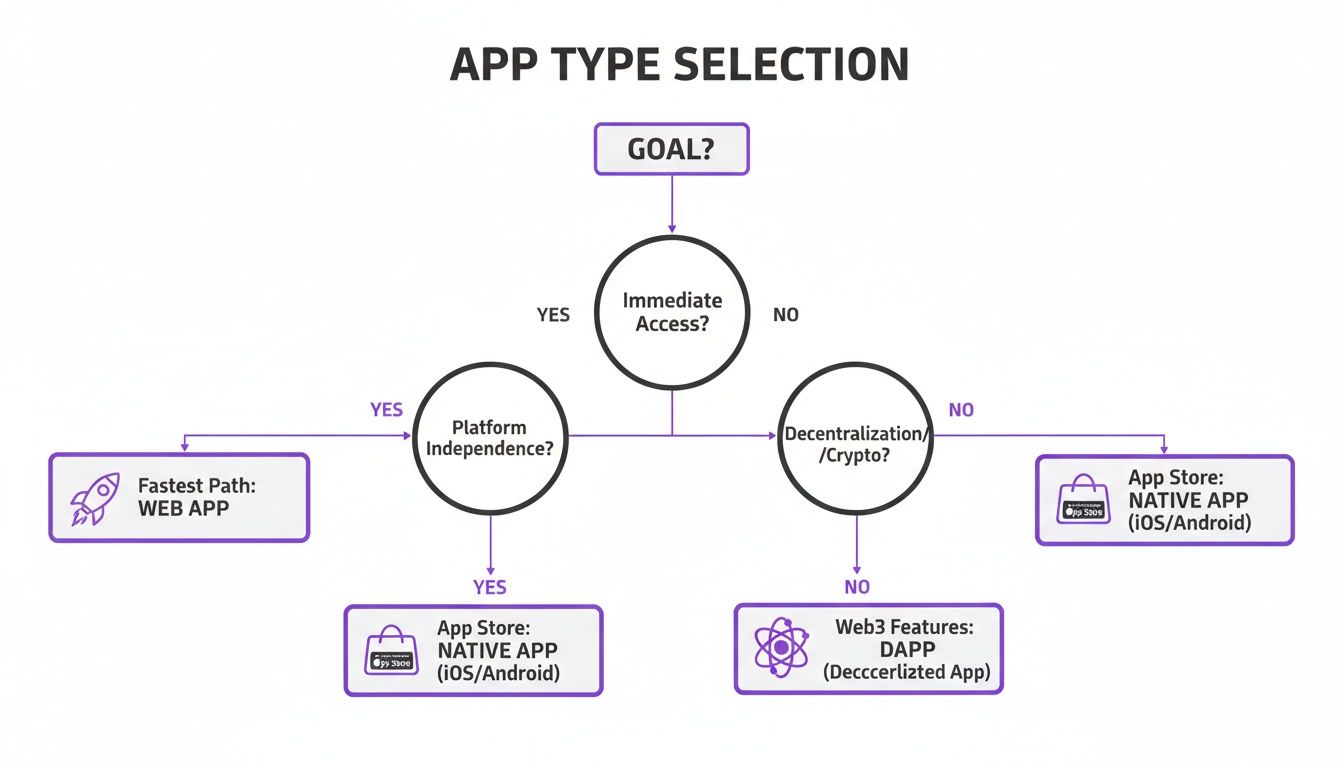
As you can see, if getting something out the door fast is your main concern, a PWA is a no-brainer. If having a listing on the App Store is non-negotiable, you’ll be looking at a webview wrapper. And for those who want to integrate bleeding-edge features, a more advanced approach is in order.
Website to App Conversion Methods at a Glance
To give you a quick snapshot, here's how the main conversion methods stack up against each other. Each has its place, and knowing the trade-offs is key to making the right call.
This table is just a starting point. Your specific needs for performance, budget, and features will ultimately guide your decision.
We'll dive deep into each of these options throughout this guide:
- Progressive Web Apps (PWAs): The fastest, most efficient route for a store-free experience.
- Webview Wrappers: Your ticket to getting your site listed on the Apple App Store and Google Play.
- AI-Powered Conversion: The path to adding sophisticated onchain features and true native-like performance.
For anyone looking to really push the envelope, an AI app generator like Dreamspace can do more than just wrap your site—it can help you transform it into a fully-fledged Web3 application. This "vibe coding" studio dramatically simplifies adding complex blockchain features, turning a standard website into a powerful onchain tool.
This approach is part of a bigger trend. If you want to learn more, it’s worth understanding what no-code development is and seeing how it’s lowering the barrier for creators to build incredibly powerful apps without writing a line of code.
The Progressive Web App Path
If you're looking for the fastest route to get your website behaving like an app, the Progressive Web App (PWA) is your best friend. A PWA essentially blurs the line between a website and a native app, giving you an icon on a user's home screen without ever having to deal with an app store.
Users can "install" it straight from their browser, giving your project a permanent spot on their device.
And this isn't just a fancy bookmark. A properly built PWA can work offline, fire off push notifications, and feel incredibly snappy. The real magic happens with two key files: a Web App Manifest and a Service Worker. When they work together, they transform your site into something that feels deeply integrated with a user's phone.
The Web App Manifest: Your App's Digital ID
Think of the Web App Manifest (it's usually just a file named manifest.json) as your app’s business card. It’s a simple JSON file that tells the browser how your app should look and feel when it’s "installed." It controls everything from the app icon to the color of the startup screen.
You just link this file in the <head> of your website’s HTML, and browsers that support PWAs handle the rest. The manifest gives your website a real identity, making it feel less like a browser tab and more like a standalone application.
Here’s a real-world example of what a manifest.json file looks like:
{
"name": "My Awesome Web App",
"short_name": "AwesomeApp",
"start_url": "/",
"display": "standalone",
"background_color": "#ffffff",
"theme_color": "#a953f9",
"icons": [
{
"src": "images/icons/icon-192x192.png",
"sizes": "192x192",
"type": "image/png"
},
{
"src": "images/icons/icon-512x512.png",
"sizes": "512x512",
"type": "image/png"
}
]
}
This simple config tells the browser:
name&short_name: What to call your app on the home screen.start_url: The page to open when the app launches.display: Setting this to "standalone" hides the browser's URL bar and buttons for a true app-like feel.background_color: The splash screen color that shows while your app is loading.icons: The different-sized icons for various devices.
The Service Worker: The Engine of Offline Power
The true powerhouse of any PWA is the Service Worker. It's a special JavaScript file that runs in the background, completely separate from your web page. Think of it as a proxy that sits between your app, the network, and the browser's cache.
Its most critical job? Enabling offline functionality. A Service Worker can intercept network requests and serve up cached content when the user has a spotty connection—or no connection at all. This means your app can still show core content, layouts, and images instead of that dreaded "You are offline" error page. This is what truly makes a website feel like a reliable, installed application.
A PWA can see user retention rates jump by over 100% compared to a standard mobile website. The ability to add an icon to the home screen and provide offline access makes a huge difference in getting users to stick around.
Weighing the Pros and Cons
Going the PWA route is a fantastic option, but it’s not perfect for every situation. You really need to understand the trade-offs before diving in.
Advantages of a PWA:
- Single Codebase: Your website is your app. No need to juggle separate codebases for iOS, Android, and the web.
- Instant Updates: When you push an update to your website, the PWA updates for everyone automatically. No waiting for app store reviews.
- No App Store Fees: You get to completely sidestep the 30% commission that Apple and Google take on in-app purchases.
- Discoverability: Your PWA is just a website, so it gets indexed by search engines, making it easier for new users to find you.
Limitations of a PWA:
- Limited Hardware Access: PWAs can't dig as deep into a device's hardware. Access to things like contacts, Bluetooth, and advanced camera controls is often restricted.
- iOS Quirks: Apple has gotten better, but PWAs on iOS still have some frustrating limitations, especially around push notifications and how smoothly they integrate with the home screen.
- No App Store Presence: If being discoverable on the App Store or Google Play is a core part of your marketing strategy, a PWA alone won't get you there.
As you explore different methods, you'll see projects like the Direct2app project pop up, which offer quick ways to package a site into an app. This just shows how strong the demand is for these kinds of conversion solutions. For many, the speed and simplicity of a PWA make it the perfect first step into the world of apps.
The Webview Wrapper Path
So, you want to get your website listed on the Apple App Store and Google Play? If that’s the main goal, then a webview wrapper is your most direct path forward. It’s a clever way to get the discoverability of a native app without junking your existing website and starting from scratch.
Think of it like this: a webview wrapper is a bare-bones native app whose only job is to display your website in a full-screen, dedicated browser. No address bar, no extra buttons—just your site, looking and feeling like a self-contained application. It’s a native "shell" that wraps your web experience, giving you that coveted spot on the app marketplaces.
This approach has blown up in popularity, and for good reason. It lets you stick with the web codebase you've already built and perfected. Modern tools like Capacitor have made this process surprisingly straightforward.
So, How Does It Actually Work?
Frameworks like Capacitor take your web project—all your HTML, CSS, and JavaScript—and package it neatly inside a native iOS or Android project. You start with your website's code, run a few commands, and the framework generates the necessary project files for Xcode (for iOS) and Android Studio.
Once it's all set up, the native app’s main screen is just a webview component that loads your site’s URL. For the user, the experience is almost seamless. They’re interacting with your live website, but it feels like they’re inside a dedicated app they downloaded.
This gives you a few major wins:
- App Store Access: This is the big one. It puts your brand right where millions of people are searching for apps every day.
- Single Codebase: You just keep updating your website. The app updates right along with it since it's just loading the live version.
- Tap into Native APIs: This is where wrappers shine over PWAs. You can more easily access native device features like the camera, Face ID, or push notifications through something called a "JavaScript bridge."
Bridging the Gap Between Web and Native
The real magic of modern webview wrappers is the JavaScript bridge. This is a special communication channel that lets your website’s code (JavaScript) talk directly to the native code of the phone, and vice-versa.
For instance, your website’s JavaScript could call a function to pop open the native iOS share dialog. Or, the native app could detect the phone went offline and send a signal back to your web code to display a "No Connection" message. This bridge is what elevates a webview from "just a website in a box" to a truly integrated app.
A webview wrapper is more than just a container. When you use the JavaScript bridge correctly, you can create powerful hybrid experiences that blend the convenience of the web with the raw power of native device features.
Avoiding the Dreaded App Store Rejection
Now for the reality check. Getting your app approved, especially by Apple, is the biggest hurdle. The infamous App Store Review Guideline 4.2 is the one you need to worry about—it basically says they'll reject apps that are just a "repackaged website." If your app does nothing more than what a user could do in Safari, expect a rejection letter.
To get past the gatekeepers, you have to add real, app-specific value. This means putting that JavaScript bridge to work.
How to Add Enough "Native" Value:
- Push Notifications: A must-have. Use them to bring users back with relevant updates.
- Offline Support: Cache key data so the app is still useful without an internet connection.
- Device Features: Integrate with the camera, file system, or biometric authentication.
- Better Navigation: Make sure your navigation is snappy and feels like an app, not a clunky website.
If wrestling with native code and JavaScript bridges sounds like a headache, you're not alone. Simpler tools are emerging to handle the heavy lifting. For example, using an AI app builder can seriously speed up the process. Dreamspace is another great example—it’s like a vibe coding studio that uses AI to generate production-ready onchain apps, removing the complexity of adding advanced features.
Your end goal is always the same: create an experience that feels designed for the device in your hand, not just a website shoehorned into an app icon.
Taking Your App Onchain with AI
So, you’ve managed to turn your site into an app. That’s a huge first step. But what comes next? You could stop there, or you could push the boundaries and transform your simple app into a powerful onchain experience.
Not long ago, integrating blockchain features was a beast of a task. It meant diving headfirst into complex languages like Solidity and hoping for the best. Thankfully, that steep learning curve is starting to flatten out, largely thanks to intuitive AI tools that do the heavy lifting for you.
From E-Commerce App to Web3 Loyalty Program
Let's walk through a real-world scenario. Say you just wrapped your e-commerce site into a slick new app. Sales are decent, but you're looking for a way to build a die-hard community around your brand. An NFT-based loyalty program could be the perfect hook—give users a unique digital collectible that unlocks exclusive perks.
In the past, this meant finding and hiring an expensive blockchain developer to write and audit a custom smart contract. It was a slow, costly process.
This is where an AI app generator like Dreamspace completely flips the script. Dreamspace acts like a vibe coding studio. Instead of writing lines of code, you just describe what you want to build in plain English.
For our e-commerce example, you could:
- Prompt the AI for a smart contract: Describe the loyalty program you have in mind. Something like, "Generate an ERC-721 smart contract for a loyalty program NFT. Call it 'Loyalty Pass' and make it non-transferable."
- Generate blockchain queries: You'll need a way for your app to check who actually holds the NFT. You can prompt the AI to whip up the SQL queries needed to verify wallet ownership on the blockchain.
- Deploy and integrate: The AI spits out the code for both the contract and the queries. From there, you just need to plug it into your app's backend to start offering exclusive content or discounts to your loyal NFT holders.
Suddenly, you don't need to be a Solidity wizard to build something cool. You get to focus on the creative vision—the "vibe" of your project—while the AI handles the nitty-gritty technical details.
The Power of Vibe Coding
This whole approach, what Dreamspace calls "vibe coding," is all about translating your ideas into production-ready code using natural language. It’s a game-changer because it finally opens up Web3 development to creators and entrepreneurs who were previously sidelined by the technical complexity.
Using AI to generate onchain features isn't just a gimmick. It adds real, tangible value that makes your app stand out. You’re no longer just shipping an app; you're building a genuine onchain experience that pulls users in and builds a stronger community.
In competitive markets, unique features are what keep people coming back. For e-commerce, this is especially true. Mobile might account for 73% of traffic, but its conversion rate lags at a mere 2.9%, far behind desktop's 4.8%. Introducing something novel like an onchain loyalty program gives people a compelling, mobile-first reason to not just browse, but to engage and buy.
What Else Can You Build?
Loyalty programs are just scratching the surface. Think about all the other unique features you could bake into your app:
- Token-Gated Content: Lock down premium articles, videos, or private community channels for users who hold a specific crypto token or NFT.
- Decentralized Identity: Let users sign in with their crypto wallets, ditching the old email-and-password routine.
- Onchain Achievements: Award soulbound (non-transferable) NFTs as cool digital badges when users complete specific actions in your app.
Adding features like these transforms your app from a simple content feed into an interactive, community-driven platform. If this has you thinking about what’s possible, you should see how easy it is to code with AI and start building. This approach lets you innovate faster and finally bring that ambitious app idea in your head to life.
Optimizing Performance for a True App Experience
Let's be honest: an app that feels like a slow, clunky website is dead on arrival. When you turn your site into an app, user expectations jump to a whole new level. They're looking for instant taps, smooth scrolling, and an experience that doesn't crumble on a weak connection.
Simply wrapping your website in a webview and calling it a day just won't cut it. Sluggish load times are a one-way ticket to the uninstall button. The real goal is to make the web tech powering your app completely invisible, creating a seamless experience that feels truly native. That means getting obsessed with speed right from the start.
Mastering Client-Side Caching
Your secret weapon here is smart client-side caching. The first time someone opens your app, you can stash essential assets—CSS, JavaScript, logos, fonts—right on their device. In a PWA, a Service Worker usually handles this.
What does this mean for the user? Near-instant startups. The next time they open the app, the core structure loads straight from local storage. No re-downloading necessary. This creates that snappy, native feel we're all after and goes easy on their data plan, which is a huge plus for anyone on a limited connection. It's also the bedrock of any solid offline experience.
Adopting the App Shell Model
A brilliant trick for perceived performance is the app shell model. Think of the "shell" as the bare-bones UI—the header, the nav bar, the basic layout. It's the minimal HTML, CSS, and JavaScript needed to get something on the screen.
This shell loads almost instantly, giving the user immediate visual feedback. No more staring at a blank white screen. While they see the static shell, your app is busy fetching the dynamic content in the background, like the latest blog posts or product listings.
By loading the UI shell from a local cache first, you give users an immediate, tangible interface. This simple trick dramatically improves the perception of speed, which is often just as important as the actual load time.
Smart Asset and Content Loading
Not everything needs to load the second your app opens. Lazy loading is a game-changer, especially for content-heavy pages. This technique basically tells the app not to load images or media until they're about to scroll into view. Your e-commerce app doesn't need to load all 100 product images at once; it just loads the handful the user can actually see.
On top of that, you have to optimize your assets for mobile. This is non-negotiable.
- Image Compression: Use modern formats like WebP to slash file sizes without wrecking image quality.
- Responsive Images: Don't send a massive desktop-sized image to a tiny phone screen. Serve up different sizes based on the device.
- Minify Code: Shrink your CSS and JavaScript files by stripping out all the unnecessary characters and whitespace.
These small tweaks have a massive impact on user retention. Let's face it, mobile app conversion rates are a tough nut to crack—the average install-to-purchase rate is a slim 1-2%. Don't let a slow, janky app be the reason you're losing customers. You can dive deeper into mobile conversion benchmarks at UXCam to see what you're up against.
Navigating App Store Submission and Monetization
So, you’ve built your app. That’s a huge win, but honestly, it’s only half the battle. Now comes the tricky part: getting it into the hands of actual users and figuring out how to make it financially sustainable. This is where your submission and monetization strategy can make or break your project.
Choosing how your app will make money is one of the biggest decisions you'll face. The right model really boils down to the value you're offering and what your audience is actually willing to pay for it.
Finding Your Monetization Model
You’ve got a few solid options on the table, and each comes with its own trade-offs.
- One-Time Purchase: The classic model. Users pay once, and the app is theirs forever. It’s simple and direct, but you won't get any recurring revenue.
- Subscriptions: This is the golden ticket for predictable income. Users pay a weekly, monthly, or yearly fee for ongoing access. It works wonders for apps that deliver continuous value.
- In-App Advertising: If your main goal is to get as many downloads as possible, offering the app for free and running ads can be a great path. The catch? You have to strike a delicate balance between ad revenue and a clean user experience.
The subscription model has some fascinating quirks. Recent data shows higher-priced apps actually get a better download-to-trial rate (9.8%) compared to cheaper ones (4.3%). But here's the twist: lower-priced subscriptions are way better at converting those trials into paid customers (47.8% vs. 28.4%).
This hints that a lower price point might just be the sweet spot for maximizing your revenue over the long haul.
Demystifying the Submission Process
Once your app is polished and ready to go, you need to get it live. Both the Google Play Store and the Apple App Store have their own detailed submission processes, and you’ll want to be prepared. For a deep dive into the Android side of things, check out this excellent guide on publishing an app on Google Play.
Before you even start the upload, get your assets in order.
Essential Submission Assets:
- App Icons: You’ll need a whole set of these in various sizes for different devices and store listings.
- Screenshots: High-quality images that show off your app’s best features are non-negotiable.
- App Store Description: This is your sales pitch. Write a compelling, keyword-rich description that tells people what your app does and why they need it.
- Privacy Policy: A clear, easy-to-find policy explaining how you handle user data isn't just nice to have—it's mandatory.
Getting approved isn't a guarantee, especially with Apple. Their review team is known for rejecting apps they feel are "just a website in a box." You absolutely have to prove that your app delivers real, native value beyond what someone could get in a browser.
Avoiding Common Rejection Pitfalls
The number one reason webview-style apps get rejected is for failing to meet the "minimum functionality" guidelines. Apple, in particular, wants to see that you've used native device features to create an experience that feels like a real app.
To stay out of the rejection pile, make sure your app includes things like:
- Push notifications to bring users back.
- Meaningful offline capabilities so it's not useless without a connection.
- Integration with device hardware like the camera or GPS.
This is where a tool like Dreamspace can give you a serious edge. As a vibe coding studio, it helps you generate unique onchain features that provide genuine, tangible value. This makes it much easier to justify your app's existence to the store reviewers. The more your app feels like a distinct, powerful tool, the smoother your submission process will be.
Common Questions About Turning a Website Into an App
Taking your website mobile is a big step, and it's totally normal to have a ton of questions swirling around. Let's tackle some of the most common ones I hear from people making this transition.
How Much Does It Cost to Turn a Website Into an App
Honestly, this can range from almost nothing to a small fortune. It all comes down to the route you take.
A Progressive Web App (PWA) is easily the most wallet-friendly path. You’re essentially just upgrading your existing site, so if you've got the web dev skills in-house, your main cost is time.
Using a webview wrapper with a tool like Capacitor is your mid-range option. It's still very cost-effective, but you'll have to factor in developer account fees for the app stores and maybe some budget for a little native coding to get things just right. Going for a full, from-scratch native app? That's where the costs really climb.
An AI app builder like Dreamspace can be a game-changer here. It dramatically cuts the cost of adding complex onchain features, saving you from hiring expensive, specialized blockchain developers.
Will My App Get Accepted by the App Stores
This is the big one, especially with Apple's famously tough review guidelines. The short answer is: it depends on the value you add.
Simply wrapping your website in an app container and calling it a day is a recipe for rejection. The stores, particularly Apple, want to see that your app offers something more than the mobile website.
Here’s what they’re looking for:
- Push notifications to engage users directly.
- Offline access so your app is useful without a connection.
- Real integration with the device – think camera, GPS, or Face ID.
Can I Use My Existing Website Backend and Database
Absolutely! This is one of the biggest wins of the approaches we’ve covered. Both PWAs and webview apps are designed to plug right into the backend you already have.
You’re not starting over; you’re building a new doorway to your existing system. Your current APIs, databases, and server logic will power the app just like they power your site. This saves a massive amount of development work and ensures all your data stays perfectly in sync.
Ready to transform your website into a powerful onchain application? With Dreamspace, our AI-powered vibe coding studio, you can generate smart contracts, query blockchain data, and deploy your project without writing a single line of code. Start building with Dreamspace today!