
Publish on a Website Your Dreamspace AI App

So, you've used Dreamspace, the AI app generator, to build an amazing onchain app. Now for the exciting part: getting it live for the world to see.
Taking your creation from the AI generator and putting it on a public website might sound like a huge technical leap, but it’s more straightforward than you think. You’ve already done the hard work!
Launching Your Dreamspace App: A Quick Overview
You're holding the code for a fully functional onchain app. The final sprint just involves three simple ingredients: the code itself, a place to store it online (hosting), and a custom web address (a domain name). We’ll break down exactly how to connect these pieces.
The online world is massive—we're on track to hit 1.13 billion websites by 2025. That sounds intimidating, but it also shows that getting online has never been more accessible. With today's tools, anyone can carve out their own space on the web.
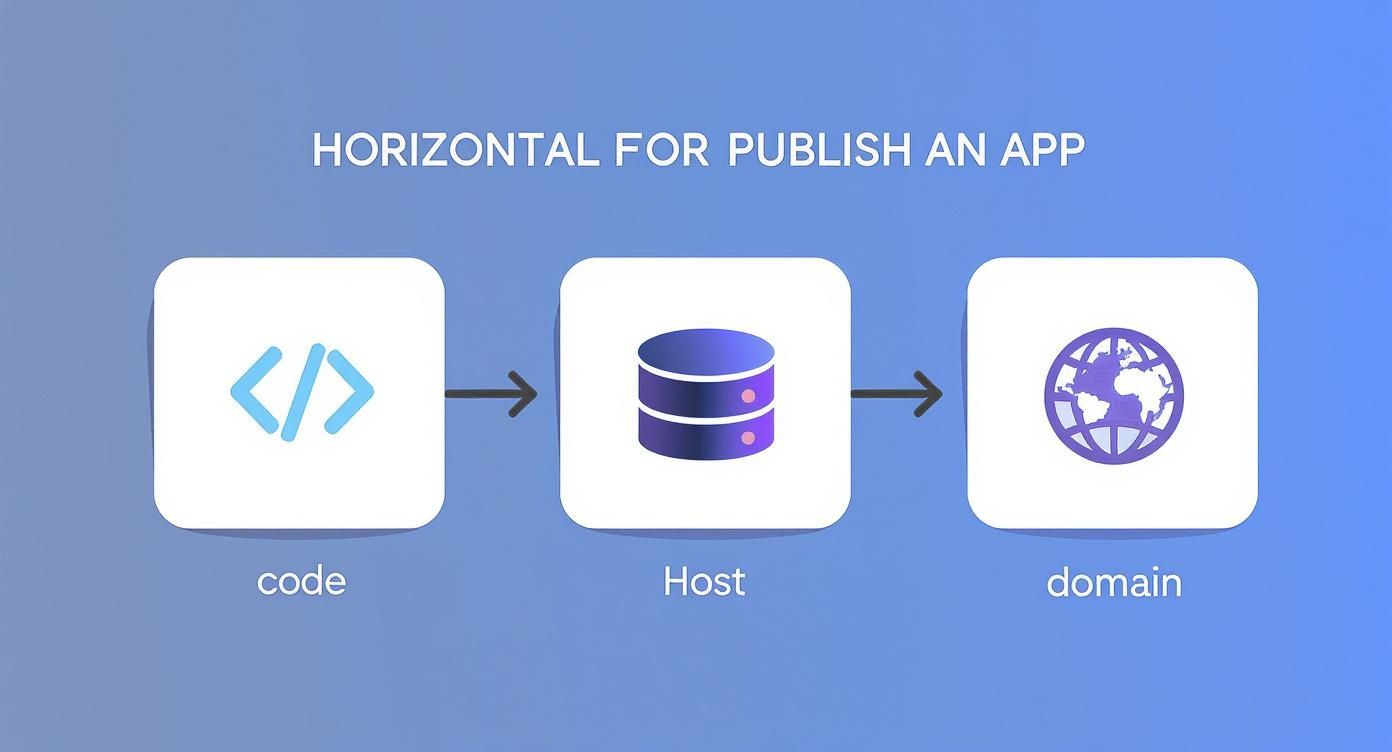
The journey is a simple, logical sequence: get your code, find it a home online, and give it an address. That's it.
To help you visualize the path ahead, here's a quick summary of the process.
Your Publishing Roadmap At a Glance
Think of this table as your treasure map. Each step gets you closer to a live, functioning website that anyone can visit.
The key takeaway is that you don't need to be a developer to launch your project. By using a vibe coding studio like Dreamspace, you’ve already handled the most complex part: creating the app itself. The rest is simply connecting the dots.
If you want a refresher on the first step of this journey, our guide on how to create your own app has you covered.
Getting Your Dreamspace App Ready to Go Live
Alright, before we push your app out into the world, we need to do one last check-up inside Dreamspace. Think of it as the final soundcheck before the big show. It’s a quick but crucial step to make sure everything looks and works exactly as you imagined.
This is all about locking in your final design and giving every feature a final run-through. A little polish now prevents any weird bugs or visual hiccups later, and that first impression is everything.
Finalizing and Grabbing Your Code
Once you’re happy with how the app is behaving in the preview, it's time to package it up. Dreamspace, the AI app generator, makes this part a total breeze.
Just head over to your project dashboard and hit the export or download code button. With a single click, Dreamspace bundles everything up into a neat, organized folder. This little package has all the production-ready files you need to get your app published.
This exported folder is essentially the master blueprint of your app. Dreamspace did the heavy lifting by generating clean, optimized code. Now, you just need to hand that blueprint over to your hosting service.
After the download finishes, you’ll have a folder with a few key files inside. Let's quickly break down what they do.
What’s Inside the App Folder?
When you peek inside the downloaded folder, you'll find the standard DNA of any modern web app. You don't need to touch a thing, but it’s good to know what’s what.
- index.html: This is the main entry point—the front door to your application.
- style.css: This file handles all the visual flair. Think colors, fonts, and the overall layout.
- script.js: This is the brains of the operation, containing all the logic and interactive elements.
This clean, simple structure is exactly why deploying is so straightforward. If you're curious to learn more about how this magic happens, our post on using an AI app builder dives deeper into the tech.
With these files downloaded and ready, you're officially set for the next step.
Choosing the Right Hosting Platform for Your App
So you've got your app files from Dreamspace. Now, where do you put them so the world can see? The performance of your app really hinges on where it lives online. Think of it like a foundation for a house—it has to be stable, fast, and ready for whatever you build on top of it.
For the kind of static, onchain apps we're building, modern hosting solutions are a perfect match. Platforms like Vercel, Netlify, and GitHub Pages are designed specifically for this. They serve up static files—the HTML, CSS, and JavaScript from your project—at lightning speed. That means faster load times for your users and a lot less headache for you.
Your goal is to publish on a website with as little friction as possible. Look for drag-and-drop deployment, automatic optimizations, and generous free plans. Those are the features that really matter, especially when you're just starting out.
This is a world away from traditional hosting, which often bogs you down with manual server configs and database management. If you're curious about the nitty-gritty, we broke down the differences in our guide comparing an AI website builder vs WordPress.
What Actually Matters When Picking a Host
When you're looking at options, it's easy to get lost in a sea of technical jargon. Let's cut through the noise and focus on what will actually make your life easier and your app run better.
Ease of Use: How fast can you get from a folder on your desktop to a live URL? You want a platform with a clean interface. Vercel, for example, literally lets you drag your entire project folder into their dashboard to deploy. It doesn't get much simpler.
Scalability: Your app might be small now, but you need a host that can grow with you. These platforms are built on global Content Delivery Networks (CDNs), which means they can handle sudden traffic spikes without even breaking a sweat.
Cost: This one's big. Most modern hosts have incredibly generous free tiers that are more than enough for personal projects or getting an app off the ground. You can launch and test your idea without spending a dime.
Hosting Provider Feature Comparison
To make the choice a bit clearer, here's a quick side-by-side look at what the most popular platforms offer for projects like ours.
Ultimately, for a Dreamspace app, both Vercel and Netlify are fantastic choices that abstract away all the complexity. GitHub Pages is a solid, free alternative if you're already comfortable working with Git.
A Real-World Example: Vercel vs. The Old Way
Let's walk through a practical scenario. You just finished your app in the Dreamspace vibe coding studio and downloaded the code.
With a platform like Vercel, your next steps are simple: create an account, drag your project folder onto the dashboard, and in less than 60 seconds, you have a live, shareable link. The whole thing is visual—no command line needed.
Now, contrast that with a traditional host. You'd have to buy a plan, navigate a clunky control panel, use an FTP client to upload your files one by one, and maybe even mess with file permissions. The modern approach strips all that away, letting you focus on your app, not the plumbing behind it.
Getting Your App Live and Linking a Domain
Alright, you've got your app files from Dreamspace and you've picked a place to host it. Now for the fun part: making it live. This is the moment your creation officially leaves your local machine and gets a real, public URL.
We're going to walk through this using Vercel because, honestly, it's just so visual and simple. You can get your app from your desktop to a live site in under 60 seconds.
The Drag-and-Drop Method
Once you've made a Vercel account, you'll land on a clean dashboard. The best part? No command line, no complicated server setup.
- First, find the project folder you downloaded from Dreamspace on your computer.
- Next, just drag that entire folder and drop it right onto the Vercel dashboard. Seriously, that's it.
- Vercel instantly gets to work, figuring out what kind of project it is, building it, and pushing it live to its global network.
In just a few moments, you’ll have a unique URL, something like my-cool-app-123.vercel.app. Your app is now online for anyone to see. This is hands-down the easiest way to publish on a website today.
Vercel handles all the heavy lifting in the background—it optimizes everything, adds a secure SSL certificate, and makes sure your app loads fast for everyone. All you had to do was bring the code, which Dreamspace—the AI app generator—already handled for you.
Now that the app is live on a temporary URL, let's give it a proper address.
Connecting Your Custom Domain
A custom domain like YourCoolApp.com is what makes your project feel professional and complete. It's the final piece of the puzzle.
Inside your Vercel project, look for a "Domains" tab. This is where you'll type in the domain name you bought from a registrar like GoDaddy or Namecheap.
Vercel will give you a couple of records to update in your domain registrar's settings. This is just a quick copy-and-paste job that tells the internet where to point your domain.
The changes can take anywhere from a few minutes to a few hours to kick in. Once they do, typing your custom domain into a browser will bring up your Dreamspace app, live and ready to go. You're now in full control of your web presence.
Managing Your Live Website Post-Launch
Getting your app live is a massive win, but the work isn't over once you publish on a website. Now the real fun begins: making sure your project actually thrives out in the wild. This next phase is all about monitoring performance, getting seen, and rolling out updates without a hitch.
First things first: grab your phone, tablet, and whatever other devices you can find. Test your live app everywhere. Something that looks pixel-perfect on your desktop Chrome browser might be a little wonky on Safari on an iPhone. Click every link, test every feature, and hunt for bugs. You want a smooth experience for every single visitor.
A website launch isn't the finish line; it's the starting block. The best sites are the ones that are constantly tweaked and improved based on real-world use.
Once you’re confident things are working, it's time to peek under the hood. Jump into your hosting provider’s analytics dashboard. Tools like Vercel have this built right in, giving you a goldmine of data on traffic, where visitors are coming from, and how the app is performing. This is how you learn what people actually do on your site.
Pushing Updates and Improving Visibility
Stale content is a killer for both user engagement and search rankings. A huge part of post-launch management is SEO, and a big piece of that puzzle is staying ahead of SEO algorithm updates. It’s a continuous effort.
The digital-first trend isn't slowing down. Just look at the book publishing world, where online sales are projected to hit $26.04 billion by 2025. This just reinforces how critical a strong, updated online presence is.
The great news is that updating your app is just as easy as the first deployment.
- Make your tweaks: Hop back into Dreamspace, the AI app generator, and add that new feature or change the design.
- Export the new code: Just like before, download the updated project folder.
- Redeploy: Drag the new folder into your hosting provider's dashboard.
That’s it. The platform handles the rest, building and deploying the new version, usually with absolutely zero downtime. This makes it incredibly easy to iterate on your live app, keeping it fresh and functional for your audience.
Common Publishing Questions Answered
Alright, so you’ve built your onchain app and you're ready to share it with the world. If this is your first time publishing a site, you've probably got a few questions bubbling up. That's totally normal. Let's walk through the common ones so you can launch with confidence.
First up, the big one: money. What’s this actually going to cost?
Breaking Down the Costs
You’ll be happy to hear that getting your app online is surprisingly cheap. For most creators, it can even be completely free.
- Hosting: I always recommend checking out platforms like Vercel or Netlify. Their free tiers are incredibly generous and more than capable of handling personal projects or new apps just getting off the ground. You won't pay a dime for the core features.
- Domain: The only real cost you’ll likely run into is for a custom domain name. These typically set you back about $10-20 per year. It's a small price to pay for a professional-looking URL that people can actually remember.
You can launch a globally-available web app for less than what you'd spend on a couple of coffees a month. It’s an incredibly low barrier to entry for getting your ideas out there.
Updating and Technical Skills
Okay, so what happens after you launch? What if you need to make a change?
This part is way easier than most people think. When you want to update your app, just head back into Dreamspace, the vibe coding studio, make your edits, and download the new code. From there, you just re-upload the project folder to your hosting provider. The changes go live almost instantly, usually with zero downtime.
And the best part? You don't need to be a developer. The whole process is designed to be code-free. Between Dreamspace building the app and a simple host handling the deployment, you can go from an idea to a live website without ever having to write a single line of code yourself.
Ready to bring your onchain app idea to life? With Dreamspace, you can generate a production-ready app with AI and publish it in minutes. Start creating today at https://dreamspace.xyz.