
A Practical Guide to Making a Social Media App Users Love

Before you even think about writing code, you need a solid blueprint. Building a social media app isn't just about features; it’s about laying the right foundation with a smart architecture and data model that can actually handle the load. This is the most critical step, and it's where you define how your app will manage everything from user profiles to real-time interactions for potentially millions of people.
Planning Your Social App for Long-Term Success
Seriously, don't rush this. Your initial architectural plan will make or break your app's ability to grow. For an onchain social platform, this is doubly true because smart contracts are largely irreversible and data structures are notoriously complex.
This isn't just a simple feature checklist. You're designing a system that needs to be ready for massive scale from day one. By October 2025, the number of global social media user identities is expected to hit 5.66 billion. That means your app needs to be engineered to support tens of millions of users just to have a fighting chance.
Defining Your Core Features and Data Models
The first real step in your architectural design is to map out the core user experience. Every single feature you dream up—from a basic "like" button to a full-blown real-time chat—directly impacts your data model and backend.
You need to think about the absolute fundamentals:
- User Profiles: What goes in them? Just a username and wallet address, or more complex data like a bio and profile picture? How do you structure this for lightning-fast lookups?
- Content Posts: What kind of content will you support? Text only? Images? Videos? How are you handling metadata like timestamps and user locations?
- The Social Graph: This is the web of connections—the "follows" and "friendships." How will you query this data efficiently to generate user feeds and connection suggestions without bogging down the entire system?
Getting clear answers to these questions is how you build a logical data model. This model becomes the schematic for both your database and your smart contracts, making sure data is stored efficiently and can be retrieved without a hitch as you scale.
Key Takeaway: A well-designed data model is the unsung hero of a scalable social app. Rushing this step often leads to costly rewrites and a sluggish user experience down the line. Spend the time to get it right from the start.
Making Critical Architectural Choices
Once you have a feature list and a data model, you can start making the big architectural calls. For an onchain app, this is all about deciding where and how your data lives. Let's be real: storing everything on the blockchain is usually way too expensive and slow.
A hybrid approach is almost always the right answer. Core interactions, like minting a post as an NFT, get verified onchain. But the bulk data—the actual images, video files, and post content—gets stored off-chain using something like IPFS or a dedicated database.
This is where a tool like Dreamspace can be a huge time-saver. It's an AI app generator that helps you visualize and tweak your architecture before you pour tons of resources into development, letting you model different approaches and see the trade-offs.
Core Feature Planning and Architectural Choices
Here's a breakdown of how common features map to architectural decisions. Thinking through these early will save you a world of hurt later on.
Ultimately, this planning is about more than just code. Your goal is to build a foundation that not only supports your launch features but is also flexible enough for what comes next. A huge part of that is cultivating a space where people want to be. Learning how to build an online community that thrives is just as important as your tech stack for achieving real, lasting growth.
Designing Smart Contracts for Social Interactions

Once your architecture is mapped out, it's time to dive into the onchain logic that will actually run your app. Smart contracts are the heart of any decentralized social platform, handling everything from profile ownership to how content gets created and shared. Getting them right is a careful balance of functionality, security, and cost.
Your absolute top priority has to be gas efficiency. Every single thing a user does—posting, liking, following someone—costs gas. If your contracts are clunky and inefficient, you’re just creating high transaction fees for your users, which is one of the fastest ways to kill adoption. Clean, optimized code isn’t just a nice-to-have; it's a must for a good user experience.
Crafting the Core Logic for Social Actions
Your contracts are responsible for turning familiar social concepts into concrete onchain actions. That means defining the right data structures and functions to manage all the fundamental interactions in your app.
Here’s a quick look at the essential contracts you'll almost certainly need to build:
- UserProfile Contract: Think of this as your onchain identity layer. It links a user’s wallet address to their profile data, like a username or a pointer to an off-chain profile picture (usually an IPFS hash). The key here is to keep onchain data as light as possible to save on gas.
- Post Contract: This is where content creation and ownership live. When someone makes a post, this contract could mint an NFT to represent it, tying ownership directly to the user's wallet. It would also store the content's URI and handle basic interactions.
- SocialGraph Contract: This contract manages all the connections between your users. It needs functions like
follow(address user)andunfollow(address user)that update the mappings tracking who follows whom. This data is the foundation for building user feeds down the line.
Whether you're coding this from the ground up or using a vibe coding studio like Dreamspace to speed things up, the core ideas are the same. You're building a trustworthy, logical onchain foundation for everything else. For a more detailed look, our guide on how to build smart contracts covers a lot of the foundational knowledge.
Prioritizing Security From the Start
Security isn't something you can sprinkle on at the end. It has to be baked into your design from the very first line of code. One little vulnerability can cause a total meltdown, destroying user trust and leading to stolen assets. This is non-negotiable.
Make sure you're focusing on these key security practices:
- Prevent Reentrancy Attacks: This classic exploit lets a malicious contract call back into your function before it's finished executing. Always use the "Checks-Effects-Interactions" pattern, which means you handle all your internal state changes before making any calls to external contracts.
- Manage Access Control: Not every function should be a free-for-all. Use modifiers like
onlyOwnerto lock down administrative functions so only your deployer address can access them. This stops random users from messing with critical contract settings. - Handle Integer Overflows/Underflows: Older versions of Solidity (before 0.8.0) were susceptible to bugs where numbers could wrap around. While newer versions have protections, it's still a critical concept to understand anytime you're doing math in your contracts.
Expert Insight: My golden rule is to always assume that any external contract you interact with is hostile. Validate every input, check all return values, and never, ever blindly trust data coming from outside your contract.
Planning for Future Upgrades
The last piece of the puzzle is planning for the future. Your app is going to evolve. You'll add features and squash bugs. But since smart contracts are immutable, you need a way to update your logic without forcing everyone to migrate to a brand new contract.
The go-to solution here is the proxy pattern. This approach neatly separates your application logic from your data storage. Users interact with a proxy contract, which forwards all the calls to a separate logic contract. Need to upgrade? Just deploy a new logic contract and tell the proxy to point to the new address. All your users, data, and the contract address they interact with stay exactly the same.
It’s a bit more work to set up initially, but that small upfront cost pays for itself by giving your onchain social app the flexibility it needs to survive and thrive long-term.
Building a Fast Backend with Blockchain Indexing

Let's get one thing straight about building a social app onchain: querying the blockchain directly is a non-starter. It’s painfully slow. Your users expect feeds, search results, and notifications to pop up instantly, and trying to pull that data from a node in real-time will kill your app before it even gets off the ground.
To deliver that snappy, Web2-like experience everyone is used to, you absolutely need a smart backend built around blockchain indexing. The whole idea is to create a separate, off-chain database that mirrors your onchain activity, making it ridiculously fast to query.
How Blockchain Indexing Actually Works
Picture an indexer as a little spy that does one thing really well: it watches your smart contracts. Every single time a user creates a post, likes something, or follows another account, your contract emits an event.
The indexer’s job is to catch those events and translate them into a nicely structured SQL database. This is the magic trick. It takes the raw, chronological mess of blockchain data and reorganizes it into a clean, relational format you can work with.
You end up with the best of both worlds: the decentralized, immutable truth of the blockchain, plus the high-speed query power of a traditional database.
Setting Up Your Indexer and APIs
First, you’ll point your indexer at your smart contracts and tell it which events to listen for. This means defining a schema that maps the event data—things like userAddress, postId, and timestamp—into specific tables and columns in your database.
Once your indexer is up and running, populating your database with fresh data, you can build a standard API (like a REST or GraphQL API) right on top of it. This API becomes the workhorse, handling all the heavy lifting for your frontend.
Suddenly, you can build features that would be impossible otherwise:
- Personalized Feeds: Your API can run a quick SQL query to grab the latest posts from all the users someone follows, sort them by time, and send back paginated results.
- Real Search: When a user searches for a profile or a keyword, your API hits the indexed database for a near-instant text search—not the sluggish blockchain.
- Activity Notifications: Need to show a user their recent likes and comments? The API can pull all
LikeorCommentevents tied to their posts in milliseconds.
Key Takeaway: An indexed backend isn't just a nice-to-have; it's a fundamental piece of the puzzle for any onchain social app that wants real users. The performance jump is massive.
This whole setup can be a serious grind, but using an AI app generator like Dreamspace can automate nearly all of it. Instead of wrestling with indexer configurations and writing boilerplate API code, Dreamspace hooks up your contracts to a queryable database and generates the backend for you. It's a huge shortcut.
Optimizing Queries for Speed and Scale
Just having the data indexed isn't the final step. A poorly written query can still bog things down, especially once you have millions of posts and interactions flying around.
Keep these principles in mind:
- Index Your Database: Your database tables need their own indexes on columns you query often, like
userIdortimestamp. This is critical for fast lookups. - Cache Everything You Can: Data that doesn't change every second, like user profiles, is a perfect candidate for a caching layer like Redis. Serving requests from memory slashes your database load.
- Paginate All The Things: Never, ever return a giant list of thousands of items in one API call. Implement pagination on every feed and list to keep responses small and blazing fast.
This architecture is what powers a modern onchain social experience. It closes the gap between decentralized logic and the user's expectation for a fluid, responsive app. For a deeper look into the nuances of onchain data, our post on approaches to blockchain data analysis is a great resource.
Using AI and No-Code to Build Your App
Once your architecture is mapped out and your backend is planned, it's time to bring your onchain social app to life. Traditionally, this meant a long, grueling process of hand-coding the frontend and server logic—often with separate teams struggling to stay in sync.
That whole workflow is being turned on its head.
AI-powered development tools are changing the game entirely. Instead of writing thousands of lines of code from scratch, you can now generate massive chunks of your application automatically. This new way of working lets you jump from a rough concept to a fully interactive product faster than ever before.
From Prompt to Production Code
The idea is refreshingly simple: you describe what you want to build in plain English, and an AI model writes the code for you. This is where a vibe coding studio like Dreamspace really makes a difference. It acts as an AI app generator, taking your descriptions and translating them into production-ready code.
Let’s say you need a user profile page. Forget opening a code editor and writing JSX. You just describe what you want:
- A round profile picture in the top left.
- The user's display name and @handle right next to it.
- A short bio underneath.
- Two buttons: one to "Follow" and another to "Message".
The AI takes those simple instructions and spits out the React or Next.js code, styling included. It’s not just for small components, either. You can describe entire user flows—like the sign-up process or the "create post" screen—and watch the AI build out the pages and connect the logic. You get to skip the boring boilerplate and focus your energy on the unique features that make your app special.
Key Insight: The real magic of AI in app development isn't just about speed. It’s about the freedom to iterate. You can test a new idea, get feedback, and generate a completely new version of your UI in a couple of hours, not weeks.
Generating Your Backend and API Logic
This AI-driven approach isn't limited to what the user sees. It's just as powerful for generating the backend logic that makes your app tick. You can define your API requirements in the same conversational style.
For instance, you could tell the AI to create an API endpoint that pulls the 10 most recent posts from a specific user. The generator will then produce the necessary server-side code to query your indexed database, format the JSON response, and send it over to the frontend.
The integration is surprisingly smooth. The AI understands the relationship between the frontend components it just built and the backend data they need, ensuring everything just works together right out of the box. If you're curious about how this all comes together, you can learn more about how to AI App Generator to Create Your Social Media App (Without Code).
By automating both the frontend and backend generation, you're not just saving time—you're collapsing the entire development cycle. Building the core of your social media app becomes a conversation, not a coding marathon. This gives you a massive advantage, letting you launch an MVP, get it into users' hands, and start collecting feedback while others are still setting up their dev environments.
To see these tools in action, take a look at our guide on using an AI app builder to bring your vision to life.
How to Integrate, Test, and Deploy Your Social App
Alright, you’ve got your frontend, backend, and smart contracts sorted. Now for the fun part: stitching it all together into a living, breathing application. This is where your separate components stop being just code and start becoming a real social platform. The whole goal here is to make sure every part talks to the others without a hitch.
First up, you’ll need to connect your AI-generated frontend with the backend APIs you’ve indexed. This means wiring up your UI—think buttons, forms, and feeds—to make API calls that pull data from the database or fire off transactions to your onchain contracts.
This is a stage where tools like Dreamspace really shine. Because it's an integrated AI app generator, the frontend code it creates is already built to play nicely with the backend it just made for you. That cuts out a ton of the usual friction you'd get from manual integration.
End-to-End Testing for a Flawless Launch
Before you even dream of hitting the "deploy" button, you need to test everything. And I mean everything. End-to-end (E2E) testing isn't just about clicking a button to see if it changes color; it's about simulating a real user's entire journey through your app.
You have to validate complete user flows on a testnet. For example, a solid test case would be: a user connects their wallet, creates a profile, makes their first post, and then a different user sees that post pop up in their feed. These are the kinds of tests that uncover the messy bugs that only show up when different parts of your system start interacting.
Here's how I think about the critical testing layers:
- Smart Contract Audits: This is non-negotiable. Before you do anything else, get your smart contracts professionally audited for security holes. Seriously, don't skip this.
- API Load Testing: Grab a tool and hammer your backend APIs with thousands of simulated users. This is how you find performance bottlenecks before a real traffic spike takes your app down.
- Frontend E2E Tests: Automate browser-based tests that mimic how a user would actually click around. This ensures the whole flow works just as you designed it, across different devices and scenarios.
This whole process—from design to launch—gets a lot simpler when you're using an AI-powered workflow.
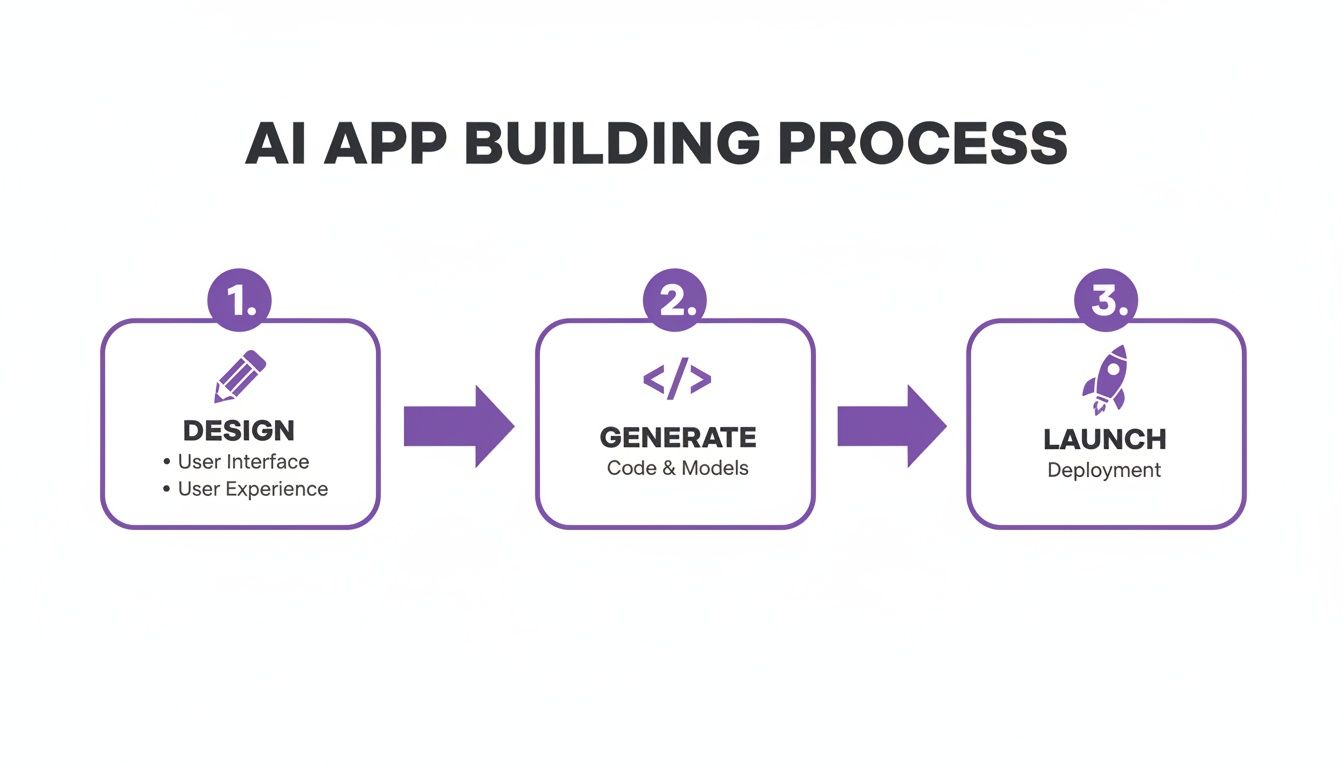
As you can see, modern tools are all about condensing these phases. The faster you can get from an idea to a deployed app, the faster you can start getting that all-important user feedback.
Automating Deployment with CI/CD Pipelines
A Continuous Integration/Continuous Deployment (CI/CD) pipeline is your secret weapon for a smooth launch. It automates all the tedious steps of testing and deploying code whenever you push a change, dramatically cutting down the chances of human error.
For a web3 app, the pipeline has a few extra jobs. Your CI/CD process should automatically run your smart contract tests, build your frontend assets, and deploy your backend services. You can also configure it to manage deployments to different environments, like a staging server for one last check before going live to production.
Pro Tip: I always set up my pipeline to automatically deploy smart contracts to a testnet on every single commit. This gives the whole team a constantly updated testing environment, and we catch integration problems almost instantly.
Post-Launch Monitoring and User Feedback
Shipping the app isn't the end—it's the beginning. Those first few weeks are absolutely critical for gathering real-world data and user feedback that will shape the future of your platform.
Get robust monitoring set up for your entire stack. You need dashboards tracking API response times, server health, and any errors firing from your smart contracts. Being proactive here lets you spot and fix issues before most of your users even notice something is wrong.
At the same time, you have to listen to your community. Digging into user behavior metrics is the only way to make smart product decisions. With the average person spending nearly 139 minutes on social media daily, analyzing how people actually use your app will tell you which features are winners and which ones need a rethink. This feedback loop is what separates successful apps from forgotten ones.
Common Questions About Making a Social Media App
Alright, even with a solid game plan, you're bound to have questions. Building a social media app from the ground up, especially an onchain one, is a massive undertaking. Let's tackle some of the big ones that pop up time and time again.
How Much Does It Cost to Build a Social Media App?
This is the million-dollar question, literally. The honest answer? It's all over the map. A bare-bones MVP for a social app might run you tens of thousands of dollars. But if you're talking about a feature-rich platform with live streaming and complex algorithms, you’re easily looking at a seven-figure investment. The cost scales directly with complexity and the size of your team.
This is where modern tooling completely changes the game. An AI app generator like Dreamspace can take a huge bite out of those initial development costs. By handling the heavy lifting of code generation for both your frontend and backend, you can achieve with a small, focused crew what used to take a small army of engineers.
But remember, the dev cost is just the price of admission. Don't forget to budget for the ongoing costs that will keep your app alive and kicking:
- Server and Infrastructure: Someone has to pay for the backend, database, and all that off-chain media storage.
- Content Moderation: This is the silent killer of many social app budgets. It's a non-negotiable expense that requires a smart mix of AI tools and actual human beings.
- Marketing and Growth: Your first users won't just magically appear. You have to go out and find them.
What Is the Best Technology Stack for a Social Media App?
Anyone who gives you a single "best" stack is selling something. The right choice depends entirely on what your app needs to do. For the onchain social app we're building here, the core pieces are pretty clear.
You'll be building on a foundational blockchain—think Ethereum or a compatible L2—using Solidity for your smart contracts. But to give users the snappy experience they expect, you absolutely need an indexer to pull onchain events into a queryable SQL database. For the frontend, a framework like React or Next.js is a solid choice for building out that dynamic UI.
A vibe coding studio like Dreamspace makes this whole process way less painful. It’s an integrated environment that generates the code across the entire stack, from the smart contract logic to the frontend components. Critically, it makes sure all those pieces are actually designed to talk to each other right from the start.
Key Insight: The best stack is the one that gets your vision to market the fastest without forcing you to compromise on your core features. Integrated platforms are a huge win here, as they let you focus on your app's unique value instead of fighting with glue code.
How Do I Get My First 1,000 Users?
Getting those first thousand believers is pure hustle. There are no shortcuts. The absolute key is to stop trying to appeal to everyone. Instead, find your niche—a small, passionate community that the big platforms are ignoring.
Figure out where these people already live online. Are they in specific Discord servers? Obscure subreddits? Old-school forums? Go there and become part of the community. Don't just drop a link and run. Actually talk to people, understand their frustrations, and show them how your app solves a problem they genuinely have.
Once you've made some inroads, connect with the micro-influencers in that space. Give them early access, listen to their feedback like it's gold, and make them feel like co-creators. Your goal isn't just to rack up sign-ups; it's to build a small tribe of advocates who will become your most powerful marketing engine.
What Are the Biggest Challenges in Running a Social Media App?
Let's be clear: building the app is just the start. The real work begins after you launch. Once you move past the initial development sprint, three major challenges will consume most of your time: user retention, content moderation, and scaling.
Keeping people coming back requires constant iteration and a deep connection to your community. You can't just set it and forget it. Moderation, as mentioned before, becomes a gargantuan operational task that grows exponentially with your user base. And finally, the technical battle of ensuring your infrastructure doesn't crumble under the weight of a million users is a war that never truly ends.
Ready to stop planning and start building? With Dreamspace, you can generate your onchain app with AI, from smart contracts to a full-stack frontend and backend. See how it works at https://dreamspace.xyz.