
How to Publish a Web Page From Code to Live URL

So, you've built something cool on your computer. Now what? Getting it from a local folder to a live, public URL involves a few key moves: prepping your files, picking a hosting service, pointing a domain name to it, and finally, pushing the code live.
Your Blueprint For Taking Your Project Live

Learning how to publish a web page is the final, crucial jump that brings any digital idea into the world. Think of this guide as your launch blueprint. We’re going beyond basic steps to walk you through the entire journey, from a folder of code to a URL you can share with anyone.
We'll cut through the noise and clarify the big decisions you need to make, whether you've been coding for years or are just starting out. This means getting your project's assets in order, finding the right hosting platform—from modern powerhouses like Vercel to decentralized networks like IPFS—and getting your domain name sorted.
The Modern Publishing Landscape
What started as a niche skill back in 1991 is now a fundamental part of creating anything online. With 6.04 billion people on the internet, a single web page can now reach over 73.2% of the entire world.
This isn't just trivia; it's context. That massive audience is what powers a digital media market expected to rocket toward $1.9 trillion by 2030. When a crypto builder uses an AI app generator like Dreamspace, every launch is a direct tap into that potential.
This guide is built to give you the confidence to navigate the entire process. We'll even cover specific workflows, like how to take a front-end you built in a vibe coding studio like Dreamspace and turn it into a live onchain application.
Publishing isn't just a technical checklist. It's your ticket to the digital economy. Nail this process, and you can ship ideas faster, test concepts, and find your audience almost instantly.
As you start mapping out your project, it's smart to check out a professional's guide to deploying to production to get a feel for best practices from day one. Our goal here is to hand you a clear roadmap, making sure your project doesn't just go live—it makes an impact.
Preparing Your Project for a Flawless Launch
Before you even start thinking about hosting, you’ve got to get your project’s foundation solid. Getting this part right is the difference between a launch that just works and one that turns into a frustrating mess of errors. It all starts with your files.
A clean, well-structured project directory is your first big win. I always keep my source code, images, and style files in separate, obvious folders—think src, assets, and css. This isn't just about being tidy; it makes the build process predictable and saves a ton of headaches when you have to debug something later.
If you’re working with a modern framework like React or Vue, now’s the time to generate your production build. Running that command compiles and optimizes all your code, spitting out a clean dist or build folder. That folder is your website, ready to go live.
Asset Optimization Is Non-Negotiable
Nothing kills the user experience faster than a slow-loading page. And the biggest culprits are almost always unoptimized assets: massive images, bloated CSS, and heavy JavaScript files. You have to shrink these down before launch.
Image Compression: Huge image files will absolutely cripple your site's speed. Use a good tool to compress your JPEGs and PNGs without making them look grainy.
Minification: This is just a fancy word for stripping out all the unnecessary characters from your code—like whitespace, comments, and line breaks—without affecting how it runs. Minifying your CSS and JavaScript files makes a surprisingly big difference in file size.
It's a classic mistake to think that modern internet speeds make optimization optional. Every single kilobate you save adds up to a faster load time, which has a direct impact on whether users stick around and how you rank in search results. A lean site is a fast site.
For a more streamlined approach, platforms from a vibe coding studio like Dreamspace often handle these optimizations for you automatically. If you're new to the idea, our guide on what no-code development is explains how these tools can simplify the whole process.
Your Pre-Launch Checklist
Before hitting that deploy button, do a final run-through to catch any last-minute issues. This quick audit can save you from a lot of face-palming after you've gone live.
- Test Responsiveness: Seriously, check it on your phone. Make sure your site looks and works great everywhere, from small screens to massive desktops.
- Check for Broken Links: Use a link checker to hunt down and fix any links that go nowhere. A 404 error looks sloppy.
- Proofread Content: Typos and grammatical mistakes can make an otherwise awesome project feel unprofessional. Give all your text one last read.
Nailing these prep steps ensures your project makes a strong, professional first impression the moment it’s out in the world.
Choosing Your Hosting Playground
Where you decide to host your web page is a huge deal. It's the digital ground your site will live on, and this choice directly affects everything from performance and scalability to your day-to-day workflow. Think of it as finding the right playground for your project's specific needs.
For most of us building today, the journey begins with modern static hosting providers. Platforms like Netlify, Vercel, and GitHub Pages have exploded in popularity for a very good reason. They offer slick, seamless integration with Git. You just connect a GitHub repo, and your site automatically builds and deploys every time you push a change. This setup is fast, reliable, and just plain gets rid of so much manual grunt work.
Let’s say you just polished off the code for your new portfolio. By linking that project's GitHub repository to Vercel, every single git push to your main branch can trigger a fresh build and deploy the updates in seconds. This continuous deployment flow is a game-changer for iterating quickly. If you're hunting for environments that champion this kind of rapid development, you should check out our breakdown of powerful Replit alternatives that offer similar integrated setups.
Centralized Versus Decentralized Hosting
While centralized hosts are all about convenience, there's a whole different philosophy powering the decentralized web. Instead of trusting a single company's servers, decentralized options like the InterPlanetary File System (IPFS) and Arweave offer a more resilient and censorship-resistant way to publish.
- IPFS: Picture a distributed file system where your site's files are held across a network of peers. This makes it incredibly difficult for any single party to take your content down.
- Arweave: This one is all about permanent storage. When you publish to Arweave, it’s stored forever on the "permaweb"—perfect for archiving critical data or building immutable onchain experiences.
This decentralized route is particularly compelling for crypto projects or anyone building something that needs to last and remain in the user's control.
Hosting Platform Comparison: Centralized vs. Decentralized
Deciding between the convenience of centralized platforms and the resilience of decentralized ones can be tough. They serve different purposes and fit different project goals. This table breaks down the key differences to help you see which path makes sense for you.
Ultimately, centralized hosts excel at speed and developer experience, making them perfect for most modern web projects. Decentralized hosts, on the other hand, are built for a future where permanence and user control are paramount.
For a deeper dive, this guide on How to Choose a Web Hosting Provider is a fantastic resource, complete with a checklist and other key factors to consider.
The Bigger Picture in Digital Publishing
When you publish a web page, you're not just putting a file online—you're participating in a massive and accelerating industry. The digital publishing market is projected to be worth around $257 billion in 2025 and is on track to hit nearly $447 billion by 2030. This explosive growth is why so many developers are shipping web-first experiences instead of old-school static documents.
For a vibe coding studio like Dreamspace, this trend is a direct opportunity. Every front-end our AI generates isn't just a simple utility page; it's a piece of a rapidly expanding digital stack.
Your hosting choice isn't just a technical footnote—it's a strategic decision. Centralized platforms give you speed and an amazing developer experience. Decentralized options give you resilience and permanence. The right answer depends entirely on what you’re building.
So whether you go with a streamlined platform for your personal blog or a decentralized network for an onchain dApp, just understanding your options is the first real step toward a successful launch.
Mastering the Deployment Process
Alright, you’ve prepped your project and picked a hosting platform. Now for the fun part: deployment. This is where your code leaves your local machine and goes live for the entire world to see. Let's get into the nuts and bolts of how it actually works.
When it comes to getting your site live, you generally have two paths: the command-line interface (CLI) or a graphical user interface (GUI). There's no "better" option—it all comes down to your workflow. If you're comfortable in the terminal, the CLI is fast and scriptable. If you prefer a visual approach, a drag-and-drop GUI is incredibly intuitive.
This whole journey, from code to live site, can be boiled down to a simple flow.
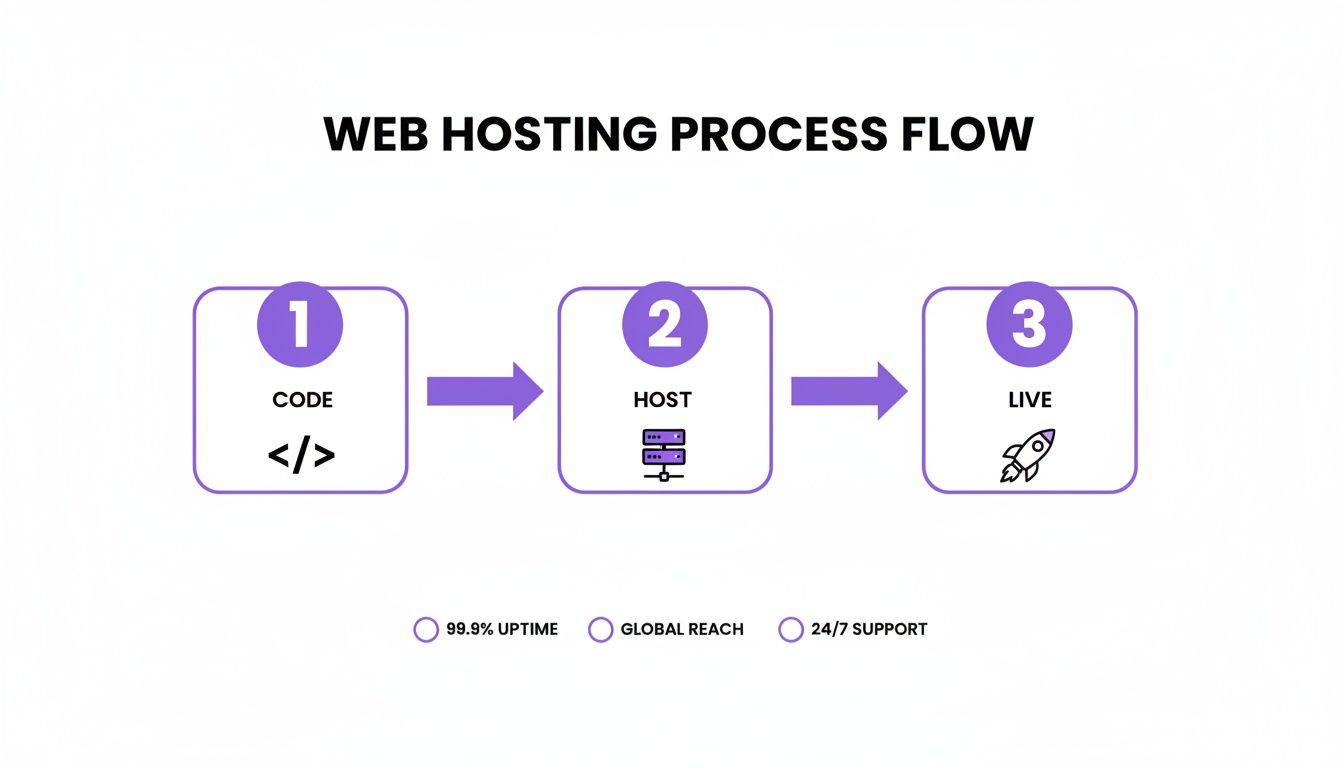
Whether you're using a sophisticated CI/CD pipeline or just uploading a folder, it all comes back to these three stages: Code, Host, and Live.
The Command-Line Route
For developers who practically live in the terminal, deploying with a tool like the Vercel CLI is pure efficiency. Once it’s installed, you just pop into your project’s root directory and fire off a single command.
A typical deployment looks something like this:
Get into your project folder
cd my-awesome-project
Push the current directory to Vercel's production environment
vercel --prodAnd that’s really it. The CLI takes care of building your project, uploading the files, and spitting back a live URL. It’s perfect for automating your workflow and makes publishing updates almost instantaneous.
The Drag-and-Drop Method
Not a command-line person? No problem. Platforms like Netlify offer a ridiculously simple drag-and-drop interface. You literally just drag your final build folder (usually called dist or build) from your desktop right into their web UI.
This approach is a lifesaver for quickly launching simple static sites or for creators who'd rather not touch the terminal. It completely removes the technical barrier, letting you focus on your work instead of deployment logistics.
Pointing Your Custom Domain
Your site is live on a temporary URL, but you'll want to connect your own domain to make it official. This step usually just means adding an A or CNAME record in your domain registrar’s dashboard. Your hosting provider will give you the exact values to copy and paste.
If you’re building in a vibe coding studio like Dreamspace, you get to skip most of this. As an AI app generator, it handles the entire workflow. You can go from a fresh idea to a fully deployed web app on its own URL in a few clicks, bypassing all the manual commands and DNS settings.
The way we publish web pages has changed so much. It’s no longer about manual FTP uploads; it's about orchestrating AI and mobile-first experiences. With digital ad revenue jumping 14.9% to nearly $258.6 billion and over a billion people using AI platforms monthly, the demand for modern, fast online projects is undeniable.
For anyone using Dreamspace to publish crypto apps, these numbers just confirm what we're seeing: AI is now mediating both content creation and discovery at an incredible scale. You can read more on these trends in the digital 2026 global report.
Post-Launch Checks and Onchain Integration
Congratulations—you’ve pushed the deploy button and your project is officially live on the internet. That’s a huge moment, but the job isn't quite finished yet. Now it's time for a quick post-launch audit to make sure everything works just as well in the wild as it did on your local machine.
This last mile is all about verification and fine-tuning. The very first thing I always do is a quick but thorough check of the essentials. Does the site load correctly at the main domain? Are all the pages accessible, or are you hitting any unexpected 404 errors? This is also the moment you confirm your SSL certificate is doing its job—look for that little padlock in your browser's address bar.
Verifying and Troubleshooting Your Live Site
Once you’ve confirmed the basics, it’s time to dig a little deeper. A common gremlin that pops up after publishing a web page is the dreaded "mixed content" warning. This happens when a secure (HTTPS) page tries to load insecure (HTTP) assets, like images or scripts. These warnings can make your site look untrustworthy to visitors and should be squashed immediately.
Next up is cross-browser testing. What looks picture-perfect in Chrome might be a jumbled mess in Safari or Firefox. You'll want to use a few different browsers and devices to click through your site, test your forms, and double-check your layouts.
- Deployment Verification: Clear your cache and hit your live URL. Are you seeing the latest version you just deployed?
- SSL Certificate Check: Make sure your site loads over HTTPS without any scary security warnings.
- Link Integrity: Click every single link you can find—internal pages, external sites, everything. Make sure none are broken.
- Console Errors: Pop open your browser's developer console and hunt for any red error messages that need attention.
A successful launch isn't just about getting the site online; it's about making sure the user experience is flawless from the very first visit. Spending 30 minutes on these checks can save you from days of user complaints and lost traffic.
Integrating with the Onchain World
For those of us building in the crypto space, deploying the front-end is just the beginning. The real magic happens when you bring it onchain.
This is where you verify that your dApp is actually communicating with your deployed smart contracts. Can users connect their wallets without a hitch? Is onchain data, like token balances or NFT metadata, pulling through and displaying correctly?
This is also the perfect time to give your decentralized site a friendly, human-readable name using the Ethereum Name Service (ENS). Instead of sharing a long, cryptic IPFS hash, you can point a .eth name directly to your content.
This entire workflow—from building a UI to connecting it onchain—is a core part of modern web3 development. We built the Dreamspace AI app generator as a vibe coding studio to bridge this exact gap, making the process much smoother. If you're interested in the creative side of development, you can see more about the vibe coding app experience and how it's changing the way builders approach onchain projects.
A Few Common Web Publishing Questions
Diving into web publishing can feel a little like stepping into a new world, complete with its own language and quirks. As you start to get your bearings, a few questions tend to bubble up to the surface again and again.
Let's clear the air on some of the most common ones.
How Long Until My New Site Shows Up on Google?
This is the million-dollar question, isn't it? The honest answer is: it depends. For a brand-new site on a fresh domain, it could be anywhere from a few days to several weeks before Google’s bots find, crawl, and finally index your pages.
But you’re not just sitting around waiting. You can give Google a nudge in the right direction.
- Hand them a map: Submit your
sitemap.xmlfile directly through Google Search Console. This is the fastest way to show Google all the pages you want indexed. - Jump the queue: For your most important pages, use the "URL Inspection" tool in Search Console and hit "Request Indexing." It’s like a priority pass.
- Get a referral: When other, already-indexed sites link to you, it signals to Google that your site is worth checking out. Even a link shared on social media can help speed up discovery.
Even after doing all that, a bit of patience is still part of the game.
What's the Real Difference Between a Domain Name and Hosting?
This one trips a lot of people up, but the analogy is simple. Think of it like building a house.
Your domain name is your street address—like mycoolsite.com. It’s the unique, memorable address people use to find you online. You essentially rent this from a domain registrar.
Hosting is the actual plot of land where you build your house. It’s the server space where all your website’s files (HTML, CSS, images, etc.) live. When someone types in your domain, they’re being directed to that plot of land to see what you’ve built.
You absolutely need both to have a live website. The domain is the address, and the hosting is the house. They're two separate things that work together.
Do I Actually Need to Code to Publish a Website?
Not anymore. While knowing your way around code gives you ultimate power and flexibility, it’s far from a requirement these days. The entire game has been changed by no-code platforms and AI-driven tools.
For instance, an AI app generator like Dreamspace can take you from an idea to a fully deployed, production-ready onchain application without you ever touching a line of code. It handles everything, from generating the UI to getting it live on the web. It’s all part of a bigger shift where the tools are finally smart enough to handle the technical grunt work, letting creators focus on the vision.
Why Is My Live Site Showing an Old Version?
Ah, the classic. This is a super common and incredibly frustrating issue, but 99% of the time, the culprit is caching. A browser or a server will often save a copy of your site so it can load faster for repeat visitors. Sometimes, it just gets a little too attached to the old version.
Here’s your troubleshooting checklist:
- Force a Hard Refresh: This tells your browser to skip its local cache and pull the absolute latest files directly from the server.
- Clear Your Host's Cache: Platforms like Vercel or Netlify have their own caching systems. Dig into your project’s dashboard and look for an option to "clear cache" or trigger a fresh deploy.
- Wait for the CDN: If you’re using a Content Delivery Network (CDN), it can take a few minutes for your updates to spread across its entire global network.
Nine times out of ten, a simple hard refresh is all you’ll need to see your changes.
Ready to ship your idea without getting tangled up in the technical weeds? Dreamspace is the vibe coding studio for generating and publishing onchain projects with AI. Stop waiting and start building. Share your vision with the world today.