
How to Program AI Apps with a Generator
Not long ago, learning to program AI meant diving headfirst into the deep end with complex languages like Python or frameworks like TensorFlow. It was a long, slow grind. But that's changing fast. Today, it’s less about wrestling with syntax and more about guiding powerful AI tools that do the heavy lifting for you.
Using an AI app generator, you can now build a fully functional application just by describing your idea in plain English.
The New Way to Program AI Applications
The old path to AI development was a tough one, full of barriers that kept most people out. You had to sink months, sometimes years, into learning algorithms, libraries, and coding conventions before you could even think about building something real. Thankfully, those walls are coming down.
This new approach often feels more like a creative process, sometimes called Vibe Coding, where you work alongside an AI to bring your vision to life. Instead of painstakingly writing every single line, you take on the role of the director, clearly explaining what you want the application to do.
The Rise of the AI Collaborator
AI isn't just a tool anymore; it's become a genuine partner in the development process. The scale of this shift is hard to overstate. AI is already responsible for generating about 41% of all code on the planet. That works out to a mind-boggling 256 billion lines of code written by AI in a single year.
It's not just a trend for hobbyists, either. A solid 82% of professional developers are now using AI coding tools every single week, which shows just how deeply this has changed the software world.
This collaborative model creates a much more intuitive and efficient workflow. Tools like Dreamspace, our vibe coding studio, are built from the ground up for this modern way of working. They give you the power to turn a simple idea into a functional on-chain application without getting lost in the weeds of boilerplate code. You get to focus on the what—the core purpose and user experience—while the AI figures out the how.
The game has changed. The goal is no longer about mastering syntax; it's about mastering intent. Your most valuable skill is now your ability to clearly communicate your vision to an AI that can turn it into reality, from smart contracts to front-end interfaces.
Traditional vs AI-Assisted Programming Approach
To really see how much has changed, let's compare the old way of doing things with the new, AI-powered workflow.
This table makes it clear: we're moving from a world where you had to be a master craftsman of code to one where you can be the architect of an idea, with a powerful assistant to handle the construction.
In this guide, we’ll walk through exactly how to program AI applications using this new method. We’re going to focus on practical steps you can take right now to build and deploy real-world projects. You'll see firsthand how an AI app generator can help bring your most ambitious ideas to life. For an even deeper look, check out our hands-on guide for building generative AI-powered apps.
Defining Your On-Chain AI App Vision

Before you dive into prompts and code generation, let's talk about the most important step: nailing down the blueprint for your idea. I’ve seen it time and again—the quality of an AI-generated app hinges entirely on the clarity of your initial vision.
Jumping straight into the tool without a solid plan is like asking an architect to build a house with zero blueprints. Sure, you’ll end up with something, but it almost certainly won't be the sturdy, functional masterpiece you had in mind. This first phase is all about logic and user experience, not code.
Articulating Your App's Core Logic
First things first, what does your app actually do? It's time to get granular and move past the high-level concept. What specific problem does it solve? Who are you building this for? And what’s the one core action they need to take?
Let’s take a common example. A vague idea like "a decentralized voting app" is a recipe for a generic, uninspired result. A much sharper vision is: "A gas-less voting platform for holders of the 'Awesome Ape' NFT collection. Holders can propose ideas, and each NFT they hold counts as one vote. Results must be displayed in real-time on the app's homepage." See the difference? That level of detail gives the AI a clear target to hit.
A well-defined vision is your North Star. It guides the entire process and ensures the AI doesn’t just spit out random code, but generates the right code for your specific goal.
Thinking this through forces you to iron out the essential mechanics of your app before you even open a tool like Dreamspace. An AI app generator becomes infinitely more powerful when you feed it precise, well-thought-out instructions.
Mapping the On-Chain Interactions
With your core purpose locked in, the next step is to map out every single on-chain interaction. This is absolutely critical for any dApp. You need to be crystal clear about what information your app will read from and write to the blockchain.
Start by asking yourself a few key questions:
- What data does it need to read? Will it check a wallet’s token balance? Read the state of another smart contract? Look up past transaction history?
- What data will it write? Are users minting NFTs? Casting votes that change a contract's state? Transferring tokens from one wallet to another?
- What triggers these actions? Is it a simple button click? Does it happen at a specific time? Is it triggered by another user’s on-chain activity?
Answering these questions creates a detailed map of your app's blockchain footprint. This map isn't just a planning exercise; it directly translates into the prompts you'll use to generate smart contracts and build data queries later on. It’s how you turn a great idea into a practical, actionable blueprint for success.
Generating Smart Contracts with Simple Language
Alright, this is where your idea starts to become a real, on-chain foundation. Forget wrestling with Solidity. We're going to build by simply describing what we want in plain English. This is the new way to program AI applications—you become an expert at explaining your vision.
Using an AI app generator like Dreamspace, which acts as a vibe coding studio, means you can skip the headaches of writing smart contracts from scratch. Your job is to give clear, precise instructions. Think of it like briefing a world-class developer who gets exactly what you're trying to build. You'll describe the functions, the data it needs to hold (state variables), and the key actions it needs to announce (events).
Prompt Engineering for Blockchain Logic
Let's say you're building a decentralized voting system. A lazy prompt like, "Make a voting smart contract," isn't going to cut it. That's way too vague and will spit out something generic and useless.
A good prompt, on the other hand, is packed with detail. It gives the AI a solid set of requirements to work with.
"Create a smart contract for a decentralized voting system. It needs a function for registered members to create a new proposal. There must be another function that allows token holders to vote 'yes' or 'no' on active proposals. The contract should also track the total vote count for each option and declare a proposal passed if 'yes' votes exceed 50% after a 7-day voting period."
See the difference? That level of detail is exactly what the AI needs to generate a secure, production-ready contract that actually does what you want. It cuts out the guesswork and ensures the code is both functional and correct.
This kind of advanced application is exactly what's driving the explosive growth of the AI industry. Valued at roughly $391 billion, the global AI market is projected to multiply fivefold in the next five years, with 83% of companies now calling AI a top business priority. This boom is what’s funding the development of incredible tools that make complex programming so much more accessible.
The basic steps for getting your programming environment ready are pretty straightforward, as you can see here.
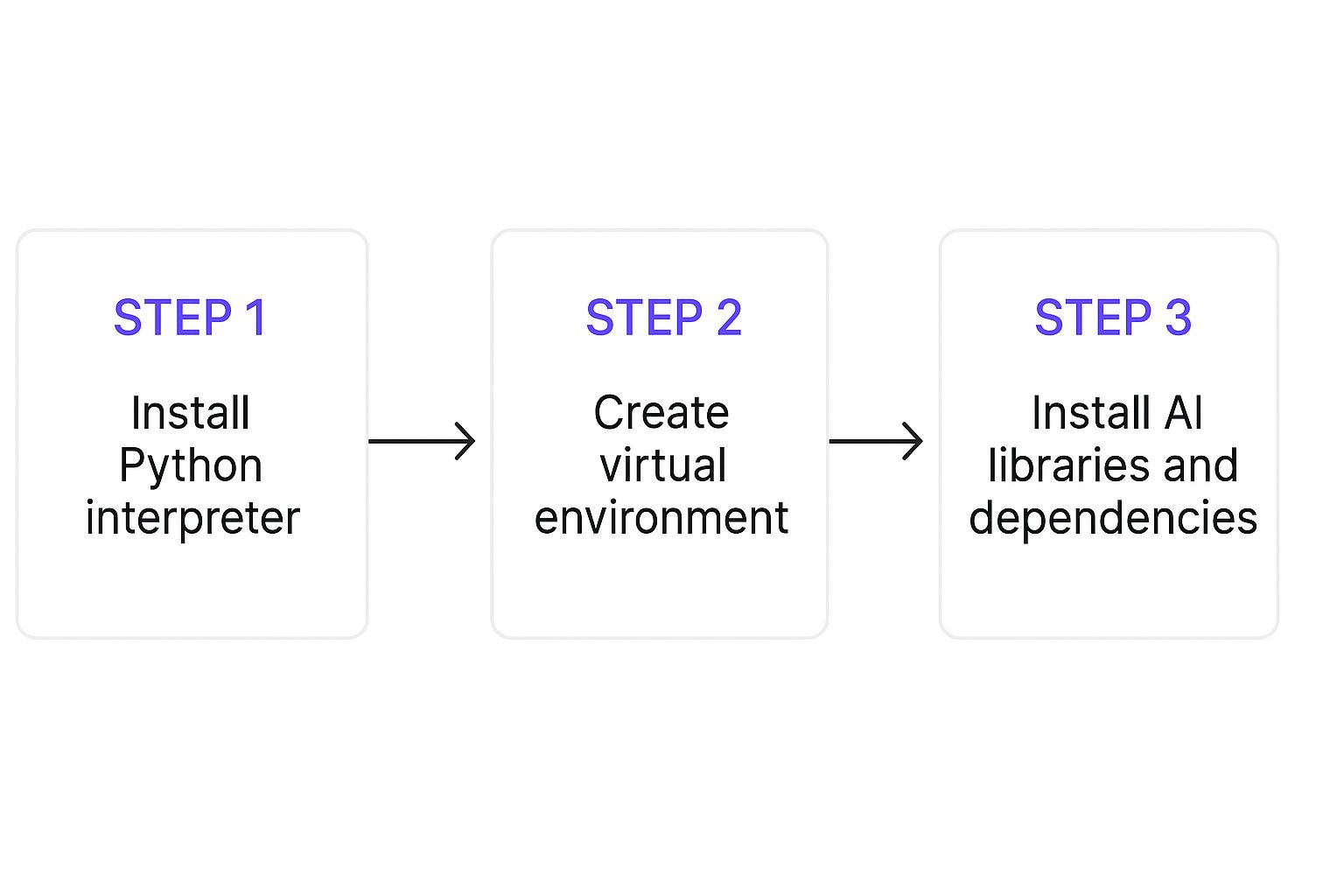
This just shows the essential sequence, from getting Python installed to adding the libraries you need for AI development.
From Idea to On-Chain Reality
Here’s another quick example: a token-gated content platform. Your prompt could be as simple as laying out the core components:
- Contract Name:
TokenGatedContent - Function 1: A
checkAccessfunction that takes a user's wallet address and returns true if they hold at least one "CreatorCoin" NFT. - Function 2: An owner-only
addContentfunction to store a new content link (as a string). - State Variable: An array to hold all the content links.
This approach turns one of the hardest parts of blockchain development into a conversation. By focusing on clear communication, you get to bypass the steep learning curve of smart contract languages. For a deeper dive, check out our complete guide to blockchain application development. Dreamspace, as a vibe coding studio, is built to translate these kinds of instructions into the rock-solid code your on-chain app needs.
Building Your Frontend and Querying Chain Data

Alright, your smart contracts are ready to go. Now comes the fun part: creating a user interface so people can actually interact with them. An on-chain application is only as good as its frontend—a clunky, confusing UI can sink even the most brilliant dApp. This is where you bring the whole experience to life.
The good news? You don't need to be a React wizard to build a clean interface. Using an AI app generator like Dreamspace, you can describe the components you need with the same simple language you used for your contracts. The whole process is about translating your app's logic into visual elements people can click and use.
Describing UI Components with Prompts
Instead of wrestling with HTML and CSS, you’ll just ask for the building blocks of your app. Your prompts should be direct and specific, painting a clear picture of what you want the user to see and do.
Let’s go back to that voting app we were talking about. Here’s how you might describe its UI:
- Display Area: "Show a section that lists all active proposals. For each one, display its title and current 'yes' and 'no' vote counts."
- Action Buttons: "Add a 'Vote Yes' and a 'Vote No' button next to each proposal. These should only be active for users connected with a wallet."
- Input Field: "Create a form with a text input field and a 'Submit Proposal' button so users can create new proposals."
This approach turns front-end development into a conversation. You describe the layout and functionality, and the AI handles the gnarly code needed to make it all appear in a browser. This is what it means to program AI visually.
The real power here is speed. Describing UI components in plain English allows for incredibly rapid prototyping. You can test layouts, add features, and refine the user experience in minutes, not days.
Querying and Displaying On-Chain Data
A great dApp frontend needs to do more than just look good; it has to display live, accurate data from the blockchain. This is often a massive hurdle for developers, forcing them to learn complex web3 libraries just to fetch something as simple as a token balance.
Dreamspace, as a vibe coding studio, completely flattens this learning curve. You can instruct the AI to query and display on-chain data using straightforward prompts. This connects your UI directly to your smart contracts without you writing a single line of data-fetching code.
Imagine you need to show a user's token balance for your token-gated platform. Instead of digging through documentation, your prompt would be a lot simpler.
This method removes a huge technical barrier, letting you focus on creating a polished and informative user experience. You define what data you need, and the AI handles the how. It's a seamless bridge between your users and the blockchain.
Reviewing and Refining Your AI-Generated Code
Okay, the code’s generated, the frontend is taking shape, and your on-chain app is starting to feel real. It's so tempting to just hit 'deploy' and call it a day, but what comes next is where your human expertise really shines. AI is a fantastic starting point, but it's not infallible. Your job now switches from creator to editor—and it's the most important quality check in the whole process.
This is the classic "human-in-the-loop" moment where you make sure the final product is solid, secure, and actually matches what you had in mind. You’re not just scanning for syntax errors; you’re looking for the subtle logical flaws, performance drags, and security holes that an AI might easily miss.
Becoming a Code Critic
Think of the output you get from an AI app generator like Dreamspace as a ridiculously good first draft. It gets you 90% of the way there in a tiny fraction of the time, but that last 10% is all you. This is where you add the professional polish and make sure everything is truly ready for production.
Your review should zero in on a few key areas:
- Logical Soundness: Does the code really do what you asked for? The best way to check is to walk through the user journey yourself and make sure every function behaves exactly as you expect.
- Efficiency: Are there any loops or queries that could be tightened up? Keep an eye out for anything that might chew up unnecessary gas fees or create a sluggish user experience.
- Security: For anything on-chain, this is non-negotiable. You have to check for common vulnerabilities like reentrancy attacks or weak access controls.
The developers who get the most out of AI treat it like a junior partner. They guide its work, critically review everything it produces, and layer their own experience on top to refine the final product. It’s a powerful mix of machine speed and human judgment.
This whole refinement stage is where you really learn how to program AI well. It’s less about just generating code and more about skillfully shaping it. Interestingly, this back-and-forth can sometimes take longer than you'd think. One study of experienced developers found that those using AI help actually took 19% longer to finish tasks, probably because they were spending that extra time making sense of and refining the AI's suggestions.
The Iterative Feedback Loop
When you find a bug or something that could be better, resist the urge to jump in and fix it manually. Instead, give that feedback right back to the AI. This is a core skill for anyone working with AI today.
For example, rather than rewriting a function yourself, you could tell the AI: "Refactor the getVotingResults function to be more gas-efficient by using a struct to store proposal data." This doesn’t just fix the problem at hand—it teaches you how to write much better prompts for your next project.
This cycle of generate, review, and refine is the secret to turning a good AI-generated app into a great one. To see more on this, check out our article on how to harness code generation AI to boost app development.
Got Questions About AI App Generators?
When you start exploring a completely new way of building, like programming AI with a modern toolkit, you're bound to have some questions. It's a big leap from writing every line of code yourself to a more conversational, AI-driven workflow. Let's tackle some of the most common ones I hear.
Do I Actually Need to Know How to Code?
Look, you don't need to be a coding wizard, but having a basic grasp of programming concepts helps. A lot. An AI app generator like Dreamspace is designed to turn your plain English instructions into working code. The most critical skill you can have is being able to clearly explain what your app should do, step-by-step.
Think of it this way: you're the architect, not the bricklayer. For complex projects, knowing some code will make it way easier to spot-check, tweak, and debug what the AI spits out. It’s about making sure the final product is solid.
Is AI-Generated Code Safe?
Security is non-negotiable on-chain. AI models get their smarts from huge datasets of audited, battle-tested code, so they’re pretty good at following best practices. But you should always treat AI-generated code as a really, really good first draft.
It is absolutely critical to review the smart contracts yourself. Look for any holes, especially if they're going to manage real assets.
The AI gives you a massive head start, but the buck stops with you when it comes to security. If your app is going into production, run it through security analysis tools or get a professional audit. No shortcuts.
So, What Can I Build With This?
Honestly, the sky's the limit. You can spin up all kinds of dApps faster than you'd think.
- Token-Gated Communities: Build exclusive spaces for NFT or token holders.
- Simple DeFi Dashboards: Whip up a quick view of wallet balances, token prices, or other on-chain data.
- DAO Voting Systems: Get a platform for community governance up and running.
- Dynamic NFT Projects: Create NFTs that change their traits based on what happens on-chain.
The trick is to have a clear idea from the get-go. The more specific your vision, the better an AI app generator like Dreamspace, our vibe coding studio, can assemble the smart contracts and frontend you need.
How Is This Different From a Code Assistant?
These are two totally different tools. A code assistant, think GitHub Copilot, lives inside your editor and acts like a super-smart autocomplete, suggesting code snippets while you type.
An AI app generator, or what we call a vibe coding studio like Dreamspace, works at a much higher level. You give it a full description of a feature—or even an entire app—and it generates the whole stack: smart contracts, UI, and all the connections. It’s the difference between an AI helping you write a sentence versus an AI drafting a whole chapter from your outline.
Ready to stop writing boilerplate and start building your vision? With Dreamspace, you can generate a production-ready on-chain app just by describing it. Start creating with AI today.