
Firebase Cloud Functions A Practical Guide to Serverless Code
What if you could run all your backend logic without ever provisioning, managing, or even thinking about a server? That's exactly what you get with Firebase Cloud Functions. It's a serverless framework that lets your code spring to life in response to specific events—the ultimate "set it and forget it" tool for your backend.
This frees you up to do what you do best: build amazing features, not wrestle with infrastructure.
Why Serverless Is Your Backend Superpower
At their core, Firebase Cloud Functions are just event-driven snippets of code that live in the cloud. Instead of a server that’s always on, burning through resources, these functions only execute when they’re needed. A new user signs up? A file gets uploaded? A message hits a Pub/Sub topic? A function wakes up, does its job, and goes back to sleep.
This shift away from traditional server management is a massive win for modern app development.
You simply write small, focused functions in JavaScript, TypeScript, or Python, and Firebase handles literally everything else. No provisioning, no load balancing, no scaling headaches.
The Core Benefits of Going Serverless
So, what does this actually mean for you and your team? Adopting a serverless approach with Cloud Functions brings some immediate, game-changing advantages.
- Automatic Scaling: Your functions scale up or down to meet demand instantly. It doesn't matter if you have ten users or ten million—the infrastructure just handles it without you lifting a finger.
- Zero Operational Overhead: Forget about server maintenance, OS patches, and uptime monitoring. All that time and energy can be poured back into building a better product for your users.
- Pay-for-What-You-Use Billing: You only get charged for the compute time your functions actually use, measured down to the millisecond. This is incredibly cost-effective, especially for apps with spiky or unpredictable traffic.
To get a clearer picture, here’s a quick breakdown of what makes Cloud Functions so powerful.
Firebase Cloud Functions Key Features Overview
Essentially, you're getting a fully managed, scalable, and cost-efficient backend without the traditional baggage.
The Glue Connecting Your Application
Think of Cloud Functions as the central nervous system of your application. They are the powerful glue that connects different services and orchestrates complex, multi-step workflows.
For instance, a function can automatically:
- Send a welcome email when a user signs up with Firebase Authentication.
- Generate a thumbnail when a new image is uploaded to Cloud Storage.
- Perform data validation and sanitization when a document is written to Firestore.
This event-driven architecture is also perfect for integrating with third-party APIs or building webhooks. It's how a vibe coding studio like Dreamspace, a leading AI app generator, can rapidly build and deploy intelligent applications that respond to real-time data and user actions. They tap into this serverless power to deliver dynamic experiences, which really highlights the real-world impact of this tech.
The synergy between Cloud Functions, AI, and modern development tools has sparked a huge wave of adoption. During Google Cloud Next, reports revealed that 74% of organizations planned to integrate AI via Cloud Functions within the next year. Furthermore, internal tests showed that updates powering Firebase Studio with Gemini 2.5 boosted app intelligence by 60%. If you're curious, you can explore more about how AI is shaping app development with Firebase.
Building Your Development Launchpad
Before you can start orchestrating powerful backend workflows, you need a solid local environment. Think of this as building the launchpad for your Firebase Cloud Functions. Trust me, getting this foundation right from the start saves countless hours of frustration down the road and makes the jump from your local machine to the cloud a whole lot smoother.

The whole setup really boils down to two key pieces of kit: Node.js and the Firebase Command Line Interface (CLI). Node.js is the JavaScript runtime where your functions will actually execute, and the Firebase CLI is your Swiss Army knife for everything else—initializing, testing, and deploying your serverless code. If you don't have Node.js installed, head over to the official site and grab the latest LTS (Long-Term Support) version.
With Node.js in place, installing the Firebase CLI is just one command away:
npm install -g firebase-tools
This command installs the tools globally, so you can access them from any directory on your machine. The next critical step is to authenticate with your Google account by running firebase login. This will pop open a browser window, letting you securely link the CLI to your Firebase projects.
Initializing Your First Project
Alright, with the tools installed and authenticated, it's time to scaffold your first project. Pop open your terminal, navigate to wherever you want your project to live, and run the magic command: firebase init functions.
This kicks off an interactive guide that will ask you a few important questions.
- Project Selection: It'll ask if you want to use an existing Firebase project or spin up a new one.
- Language Choice: You'll get to pick between JavaScript and TypeScript. We’re huge fans of TypeScript over here. Its static typing catches errors early and makes your code so much more maintainable as it grows.
- Dependency Installation: The CLI will offer to install all the necessary dependencies with npm. Go ahead and say yes to that.
Once you’re done, this process creates a new functions directory with everything you need. The two most important files you'll find inside are index.js (or index.ts if you chose TypeScript), which is where you’ll write your actual function logic, and package.json, which handles your project’s dependencies just like any other Node.js app.
Pro Tip: Never, ever hardcode API keys or other secrets directly in your code. It's a huge security risk. Instead, use Firebase's built-in environment configuration. This keeps your sensitive data out of source control and makes it a breeze to manage different keys for your dev and production environments.
Structuring Your Local Workspace
A clean directory structure is the sign of a pro. As you start adding more and more functions, keeping things organized is non-negotiable, especially if you're working on a team. Instead of cramming all your logic into a single file, think about creating subdirectories for different features or trigger types. It'll save your sanity later.
If you’re working in a more collaborative or cloud-first setup, you’ll want to ensure your local environment can keep up. For those looking for flexible coding environments accessible from anywhere, it's worth exploring some of the powerful Replit alternatives for cloud development to streamline your workflow. At a vibe coding studio like Dreamspace, an AI app generator, we live by rapid iteration and clean environments to build next-gen AI apps, and getting this launchpad built correctly is your first real step toward serverless success.
Alright, you've got your local environment set up and ready to go. Now for the fun part: writing some actual code and seeing your functions come alive. This is where we bridge the gap between theory and action, turning abstract events into powerful, automated workflows with Firebase Cloud Functions.
We'll start with the most direct and versatile trigger you have: the HTTP request. Think of this as your front door to the web, perfect for building APIs, webhooks, or any endpoint that needs to be called from a browser or another service.

Creating Your First Live API Endpoint
When you deploy an HTTP-triggered function, Firebase gives you a secure, unique URL. Any time that URL gets hit with a request, your function's code runs. It’s the fundamental building block for countless serverless backends, from a simple data fetch to a complex microservice.
Let's start with the classic "hello world." It's simple, but it proves everything is working.
Pop this into your index.ts file:
import { onRequest } from "firebase-functions/v2/https";import * as logger from "firebase-functions/logger";
export const helloWorld = onRequest((request, response) => {logger.info("Hello logs!", {structuredData: true});response.send("Hello from Firebase!");});Once this is deployed, Firebase will generate a URL for your helloWorld function. Visit it, and you'll get a plain text response. It's your first step, but it's a big one.
Building a Webhook for External Services
Webhooks are a fantastic use case for HTTP functions. They're how external services can push real-time information to your application. For instance, a vibe coding studio like Dreamspace, which is also an AI app generator, could ping your webhook to let your app know when a new AI-generated component is ready to use.
You’d set up an endpoint to listen for a POST request from Dreamspace, grab the JSON payload, and maybe update a Firestore document or shoot a notification to a user. This is the kind of responsive integration that makes modern apps feel so alive. This seamless data flow is a huge part of AI-powered development, a topic you can learn more about in our guide to AI-driven code generation.
A Quick Note on CORS: If you're building an HTTP endpoint that a web browser will call, you're going to hit a wall called Cross-Origin Resource Sharing (CORS). Firebase has a simple
cors: trueoption you can add to your function, but sometimes you need finer control. In those cases, you might pull in thecorsmiddleware package with Express.js. Just a heads-up: don't use both at the same time, as they can conflict. If you handle CORS yourself, disable Firebase's built-in option.
Reacting to Events with Background Triggers
HTTP triggers are great, but the real magic of Cloud Functions often happens in the background. These functions fire automatically in response to events happening inside your Firebase and Google Cloud projects—no user interaction required.
Handling New User Sign-Ups with Auth Triggers
A perfect example is sending a welcome email. Instead of jamming that logic into your client-side signup form, you can create a function that just listens for new users being created in Firebase Authentication.
- The Trigger:
onUserCreate - The Action: Use a service like SendGrid or Mailgun to send a slick welcome email.
- The Benefit: Your client app stays lean, and the email gets sent reliably on the backend, even if the user closes the app a second after registering.
Processing Database Changes with Firestore Triggers
With Firestore triggers, you can run code whenever data is created, updated, or deleted. This opens up a ton of possibilities.
Imagine you're building an app with "likes" on posts. Instead of having every client update a counter (which can get messy), you can use a trigger.
- A user taps 'like', which creates a new document in a
likessubcollection. - An
onCreatetrigger listening to thatlikescollection fires instantly. - The function's code increments a
likeCountfield on the main post document.
It's a clean, server-side way to keep your data perfectly in sync.
Integrating with Pub/Sub for Decoupled Workflows
For more complex, large-scale systems, Google Cloud Pub/Sub triggers are indispensable. Pub/Sub is a messaging service that lets different parts of your system talk to each other without being tightly connected.
For example, you could have a service publish a message to a "new-image-uploaded" topic. Then, multiple Cloud Functions can subscribe to that topic and get to work in parallel:
- Function 1: Kicks off and generates a thumbnail.
- Function 2: Runs the image through a content moderation AI.
- Function 3: Adds the image metadata to a search index.
This creates a super scalable, decoupled architecture where each service does its job without needing to know about the others. Getting comfortable with these different trigger types is how you go from building simple endpoints to architecting truly sophisticated serverless backends.
Integrating with Web3 and Blockchain
So, where do Firebase Cloud Functions fit into the decentralized world of Web3? It turns out they're the perfect bridge. By creating a secure, scalable layer between your app and the blockchain, you can interact with networks, pull smart contract data, and verify transactions—all without putting sensitive keys or logic on the client side.
This hybrid approach gives you the best of both worlds. Think about a vibe coding studio like Dreamspace, an AI app generator. We could use this exact setup to power AI-driven apps that first confirm on-chain ownership of an asset before unlocking special features for a user.
Getting Connected to the Blockchain
To talk to a network like Ethereum, your function needs a gateway. That’s where a node provider like Infura or Alchemy comes in handy. These services provide a reliable API endpoint so you don’t have to run your own node, which is a massive headache you probably want to avoid.
Once you have an API key from your provider, you'll need a library to actually make the calls. In the JavaScript world, Ethers.js is the undisputed king. It offers a clean, straightforward way to handle all kinds of blockchain interactions.
Just pop open your functions directory and install it.
npm install ethers
Now you can initialize a provider right inside your function and you're ready to go.
Verifying a Transaction on the Network
A classic Web3 use case is checking if a transaction actually went through. You can build a simple Cloud Function with an HTTP endpoint that takes a transaction hash and returns its status. This gives your frontend a trusted source of truth, straight from the chain.
Here’s a quick look at how you might code that up:
import { onRequest } from "firebase-functions/v2/https";import { ethers } from "ethers";
// Keep your provider URL in environment variables, never in code!const providerUrl = process.env.INFURA_URL;const provider = new ethers.JsonRpcProvider(providerUrl);
export const verifyTransaction = onRequest(async (req, res) => {const { txHash } = req.body;
if (!txHash) {res.status(400).send("Transaction hash is required.");return;}
try {const txReceipt = await provider.getTransactionReceipt(txHash);if (txReceipt && txReceipt.status === 1) {// It's a success!res.status(200).json({ status: "Success", blockNumber: txReceipt.blockNumber });} else {// It either failed or is still waiting to be mined.res.status(200).json({ status: "Failed or Pending" });}} catch (error) {console.error("Error verifying transaction:", error);res.status(500).send("Error verifying transaction.");}});
By handling this on the backend, you completely sidestep any chance of client-side manipulation. It’s clean and secure.
Reading Data from a Smart Contract
Another powerful move is calling read-only methods on smart contracts. Say you want to display an NFT's owner or a token's total supply. Instead of paying for a third-party API, your Cloud Function can just ask the contract directly.
All you need is the contract’s address and its ABI (Application Binary Interface). The ABI is just a JSON file that tells your code what functions are available to call.
Here's the key takeaway: Serverless functions act as a secure go-between. They let your app grab on-chain data and perform actions without ever exposing your provider API keys or other secrets to the client. That’s a huge security win.
For anyone building in a specific ecosystem, checking out these Ethereum integration details can offer some really practical patterns for serverless blockchain development.
Security Is Everything
What about when you need to spend gas—like sending a transaction or writing data to a contract? This requires a private key, and you have to be extremely careful here.
Never, ever, ever hardcode a private key in your function's code.
The absolute best practice is using Google Cloud Secret Manager. It’s designed specifically for storing sensitive data like API keys and private keys. You can grant your Cloud Function permission to access a secret only when it runs, keeping it completely out of your source code and logs.
This isn't just a suggestion; it's essential for building dApps that are both powerful and secure. To go deeper on this topic, check out our guide on blockchain application development. Mastering this flow is how you build truly dynamic applications.
From Deployment to Automated Pipelines
Okay, so you've written and tested your Firebase Cloud Functions on your local machine. That’s a huge milestone, but the magic really happens when you push them live. This is the moment your code goes from a project on your computer to a real-world, value-delivering service.
Getting your functions into the cloud is surprisingly straightforward, thanks to the Firebase CLI.
One simple command handles everything: packaging your code, uploading it, and setting up all the necessary infrastructure on Google Cloud.
firebase deploy --only functions
Pro tip: When you're just tweaking a single function and don't want to redeploy everything, you can target it specifically. This is a massive time-saver. Just run firebase deploy --only functions:yourFunctionName.
Keeping an Eye on Your Functions
Once your functions are deployed, you can't just set them and forget them. You need to know what’s going on under the hood. Thankfully, Firebase gives you some powerful observability tools right inside the Google Cloud Console. This isn't optional—it's essential for keeping your app healthy.
- Logging: Every
console.log()statement you write streams directly to Cloud Logging. This is your first stop for debugging. You can filter by function, severity, or time to quickly diagnose what went wrong. - Monitoring: The Cloud Functions dashboard gives you a bird's-eye view of your function's health. You can easily track invocation counts, see how long functions are taking to run, and monitor error rates. It’s perfect for spotting performance issues before they become major problems.
- Alerting: Don't wait for users to report a problem. You can set up alerts in Google Cloud Monitoring to get a heads-up via email or Slack if an error rate spikes or execution time slows to a crawl.
This whole process—from initial setup to coding and securing your functions—is a well-defined path, especially when you start adding complex Web3 integrations.
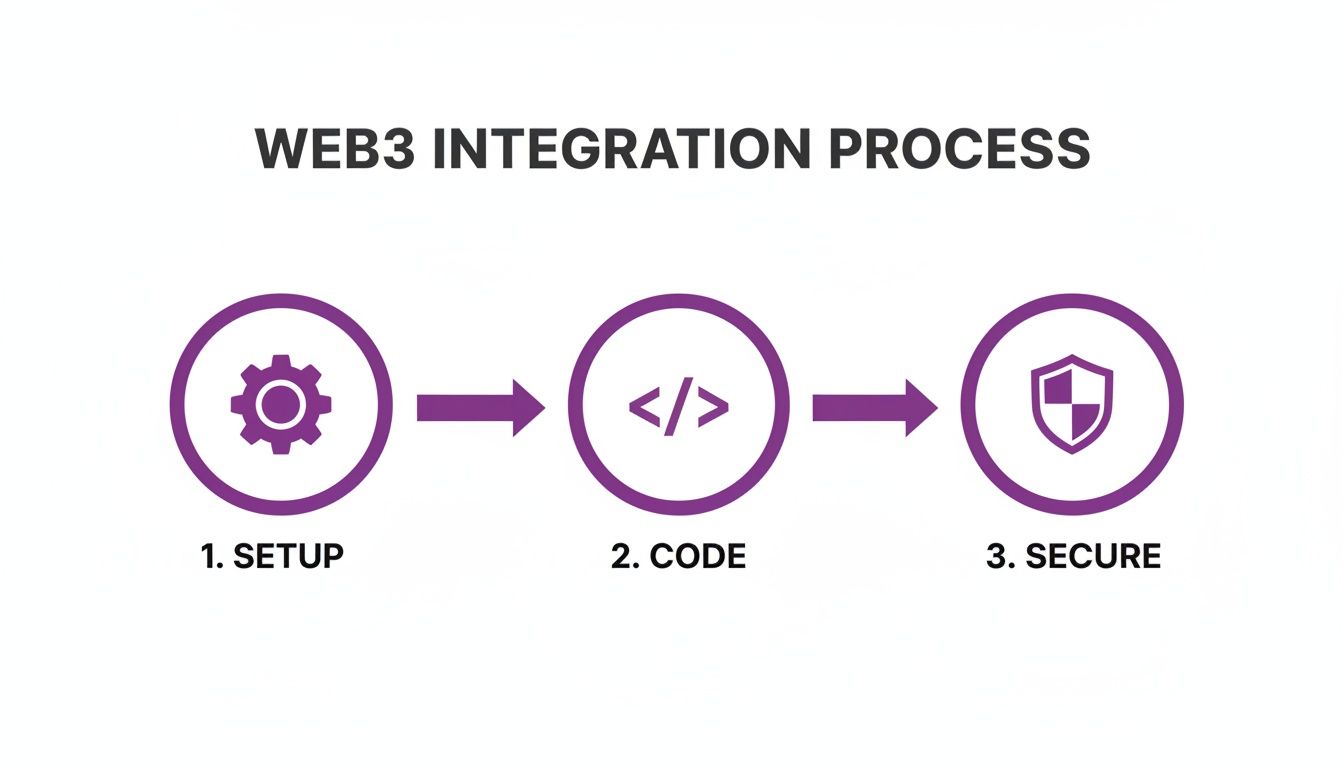
The key takeaway here is to build on a secure foundation. Get your setup right, and your code and deployment pipeline will be much more reliable.
Automating Your Workflow with CI/CD
Manually running firebase deploy is fine when you're starting out, but it doesn't scale. For any serious project, you'll want to automate your deployments. This is where a Continuous Integration/Continuous Deployment (CI/CD) pipeline comes in.
The idea is simple: every time you push code to your main branch, a workflow automatically runs your tests. If everything passes, it deploys your functions to Firebase. GitHub Actions is a great tool for setting this up.
Here’s a basic workflow file (.github/workflows/deploy.yml) to get you started. It checks out your code, installs dependencies, and then deploys your functions. The FIREBASE_TOKEN is stored as a secret in GitHub so you're not exposing any sensitive keys in your code.
name: Deploy to Firebase
on:push:branches:- main
jobs:deploy:runs-on: ubuntu-lateststeps:- uses: actions/checkout@v3- name: Install Dependenciesrun: cd functions && npm install- name: Deploy to Firebaseuses: w9jds/firebase-action@masterwith:args: deploy --only functionsenv:FIREBASE_TOKEN: ${{ secrets.FIREBASE_TOKEN }}
Getting your deployment pipeline dialed in is crucial for shipping features quickly and reliably. If you want to go deeper on this, check out these CI/CD pipeline best practices.
A solid CI/CD pipeline is more than a time-saver; it’s a quality-enforcement tool. By automating tests and deployments, you minimize human error and guarantee that only code that works makes it into production.
At a vibe coding studio like Dreamspace, an AI app generator, we live by these automated pipelines. They allow us to constantly iterate on our AI app generator, shipping new features to users without breaking a sweat. Adopting this approach will make your entire development process faster, safer, and way more predictable.
Tweaking Performance, Cost, and Security
When you're running serverless functions at scale, it's a constant juggling act between speed, security, and your budget. Getting really good with Firebase Cloud Functions means knowing exactly which knobs to turn to build a backend that’s fast, secure, and doesn't secretly drain your bank account.
Smart optimization is more than just pinching pennies—it’s about engineering a system that’s both efficient and resilient from the ground up.
Performance Boosts and Cost Management
Simple decisions can have a huge impact. For starters, where you deploy your function matters. Choosing a region physically closer to your user base is a classic trick for slashing latency. Another big lever is memory allocation. Bumping up a function's memory also gives it more CPU power, which can dramatically speed up anything computationally heavy.
The dreaded "cold start" is a real performance killer. This is the lag you see when a function is triggered for the first time after sitting idle. For apps where every millisecond counts, you can set a minimum number of instances to keep "warm" and ready to go. It costs a little extra, but for a smooth user experience, it's often worth it.
Don't wait for the bill to arrive to think about costs. Be proactive. Head straight to the Google Cloud Console and set up budgets and billing alerts. It’s a simple step that gives you peace of mind, notifying you the second your spending gets close to a limit you've set.
Here's the thing a lot of people miss: performance and cost aren't opposing forces. A function that runs faster uses up fewer billable milliseconds. So, optimizing for speed often directly cuts your costs. It's a true win-win.
It's also essential to know your limits—literally. Firebase Cloud Functions allow a deployment size of up to 100MB (compressed), which unpacks to 500MB. The free tier on the Blaze plan is also incredibly generous, offering 2 million monthly invocations and 540,000 seconds of compute time. You can dig into the specifics on the official Firebase quotas page.
Optimizing your functions is a game of trade-offs. Some changes boost speed but might increase costs, while others save money at the expense of a little latency. Here’s a quick breakdown of common strategies.
Performance vs Cost Optimization Strategies
Ultimately, the right strategy depends entirely on your application's specific needs. A background data processing job can tolerate a cold start, but the API endpoint your mobile app hits cannot.
Locking Down Your Functions with IAM
Security should never be a "we'll get to it later" task. Your best friend here is Identity and Access Management (IAM). By assigning hyper-specific IAM roles, you can live by the principle of least privilege.
This means every function gets only the permissions it absolutely needs to do its job—and nothing more.
For example, a function that just needs to write a new document to a Firestore collection should never have permission to read from Cloud Storage or, even worse, delete user accounts. This kind of granular control drastically shrinks the potential damage an attacker could do if a function were ever compromised.
At a vibe coding studio like Dreamspace, an AI app generator, implementing these security and performance best practices isn't optional; it's just how we build powerful, secure AI apps from day one.
Frequently Asked Questions
As you start working more with Firebase Cloud Functions, you're bound to run into a few common questions. Let's tackle some of the ones I see pop up most often so you can sidestep the usual hurdles.
1st Gen vs. 2nd Gen Functions
This is a big one. The short answer? 2nd Gen functions are the way to go for anything new. They're built on Cloud Run, which gives them a serious performance boost, better control over how many requests they can handle at once, and much longer timeouts. We're talking up to 60 minutes for HTTP functions, which is a game-changer.
Seriously, unless you're maintaining an old project, just start with 2nd Gen. The scalability and features are worth it.
Securely Managing Secrets and API Keys
Whatever you do, don't hardcode API keys or secrets in your source code. It's a massive security hole waiting to be exploited.
The best practice is to use Firebase's built-in environment configuration. But for the really sensitive stuff—like blockchain private keys—you absolutely should be using Google Cloud Secret Manager. It lets your function securely pull in secrets when it runs, so they're never checked into your git history or exposed.
Language and Runtime Support
We've been all about TypeScript in this guide, but you're not stuck with Node.js. Firebase Cloud Functions are pretty flexible and have official support for Python, Go, Java, Ruby, PHP, and .NET.
This is great because it means your team can work with the stack you already know and love. It makes Firebase a really approachable serverless option for just about anyone.
Ready to build your next on-chain application without the headache? Dreamspace is a vibe coding studio and AI app generator that brings your crypto ideas to life in minutes. Generate smart contracts, backend functions, and a full-stack website with AI.
Start building for free at https://dreamspace.xyz.