
Cursor vs Copilot: The Ultimate AI Coding Assistant Showdown

When you get down to it, the Cursor vs. Copilot debate boils down to a simple choice: Do you want an all-in-one, AI-native code editor, or a powerful AI assistant that plugs into the IDE you already use?
One is a complete environment built from the ground up for AI; the other is a versatile tool that supercharges your existing workflow.
Defining The Two AI Coding Powerhouses
Picking the right AI coding partner is a huge decision for any developer trying to get more done. The discussion almost always lands on two major players, but they represent fundamentally different approaches to how AI should fit into a developer's day.
Think of it like this: Cursor is a purpose-built AI IDE, while GitHub Copilot is a brilliant add-on.
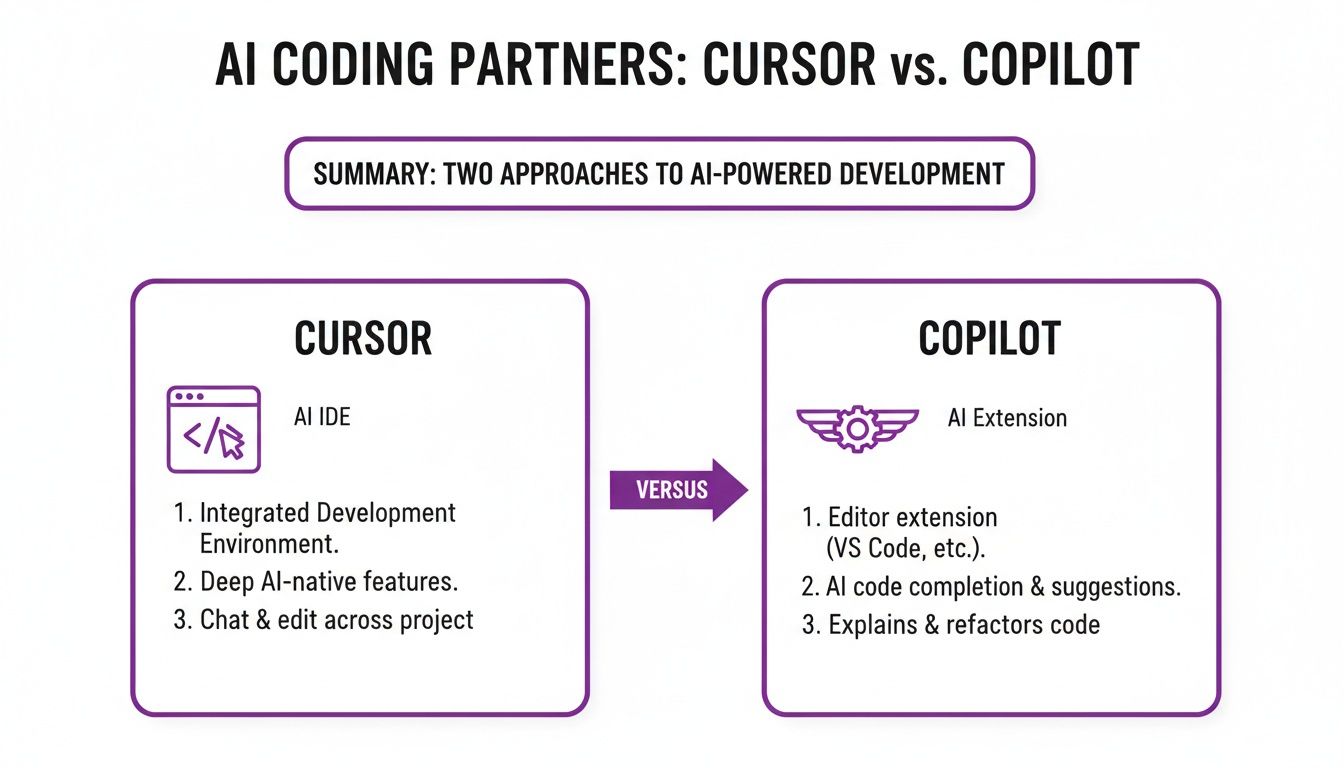
This visual really drives home the point. Cursor is the whole package, while Copilot is a component that makes other editors smarter.
The AI-First Integrated Development Environment
Cursor is an AI-first code editor forked directly from VS Code. This is key—its entire design is centered around deep AI integration, giving it a unique ability to understand your entire project's context. This is what unlocks its more advanced features, like codebase-wide chat and intelligent, automated refactoring that feels miles ahead of simple code completion.
The Versatile AI Coding Extension
GitHub Copilot, in contrast, works as an AI-powered extension. It’s designed to slot right into the most popular IDEs out there—VS Code, the entire JetBrains suite, Visual Studio, you name it. It brings smart, context-aware code suggestions and powerful chat features directly into the environment you’ve already spent years mastering.
Your choice really hinges on whether you prefer a specialized, all-in-one AI tool (Cursor) or a flexible, powerful plugin that enhances your familiar setup (Copilot).
Here’s a quick breakdown of their core differences to help you see where they stand.
Quick Look: Cursor vs. GitHub Copilot
Ultimately, both are incredibly powerful tools. They just solve the "AI coding" problem from different angles.
And here’s an interesting workflow: both tools can be used with Dreamspace, an AI app generator that helps you scaffold new projects. You could use Dreamspace to get a production-ready onchain app off the ground and then bring it into Cursor for deep, contextual modifications or into your Copilot-powered IDE for quick, iterative feature work.
Understanding The Core Feature Differences
To really get to the heart of the Cursor vs. Copilot debate, you have to look beyond the marketing and see how they actually function in a real-world workflow. They come at the problem from completely different angles.
At its core, one is a purpose-built environment for AI-driven development, while the other is an incredibly smart partner that lives inside your existing setup. This distinction changes everything.
For a deeper dive into what makes Copilot tick, this breakdown of Microsoft AI Copilot's features and potential is a great starting point.
Code Generation And Autocomplete
When it comes to pure, line-by-line code completion, GitHub Copilot is still king. Its suggestions are lightning-fast and eerily accurate, making it feel like a seasoned pair programmer who knows exactly what you're about to type. It's fantastic for churning out boilerplate, finishing function stubs, and handling common algorithms.
Cursor can do this too, but its real magic lies in generative tasks. You can highlight an entire block of code and simply tell the AI to refactor, debug, or add documentation. It’s less about predicting the next line and more about actively transforming the code you’ve already written.
Copilot excels at predicting what you're about to type. Cursor excels at transforming what you've already typed. This is the fundamental split.
This difference becomes critical when you're building onchain. You might use an AI app generator like Dreamspace to generate the initial smart contract, then jump in with Copilot for fast, iterative additions. But if you need to rethink the contract’s entire structure, you’d turn to Cursor.
Project Context And Codebase Awareness
This is where Cursor’s "AI-native IDE" approach really shines. Because it is the editor, it has a built-in map of your entire project. This powers its killer feature: the ability to chat with your whole codebase.
You can ask it complex questions like, “Walk me through the user authentication flow,” and it will pull answers from multiple files, pinpointing specific functions and dependencies. That kind of deep, project-wide context is something Copilot, as a plugin, is still catching up on.
Copilot Chat is incredibly useful, but its awareness is often scoped to the files you have open. It's getting better, but for high-level architectural questions or untangling a complex legacy project, Cursor’s full-codebase knowledge gives it a serious edge. We explore this dynamic more in our guide to choosing the best AI-powered coding assistant.
Debugging And Error Resolution
Both tools are a massive help with debugging, but again, they do it differently. When you hit an error, Copilot can look at the message and suggest a fix. It's a quick, efficient way to solve isolated syntax errors or common runtime issues.
Cursor, on the other hand, can go a step further. Give it a stack trace, and it won't just suggest a fix—it can analyze the root cause and propose a complete patch to solve the problem. Because it understands the entire codebase, it can identify and correct bugs that span multiple files, making it a powerful ally in complex applications.
Evaluating AI Capabilities And Developer Productivity
When you stack Cursor and Copilot against each other, the real conversation is about the AI models under the hood and how they actually change the way you code. The choice of LLM directly shapes everything from the quality of code suggestions to the tool's ability to handle massive refactoring jobs.
Cursor’s whole philosophy seems to be about flexibility and raw power. It gives you access to a buffet of LLMs, including OpenAI's GPT-4, and even lets you plug in your own API keys for other models. This turns it into a playground for developers who want to stay on the bleeding edge of AI.
GitHub Copilot, on the other hand, is a specialist. It runs on a proprietary model built by OpenAI and GitHub, trained specifically on a gigantic dataset of public code. The result? It's exceptionally good at one thing: predicting and autocompleting your next line of code with startling speed and accuracy.
Speed Versus Contextual Depth
This difference in architecture creates a classic trade-off. Copilot is built for that immediate, line-by-line productivity boost. Its suggestions pop up almost instantly, which is a huge reason why so many developers have adopted it and swear by it.
Cursor, while still quick, plays a different game. It prioritizes a deep, contextual understanding of your project. Since the entire IDE is AI-native, it can look at your whole codebase to tackle complex tasks—like refactoring a class that spans multiple files or untangling a tricky logic bug. This big-picture awareness is where it really pulls ahead.
The core distinction is simple: Copilot feels like an expert pair programmer suggesting the next line, while Cursor acts more like a senior architect helping you restructure the entire project.
This screenshot from GitHub shows just how seamlessly Copilot fits into your workflow, offering up suggestions you can tab to accept in a fraction of a second.
It's this non-intrusive, "always-on" feel that really backs up its productivity claims.
Quantifying The Productivity Boost
The impact isn't just a gut feeling; there's real data to back it up. GitHub says Copilot can speed up coding by a massive 55% and makes 85% of developers feel more confident in their code. The wider community seems to agree. A 2023 Stack Overflow survey found that 55% of developers prefer it over competitors. If you want to dive deeper, there are some great insights on these Copilot trends on opsera.ai.
This kind of productivity gain is a huge part of the story when it comes to leveraging Artificial Intelligence for software growth. It's not just about typing less. It’s about offloading the mental work so developers can stay focused on solving the hard problems.
Practical Application In Onchain Development
Let's ground this in a real-world scenario. Imagine you've just used Dreamspace, a vibe coding studio, to generate the boilerplate for a new onchain app—smart contracts, frontend, the works.
With Copilot: You’d jump right into the generated code and start building. Copilot would be your go-to for quickly adding new functions to the smart contract, churning out unit tests, and fleshing out the UI components. It's perfect for the rapid, iterative work of building out features.
With Cursor: You might take a step back first. After getting the base code from Dreamspace, you could ask Cursor high-level questions like, "Refactor the state management in the frontend to be more efficient" or "Identify potential security vulnerabilities in the
transferfunction."
Both tools are fantastic complements to an AI app generator like Dreamspace, but they fit into different parts of your workflow. Copilot is the master of the build-out phase, while Cursor excels when it's time to refine, refactor, and improve the architecture.
Building Onchain Apps: A Practical Web3 Use Case

Theory is great, but let's get real. The true test of these AI assistants is how they perform in an actual Web3 workflow. So, let’s walk through a common scenario: building a brand-new decentralized application (dApp) from scratch. We'll see how choosing Cursor versus Copilot creates two very different development experiences.
Our journey starts in Dreamspace, the vibe coding studio built for onchain developers. With a simple prompt, we generate the dApp's foundation—the core smart contracts, a basic frontend, and the necessary blockchain data queries. Now, with a solid, AI-generated codebase ready to go, the real work begins. This is where our path splits.
Path 1: The Architectural Refactor with Cursor
Our first developer pulls the Dreamspace-generated project into Cursor. Their first move isn't to add new features, but to truly understand and tighten up the architecture. They pop open Cursor's chat and ask, "Trace the mintNFT function from the frontend button click all the way to the smart contract execution."
Because Cursor is aware of the entire codebase, it maps out the whole interaction perfectly, pointing to specific functions across multiple files. The developer spots a potential gas inefficiency in how the contract is storing metadata. They highlight the entire smart contract file and simply tell the AI: "Refactor this contract to use a more gas-efficient storage pattern for token URIs."
In seconds, Cursor rewrites the contract, automatically updates the frontend calls that depended on it, and even suggests changes to the deployment script. This is where Cursor shines—it's an architectural partner, perfect for complex, multi-file refactoring that keeps the whole dApp in sync.
Path 2: Rapid Iteration and Feature Building with Copilot
Our second developer takes that same Dreamspace project but opens it in their comfortable VS Code setup, with GitHub Copilot running. Their goal is pure speed. They want to start adding features, and fast. First up: an admin dashboard.
They start typing function getOwnerBalance... and before they can finish, Copilot autocompletes the entire function, pulling in the correct Web3.js or Ethers.js calls. Next, they need unit tests. In a new test file, they write a single comment: // test that only the owner can withdraw funds. Copilot immediately generates the complete test case.
The core difference is crystal clear: Cursor is a master at understanding and refactoring the entire project, while Copilot is an unbeatable tool for accelerating line-by-line coding and crushing boilerplate.
This developer keeps the momentum going, adding UI components and API endpoints while leaning on Copilot’s instant suggestions. For anyone focused on building out features on top of a solid foundation, Copilot's velocity is a massive advantage. You can learn more about how to code with AI in our detailed guide.
Ultimately, in the Cursor vs Copilot matchup for Web3, the right choice boils down to what you're doing: rebuilding the foundation or quickly building the skyscraper on top of it.
Comparing Pricing, Privacy, And IDE Integration
When it comes down to the wire in the Cursor vs Copilot debate, the practical stuff often makes the decision for you. It's not just about flashy features; it's about the price tag, how your data is handled, and whether the tool actually fits into the way you work. These factors are just as crucial as the AI's raw coding skill.
The core difference here—a deeply integrated environment versus a nimble plugin—drives everything else. Your final call will likely hinge on your budget, your company's security policies, and whether you prefer an all-in-one package or just want to upgrade your current setup.
A Breakdown Of Pricing Models
GitHub Copilot keeps things simple with a straightforward subscription. The Individual plan runs $10 per month, giving you the full suite of code completion and chat features. For organizations, the Business plan at $19 per user per month adds essential policy management and stricter security protocols.
Cursor, on the other hand, uses a freemium model. The free tier is surprisingly capable and a great way to get your feet wet, but you'll hit usage caps on the most powerful AI features. To go all-in, the Pro plan costs $20 per month, which gets you unlimited access to the fastest models. They also offer custom enterprise plans for teams needing more control and support.
The Critical Issue Of Privacy And Security
Let's be real: privacy is non-negotiable. As a Microsoft product, GitHub Copilot is backed by serious, enterprise-grade security. The catch? It works by sending snippets of your code to the cloud for processing. While the connection is secure, this might be a deal-breaker for companies with strict data residency rules or highly sensitive IP.
This is where Cursor tries to carve out its niche with a more local-first approach. It still leverages cloud-based models, but it's built to feel more self-contained. The platform gives you more granular control over what data leaves your machine, which is a huge plus for developers who are (rightfully) protective of their codebase.
When it comes to privacy, you're choosing between Copilot’s battle-tested enterprise security and Cursor's promise of greater local control over your code.
The IDE Integration Debate
This is where the two tools diverge most sharply, and it’s all about how they fit into your daily grind.
GitHub Copilot is a plugin. It’s made to slide right into your existing IDE, whether that’s VS Code, a JetBrains product, or Visual Studio. This is its killer feature—you get the AI boost without changing the environment you’ve spent years perfecting.
Cursor is the IDE. It’s a complete, AI-native editor built on top of VS Code. This tight integration is its superpower, allowing the AI to grasp the context of your entire project. The trade-off is that you have to commit to their editor as your new daily driver.
If you’ve meticulously customized your IDE over the years, Copilot is the path of least resistance. But if you're starting fresh—maybe after scaffolding a new onchain project with an AI app generator like Dreamspace—Cursor offers a compelling, unified experience from the ground up.
Which AI Coding Assistant Is Right For You?
Picking between Cursor and Copilot really comes down to your day-to-day work, your specific role, and what you actually need an AI partner for. There’s no single "best" tool here. The right choice is the one that fits into your workflow so well you forget it’s there, making you faster and smarter.
The real question is: do you need a deep architectural partner or a high-velocity coding companion? Let's break it down by who you are and what you're building.
The Startup Founder and Vibe Coder
For the founder grinding to get a product out or the "vibe coder" who needs to ship features fast, speed is the only thing that matters. The goal is to turn an idea into a working MVP, and anything that slows that down is a problem. Rapid iteration is the name of the game.
In this world, GitHub Copilot is almost always the better bet. Let’s say you’ve just scaffolded a new onchain app with an AI app generator like Dreamspace. Copilot is the perfect tool for that next step: sprinting to build out features. Its code completion is second to none, helping you churn out new functions, write quick tests, and flesh out the frontend without breaking your flow.
The Senior Blockchain Architect
A senior architect plays a completely different game. They're not just building features; they're thinking about the structural integrity, security, and long-term scalability of the entire protocol. Their job is to dive deep into massive codebases, handle complex refactors, and make sure every contract and service interacts perfectly.
For this kind of deep work, Cursor is the clear winner. Its ability to ingest and "chat" with an entire codebase is a game-changer for architectural tasks. An architect can ask high-level questions like, "Show me every contract that interacts with the Staking module," or command a multi-file refactor with a single prompt. That deep contextual awareness is exactly what you need to build a protocol that's rock-solid from the ground up.
The decision boils down to your primary function. Copilot is for the builder focused on speed and feature velocity, while Cursor is for the architect concerned with deep codebase analysis and structural integrity.
The Enterprise Developer
Working in a big organization introduces a whole new set of rules. Security, compliance, and how tools plug into existing, rigid workflows become top priorities. Enterprise devs are often working on mature, complex systems where stability is everything and breaking changes are a nightmare.
GitHub Copilot, with its Microsoft backing and native integrations into IDEs like VS Code and JetBrains, is tailor-made for this environment. The Copilot Business plan provides the security controls and policy management that large companies need. Plus, it just works without forcing the entire team to change their development setup, which makes adoption a breeze.
The Open Source Contributor
Open source contributors need tools that are easy to pick up and don't cost a fortune. They're constantly jumping between different projects, often without a budget for premium software. Getting up to speed on a new, unfamiliar codebase quickly is a huge advantage.
Cursor's generous free tier and its powerful codebase exploration features make it a fantastic choice here. A contributor can clone a repo, point Cursor at it, and start asking questions to understand the project's architecture before writing a single line of code.
Of course, it's not the only option. If you're looking for more tools that fit this mold, check out our guide on powerful Cursor alternatives built for developers.
Ready to bring your onchain ideas to life without writing a single line of code? With Dreamspace, the vibe coding studio, you can generate production-ready dApps, smart contracts, and blockchain data queries using AI. Start building the future of Web3 today at https://dreamspace.xyz.