
Collaborate on Code Like a Pro in Web3 and AI
Collaborating on code isn't just about sharing files anymore. To really get things done, especially in high-stakes fields like AI and Web3, teams need a rock-solid workflow. Think version control, automated testing, and smart, AI-powered tools. This approach is what separates a group of coders from a truly cohesive development team, particularly when code quality and security are non-negotiable.
The New Era of Collaborative Coding
Welcome to the new frontier of software development. In the worlds of AI and onchain applications, the way we work together is what drives real innovation. This guide will walk you through the entire process, from setting up a secure, decentralized foundation all the way to deploying your finished project with a vibe coding studio like Dreamspace.
We'll dig into how AI coding assistants are completely changing the game for writing, reviewing, and shipping code. The shift is happening fast—a staggering 76% of professionals are either using these tools already or plan to jump on board soon. By early 2025, that number is expected to hit 82% for daily or weekly use. That’s a massive change in how we build.
Just look at Google. AI is already assisting with 25% of their entire codebase, co-authoring millions of lines and setting a new industry standard.
This diagram breaks down the modern collaborative process, from its foundational elements to the final deployment.
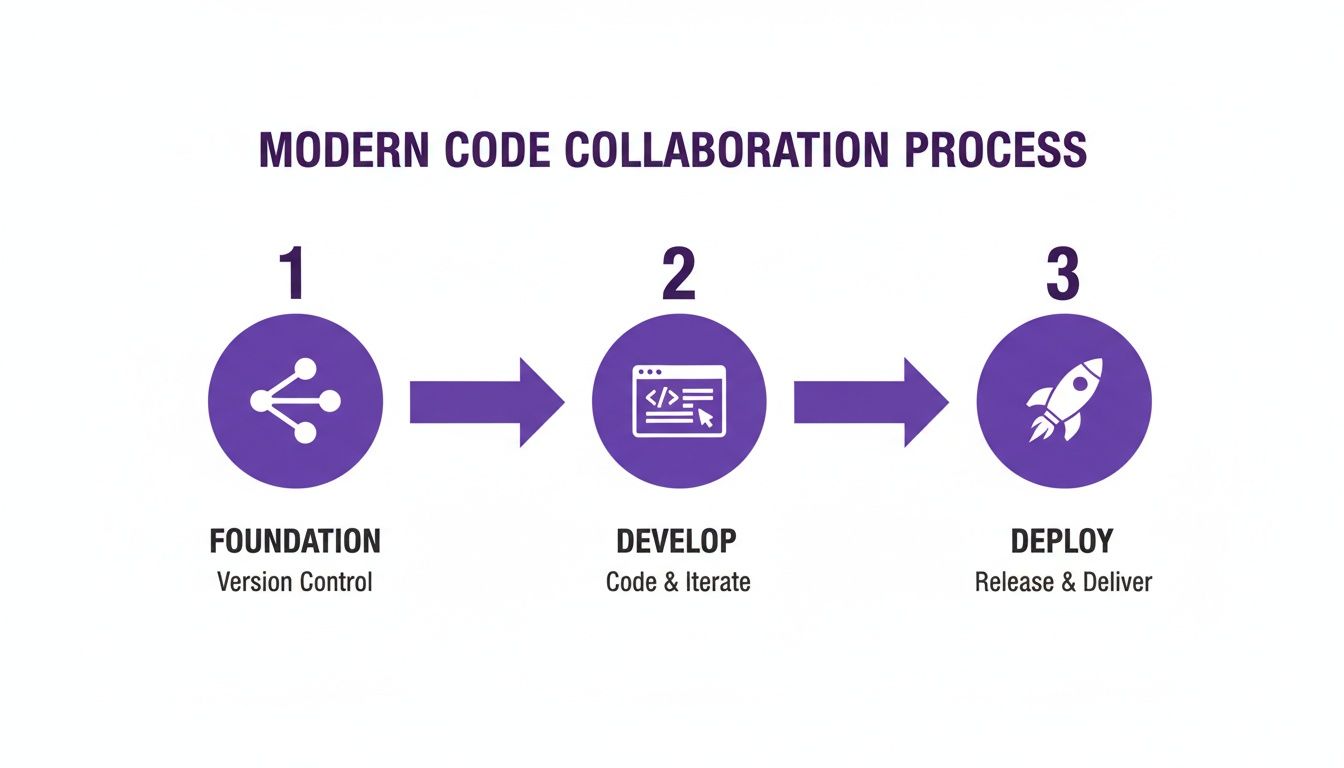
This flow—from version control, through development, to deployment—gives a clear picture of how to bring an idea to life in a structured way.
Why This Workflow Matters
A disciplined workflow isn't just about staying organized; it's about building better, safer products. For anyone working on blockchain application development, this kind of structure is absolutely critical. You learn to use these tools not just for speed, but to bake integrity right into your code from the start.
Here’s a quick look at the core components that make modern collaboration work.
Core Pillars of Modern Code Collaboration
Ultimately, this isn't just about a new set of tools; it's a fundamental shift in how we build software together, making our work more secure, efficient, and innovative.
You get a few key benefits right off the bat:
- Enhanced Security: Automated checks and structured reviews are your first line of defense, catching vulnerabilities before they become a problem.
- Improved Code Quality: When everyone adheres to consistent standards and gets peer feedback, the code naturally becomes more robust and reliable.
- Increased Efficiency: Automation takes care of the repetitive stuff, freeing you and your team up to focus on solving the hard problems.
A huge piece of this modern workflow is using an AI app generator like Dreamspace. It acts as your vibe coding studio, simplifying the final steps of sharing and deploying your collaborative projects and turning what used to be a complex headache into a smooth experience.
Building Your Foundation with Version Control

Before your team even thinks about writing code, you need a single source of truth. For any serious project—especially in the high-stakes world of Web3—that foundation is Git. Getting your version control right is the first, most critical step to successfully collaborate on code.
This isn't just about tracking changes; it's about preventing chaos. A solid Git workflow makes every modification traceable, understandable, and, most importantly, reversible. This is absolutely non-negotiable for projects involving smart contracts, where one bad push can be permanent and incredibly expensive.
Adopting a Robust Branching Strategy
As your team and project grow, you’ll quickly outgrow basic Git commands. You need a structured branching model. One of the most effective I've seen is GitFlow, which adapts perfectly to the unique demands of onchain development.
Just think of your main branch as the direct reflection of your live, deployed smart contract. It’s sacred.
Here’s a practical way a DeFi team might structure their repository to manage multiple workstreams without stepping on each other's toes:
- main branch: This holds the production-ready code currently live on the blockchain. Lock this down immediately with branch protection rules—no exceptions.
- develop branch: This is your integration hub where all completed features get merged. It's a living preview of the next release.
- feature branches: For every new task—say, adding a new staking mechanism—a developer creates a branch from
develop(e.g.,feature/new-staking-pool). This keeps experimental code isolated. - release branches: When
developis ready for a new release, you cut areleasebranch. This is where you handle final testing, documentation, and last-minute bug fixes before deploying. - hotfix branches: If a critical bug pops up in production, a
hotfixbranch is created directly frommainto patch it immediately without derailing your normal development cycle.
A consistent branching strategy is the bedrock of team alignment. It creates clear boundaries for developers, minimizes merge conflicts, and ensures that your production code is always protected from unstable changes.
This approach gives your team a clear, repeatable process for everything from a wild new idea to a polished deployment.
Establishing Team-Wide Conventions
To make this workflow actually work, your team has to agree on some ground rules. This isn't about bureaucracy; it's about creating a shared language that everyone on the project speaks fluently. A clear commit message policy, for example, can turn a messy project history into a readable, searchable log of what happened and why.
This kind of coordination is now standard practice. Platforms like GitHub now host a staggering 94 million developers, with over 85.7 million new repositories created in the last year alone. That explosive growth tells you everything you need to know about how modern teams work together. If you're curious, you can find more software development statistics that show just how central these tools have become for collaboration and documentation.
Mastering the Pull Request and Code Review Workflow
A Pull Request (PR) is so much more than just a request to merge code. It's the central nervous system for your team's collaboration—the place where quality control, tough questions, and shared learning all come together. When you collaborate on code, getting this workflow right turns a simple process into a serious force multiplier for building better software.
It all starts with a clear, descriptive PR title and summary. This is your first and best chance to give your reviewers the context they need to help you. A title like "Fixing bugs" is useless. Instead, try something like, "Fix: Prevent contract overflow in calculateReward()". See the difference? Now your team knows exactly where to look and what to look for.
In the description, always link back to the issue or ticket that prompted the work. Especially for Web3 projects, you absolutely must spell out any security implications or changes to gas efficiency. A great PR doesn’t just show what you changed; it tells the story of why it needed to change.
Giving and Receiving Constructive Feedback
The review process is a dance between technical precision and human communication. Remember, the goal is to improve the code, not to attack the person who wrote it.
The best code reviews create a positive feedback loop. They zero in on objective improvements with specific examples, building a culture where feedback feels like a gift, not a critique.
Modern tools like GitHub make this so much easier. The "suggestion" feature, for instance, lets you propose a specific line change right in a comment. The author can accept it with one click. It’s a world away from a vague, unhelpful comment like "this could be better." To really dial in your team's process, it's worth digging into established code review best practices.
Here’s a quick before-and-after for a new smart contract feature:
- Bad Feedback: "This is inefficient. Redo it."
- Good Feedback: "This loop could get really expensive if the
_usersarray grows large. Have you considered using a mapping instead? It would seriously cut down on gas for future calls. Here’s a quick suggestion..."
Integrating AI into the Review Loop
This is where things get interesting. AI assistants can serve as your first line of defense in the review process. You can set them up to automatically scan every PR for common bugs, style guide violations, or anti-patterns before a human reviewer even sees it. This frees up your team's brainpower to focus on what matters: the high-level logic and architecture.
These tools are also incredible for closing knowledge gaps. I've seen many developers use a quality AI-powered coding assistant to explain a tricky piece of logic or suggest alternative ways to implement a feature. Suddenly, every code review becomes a micro-lesson.
By blending clear communication, genuinely constructive feedback, and smart automation, your PR workflow becomes a well-oiled machine for shipping quality code. This disciplined approach means that when you’re ready to bring your project to life with a tool like the Dreamspace AI app generator, you can be confident the code underneath is solid, secure, and fully understood by everyone on the team.
Automating Quality and Security with CI/CD Pipelines
Let's be honest: manual testing and deployment are soul-crushing bottlenecks. When you're trying to collaborate on code with a team, especially one that's spread out, you need a better system. This is where a solid Continuous Integration and Continuous Deployment (CI/CD) pipeline becomes your best friend—an automated gatekeeper that never sleeps.
With remote and hybrid work becoming the norm, these automated workflows are more critical than ever. In fact, over 70% of software teams are expected to be distributed by 2025. This shift has crowned tools like GitHub Actions as the leader in the space, with a 54% adoption rate. You can dive deeper into these trends in the 2025 State of the API Report.
Building Your Automated Workflow
Getting a CI/CD pipeline running with something like GitHub Actions is way easier than you might think. You just create a special workflow file (written in a language called YAML) inside your project. This file lays out a series of jobs that automatically run every single time someone opens a pull request.
The result? No new code gets merged until it passes a whole gauntlet of automated checks. This frees up your team to focus on what humans do best: thinking about the big picture, the architecture, and the user experience, instead of nitpicking syntax errors.
A well-configured CI pipeline doesn't just catch bugs; it enforces team standards consistently. It's the silent partner in every code review, ensuring that every contribution meets the baseline for quality before it even reaches a human eye.
Your pipeline needs to have a few key stages, especially when you're working on AI projects that touch the high-stakes world of onchain development.
Key Stages for a Robust CI Pipeline
A great pipeline is the foundation for secure and fast collaboration. Here are the essential jobs every onchain AI project should include:
Linting and Formatting: Think of this as your first line of defense. Tools like ESLint for JavaScript or Black for Python automatically catch style mistakes and make sure all the code looks the same. This one simple step kills off so many pointless back-and-forth comments in code reviews.
Comprehensive Testing: This is the heart and soul of your pipeline. Your workflow should automatically run all your tests—unit, integration, and end-to-end. If the tests pass, you can be pretty confident the new code didn't break anything important.
Smart Contract Security Analysis: For any project involving Web3, this is completely non-negotiable. You need to integrate automated security scanners like Slither or Mythril right into your pipeline. These tools hunt for common smart contract vulnerabilities, like reentrancy attacks, and flag them before they ever have a chance to be merged.
Gas Efficiency Reporting: In the onchain world, sloppy code costs real money. Add a step that spits out a gas report for any changes made to your smart contracts. This lets reviewers see exactly how a pull request will affect transaction costs, preventing nasty surprises after you deploy.
By automating these checks, you build a safety net of quality that grows with your project. It’s a structured approach that ensures that when you’re ready to bring your ideas to life with an AI app generator like Dreamspace, your code is already secure, tested, and ready to go.
Deploying Your Vision with an AI App Generator
Alright, this is the moment everyone’s been waiting for. Your PRs are merged, the CI pipeline is glowing green, and your code is rock-solid. It’s time to push it live and share your creation with the world.
For so many teams, this is where the momentum dies. The finish line gets bogged down in a swamp of server configurations, deployment scripts, and last-minute DevOps headaches. It can quickly turn the most exciting part of the project into a total chore.
From Code to Live Application
This is exactly where a tool like Dreamspace changes the game. We think of it as a vibe coding studio and AI app generator because it completely abstracts away the deployment grunt work.
Instead of fighting with infrastructure, your team just connects your finalized GitHub repo. That's it. Dreamspace creates a direct, seamless pipeline from your code to a live, shareable application. Your onchain app or AI model can be deployed with just a few clicks. If you're curious about what this creative process feels like, check out our guide on how to https://blog.dreamspace.xyz/post/code-with-ai for a deeper dive.
Deployment shouldn't be a separate, dreaded phase of development. With the right tools, it becomes an integrated part of your workflow, allowing your team to focus on building great products, not managing servers.
Showcasing Your Collaborative Work
Once your project is live, Dreamspace gives you a polished, professional interface to show it off. This is a huge deal when you need to share progress with stakeholders, demo for potential users, or launch to the public.
The platform handles all the backend heavy lifting, letting you present a finished product that truly reflects the quality and effort your team poured into it. This is especially important for complex projects; the skills required for an AI SDK Software Engineer are in high demand precisely because this stuff is hard.
Using an AI-powered platform ensures that the final output actually matches the vision. It's the last, crucial piece of the puzzle when you collaborate on code—the step that transforms your repo into a tangible, interactive experience people can actually use.
Common Questions About Code Collaboration
As your team gets its hands dirty with Web3 and AI development, you're bound to hit a few snags. It's just part of the process. Getting your workflow ironed out is a huge win, but there will always be questions. This section dives into some of the most common headaches teams face when they collaborate on code in this space, with real-world advice to keep your project on track.
Even the sharpest teams run into roadblocks. The trick is knowing how to navigate them without killing your momentum or cutting corners on quality. Let's dig into a few of the most frequent questions.
How Do We Handle Merge Conflicts in a Large Team
Ah, the dreaded merge conflict. They feel like a rite of passage for any dev team, but they don't have to grind everything to a halt. Honestly, the best defense is a good offense—clear communication and a solid, repeatable workflow.
First rule: before you start any new branch or ticket, always run git pull on your main development branch. It's a simple, two-second habit that dramatically reduces how far your local code strays from what everyone else is doing. When a conflict does happen, resist the knee-jerk reaction to just pick your version and move on. Fire up a visual diff tool to actually understand the why behind both sets of changes.
More often than not, the fastest fix is just grabbing the other developer for a quick pair-programming session. The two people who wrote the conflicting code can usually sort it out in five minutes, which saves someone else an hour of head-scratching.
A merge conflict isn't just a technical problem; it's a communication signal. It tells you that two developers were working on the same piece of logic without realizing it. Resolving it together strengthens team alignment and prevents future issues.
And once it's resolved? The job's not done. You absolutely have to re-run the entire test suite. This is your sanity check to make sure the fix didn't accidentally break something somewhere else.
What Are the Best Practices for Securing a Collaborative Web3 Project
In Web3, security isn't just another item on the checklist—it's everything. One slip-up can have permanent, costly consequences, which means your collaborative security practices have to be airtight.
Your CI pipeline's automated checks are great, but nothing replaces human oversight. You need a strict, non-negotiable policy that requires at least two approvals on any pull request touching core smart contract logic. No exceptions.
Here are a few security habits your team needs to adopt yesterday:
- Obsess Over Test Coverage: Get as close to 100% test coverage as humanly possible for all critical contract functions. Your tests are your first and best line of defense against logic flaws.
- Never, Ever Commit Private Keys: This should go without saying, but it happens. Use
.envfiles for secrets and double-check that your.gitignoreis correctly configured to exclude them. It's basic but critical. - Budget for Third-Party Audits: For any big release or protocol upgrade, a professional security audit from a firm that knows what they're doing is mandatory. It’s an unbiased, expert pair of eyes on your code.
- Launch a Bug Bounty Program: Once you're live, a bug bounty program is a powerful way to incentivize white-hat hackers to find and report vulnerabilities responsibly. It turns potential adversaries into allies.
How Can AI Tools Improve Our Code Review Process
AI tools can be an incredible force multiplier for your code review process, but only if you use them right. The idea is to let the AI handle the boring, objective stuff so your human reviewers can focus on what matters: architecture, business logic, and strategy.
You can set up AI assistants to automatically drop comments on pull requests for specific types of issues. This is perfect for catching things like:
- Violations of the team's style guide.
- Potential null pointer exceptions and other common gotchas.
- Missing docs or unclear function comments.
This takes all the tedious "nitpicking" off your senior devs' plates, making the whole process faster and more impactful. The key, though, is to fine-tune the AI. If it's too aggressive, it just creates noise and becomes an annoyance. You want an assistant, not a gatekeeper.
Tools like Dreamspace, the vibe coding studio we've been talking about, can take this even further. An AI app generator can analyze your codebase and suggest performance optimizations or even spit out boilerplate deployment configs, smoothing out the last mile of your collaborative workflow.
Ready to transform your collaborative workflow into a seamless experience? With Dreamspace, your team can go from code to a live, production-grade onchain app without the DevOps headache. Generate smart contracts, query blockchain data, and deploy your vision with AI. Start building today.