
Changing Domain Name for Onchain Apps
Thinking about changing your domain name? It's a much bigger deal than just a technical tweak. This is a strategic move that needs a solid plan, especially when your app is onchain. Get it wrong, and you risk damaging your brand, confusing your users, and tanking your hard-won SEO.
The process touches everything, from your DNS records all the way to onchain identifiers like ENS.
Your Blueprint for a Seamless Domain Migration
Pulling off a domain change for your onchain app demands meticulous planning. You're not just swapping URLs; you're fundamentally shifting your project's digital foundation. This move ripples through every layer, from the frontend your users see to the smart contracts driving the logic.
Think of it like moving your digital headquarters. Every sign, every map, every public listing needs to be updated.
Usually, a big rebrand is the catalyst, pushing you toward a name that better captures your mission. Or maybe you finally snagged that perfect .com or .xyz you've been eyeing. Either way, it’s a chance to seriously upgrade your brand's clout.
Understanding the Key Players
To navigate this successfully, you’ll be juggling a few key services and technologies. These are the main players on the field:
- Domain Registrar: This is ground zero. It's where you buy and manage your domains. You’ll be registering the new one here and, eventually, letting the old one go.
- Hosting & Deployment Platforms: Think Vercel, Netlify, or AWS—wherever your code lives. You’ll need to dive into their settings to point your project to the new domain.
- Blockchain Interaction Layers: For onchain apps, you have to think about how your frontend talks to the blockchain. This means hunting down and updating any domain-specific references in your smart contracts or config files. For a deep dive on handling this whole process, check out this guide on Webflow migration explained.
Onchain Identity and App Configuration
Here’s where it gets tricky for decentralized apps: onchain identity. Systems like the Ethereum Name Service (ENS) are what connect human-friendly names to blockchain addresses. When you change your domain, you absolutely must update these onchain pointers. If you don't, you're essentially leaving a broken link on the decentralized web.
A domain migration is a multi-faceted project. It demands a holistic view, connecting offchain technical tasks with onchain identity management to ensure a consistent and trustworthy user experience across the entire ecosystem.
And don't forget your dev environment. If you're using an AI app generator like Dreamspace, it likely has specific configurations tied to your domain. You’ll have to update environment variables, API endpoints, and CORS policies to reflect the new URL. Miss these details, and you’ll end up with a dApp that’s broken in subtle but frustrating ways.
We cover the A-to-Z of building these systems in our guide to decentralized app development. Consider this your mission briefing—it lays out every stage to ensure you stick the landing.
Pre-Migration Checklist: Setting the Stage for a Flawless Switch
Before you even think about touching a DNS record, you need a game plan. Seriously. Jumping straight into the technical side of a domain change without laying the groundwork is a classic recipe for disaster—think lost traffic, a spooked community, and a whole lot of unnecessary stress. This checklist is all about getting your ducks in a row first.
First thing's first: back everything up. This is your non-negotiable safety net. If anything goes sideways during the migration, a complete backup lets you hit the reset button. We're not just talking about your website's files, either. You need a full inventory of your entire application stack.
This means grabbing copies of your primary database, all user data, and even the environment variables tucked away in your deployment platform. If you're building with an AI app generator like Dreamspace, you've got specific configurations and secrets that are absolutely critical. A full backup means you can restore your entire setup to a working state in minutes, not days.
Choosing and Securing Your New Domain
Once your backups are safely stored, it’s time to pick your new digital home. This is more than just finding a name that isn't taken; it’s a core part of your brand strategy. Your new domain has to nail the vibe of your project, be easy for people to remember, and give off a sense of trust.
The Top-Level Domain (TLD) you choose—whether it's .com, .io, or .xyz—sends its own signal. While .com is still the undisputed king of global recognition, it's also incredibly crowded. It's a well-known fact that by December 2013, every single four-letter .com combination was already registered, which is why we've seen so many projects get creative with alternatives. You can dive deeper into the history of the domain industry over on InternetX.
Found the perfect one? Register it. Now. Don't wait. Domain squatting is a real and constant threat, and the last thing you want is to see your dream domain snatched up while you're still in the planning phase.
Don't Forget to Talk to Your Community
A domain change isn't just a backend update; it’s a very public move. Your users, your community, your fans—they all need to know what's happening. A clear, proactive communication plan is the only way to avoid confusion and keep the trust you’ve worked so hard to build.
Your plan should map out what you’ll say and where you’ll say it.
- The Heads-Up: Give everyone plenty of advance notice. Announce the upcoming change and, more importantly, explain why it's happening. Is it a rebrand? A strategic pivot? Let them in on the story.
- Go-Live Announcement: On migration day, hit all your channels—social media, Discord, email, you name it—to announce that the new domain is live and kicking.
- Friendly Reminders: For a few weeks after the switch, keep posting reminders about the new domain. You need to catch anyone who might have missed the initial news.
A transparent communication strategy does more than just inform; it reinforces your brand's commitment to its users, turning a potentially disruptive event into a positive milestone for the community.
Get Your SEO Baseline
Finally, you can't know if you've succeeded if you don't know where you started. Before you touch anything, you absolutely must establish a clear SEO baseline. This data is your proof of a successful migration and your first line of defense if you need to diagnose any post-launch traffic drops.
Start by benchmarking your current performance. Get a snapshot of your keyword rankings for your most important terms, take a hard look at your organic traffic numbers, and run a complete audit of your backlink profile. Tools like Google Search Console and Ahrefs are perfect for this. This snapshot gives you a concrete "before" picture to compare against once the new domain is live, helping you spot and fix any negative impacts right away.
Executing the Technical Switch for Your New Domain
Alright, the planning phase is over. It's time to roll up your sleeves and get into the technical nitty-gritty of the domain switch. This is where precision matters most. A well-executed switch means your users and search engines will transition seamlessly, with minimal (if any) downtime.
First up: your Domain Name System (DNS) records. Think of DNS as the internet's grand central station, directing traffic from a human-friendly domain (like yournewapp.xyz) to the right server IP address. Your job is to update the station's directory.
You'll need to log into your domain registrar's dashboard—where you bought the domain—and point your new domain to your hosting provider. This usually involves changing the A, CNAME, or ALIAS records.
Before you make any changes, remember the core principles of a smooth migration: backup, communicate, and establish a baseline. Getting this prep work right is what separates a smooth transition from a weekend-long fire drill.
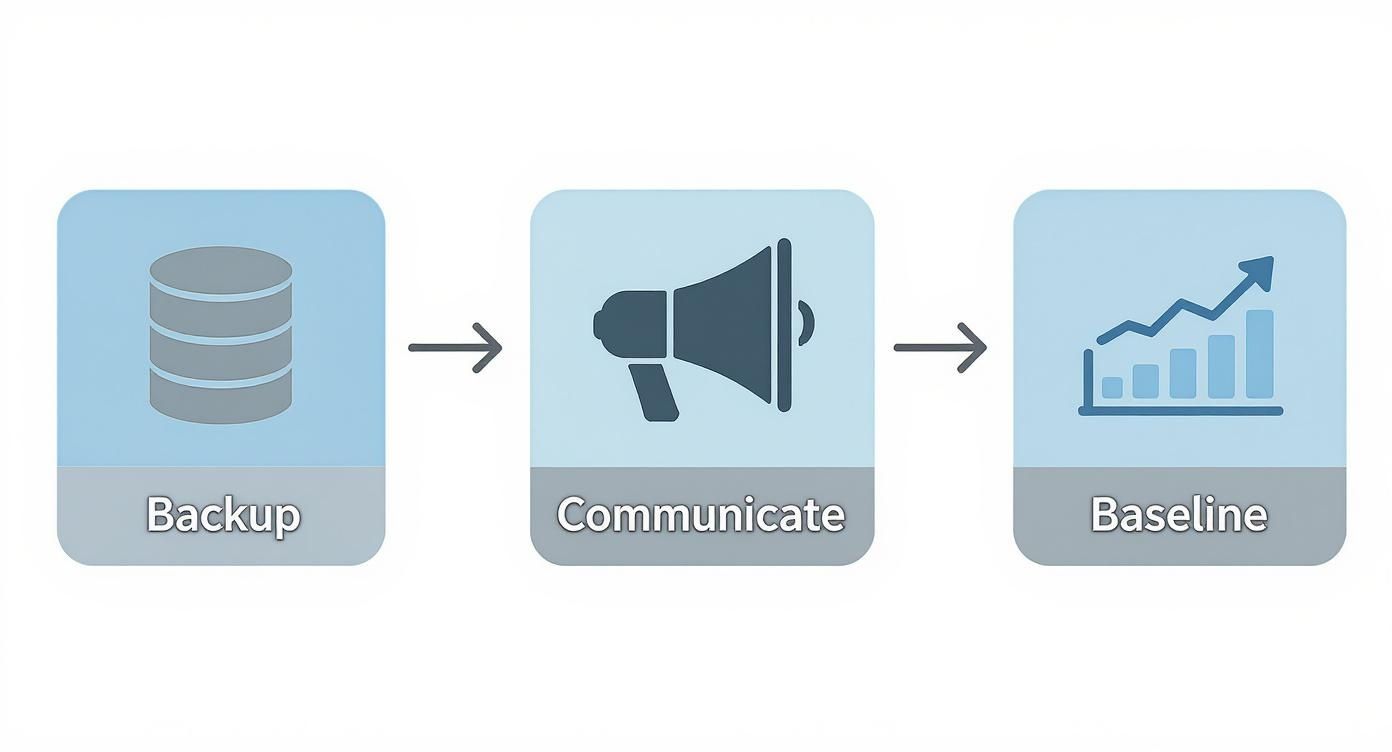
Think of this flow as your foundation. A successful technical switch isn't about flipping a switch at the last minute; it's built on solid preparation.
Securing Your New Domain with SSL
As your DNS changes start making their way across the globe, your next move is to lock down the new domain with an SSL/TLS certificate. Let's be clear: this is non-negotiable. It's the "S" in HTTPS that encrypts the connection between a user's browser and your server, giving them that little padlock icon and a lot of peace of mind.
Without it, browsers will loudly proclaim your site "Not Secure." That’s a trust-killer and an SEO killer, all in one. Thankfully, modern platforms like Vercel and Netlify make this incredibly easy, often providing free, auto-renewing certificates via Let's Encrypt. It’s usually just a matter of adding your new custom domain in the project settings.
This is a quick but powerful step. Don't move on until you've confirmed your site loads correctly over HTTPS.
The Critical Role of 301 Redirects
Now for what is arguably the most important step for your site's long-term health: setting up permanent 301 redirects. A 301 redirect is a direct command to browsers and search engine crawlers, telling them, "Hey, this page has moved for good. Here's the new address." It’s the digital equivalent of a mail forwarding service for your entire domain.
When done right, a 301 redirect passes nearly all of your old domain's "link equity"—the SEO authority it's built over time—to the new one. Neglecting this is like throwing away years of hard work and starting from scratch.
Implementing comprehensive 301 redirects isn't just a best practice; it's the lifeline that connects your old domain's authority to your new one. This is the mechanism that ensures years of SEO effort aren't lost overnight during a domain change.
Your hosting platform is your friend here. The goal is to set up a "wildcard" redirect that forwards all traffic from the old domain to the corresponding page on the new one, path for path.
Here's how it generally works on popular platforms:
- On Netlify: You can create a simple
_redirectsfile. A single line of code can handle forwarding everything from the old site to the new one while preserving the URL path. - On Vercel: This is managed in your
vercel.jsonconfiguration file. You define a redirect rule with the old domain as the source and the new one as the destination, making sure to maintain the paths.
If you’re using an integrated tool like an AI app generator from Dreamspace, this process is often even more streamlined within the deployment settings. Whatever tool you use, the objective is the same: every request to old-domain.com/page must land perfectly at new-domain.com/page. Plan to keep these redirects live for at least a year, giving search engines plenty of time to fully update their index.
To keep everything organized during the migration, a simple checklist can be a lifesaver. It ensures no small, critical step is missed in the heat of the moment.
Domain Migration Technical Checklist
This checklist acts as your single source of truth, helping you move through the technical steps methodically and confidently.
Updating Your Onchain and Offchain App Code
Alright, your DNS records are pointing to the new domain and the 301 redirects are live. The foundational work is done. But if you’re running a dApp, this is where the real fun begins. A domain change isn’t just a server-level tweak; it requires you to get your hands dirty in the application code itself—both onchain and offchain.
This is a step I’ve seen teams stumble on. They nail the infrastructure migration but forget about the deeply embedded references within their own code. The result? Broken API calls, wallet connection failures, and a clunky user experience that can quickly erode trust. Let's dive into the code and make sure every reference points to the right new address.
Aligning Your Offchain Environment
First up, let's tackle the offchain stuff. Your application’s environment variables are ground zero. These variables are the control panel for your deployed app, and they’re almost certainly littered with references to your old domain.
If you’re building in a vibe coding studio like Dreamspace, you can manage these directly in your project’s deployment settings. You need to go through them with a fine-toothed comb and swap out every instance of the old domain.
NEXT_PUBLIC_APP_URL: This one’s a biggie. Get it updated to the new domain so all your frontend links generate correctly.API_ENDPOINT: If your API lives on a subdomain, make sure it’s pointing to the new URL. Simple but crucial.- CORS Origins: Your API’s Cross-Origin Resource Sharing (CORS) policy needs to know about the new domain. Add it to the allowlist, or your frontend will get blocked from fetching data.
With environment variables sorted, it’s time to go on a hunt for any hardcoded URLs still hiding in your frontend code. These are those sneaky, direct references to the old domain you might have dropped into your HTML, JavaScript, or CSS months ago. A project-wide "find and replace" usually does the trick, but be careful—you don't want to accidentally change something you shouldn't.
Think of it like this: DNS is the new highway exit to your town, but your application's internal code is all the local street signs. If those signs still point to the old neighborhood, people are going to get lost, even if they made it off the highway.
Managing Onchain References and Identity
Now, we get to the really web3 part of this process. Changing a domain onchain is a whole different beast because, as we all know, smart contracts are immutable once deployed. If your contract logic has the old domain hardcoded for metadata or an offchain API call, you can't just edit it. You’ll either need to deploy a new version or, ideally, use an upgradeable proxy pattern that lets you update these pointers.
For example, an NFT contract might have a function that returns a base URI for its metadata. To fix this, you'd need to execute a transaction on that contract to update the base URI to your new domain. If you skip this, you could end up with a whole collection of NFTs pointing to broken images. For developers still getting the hang of this, you can learn how to code with AI assistance to handle these kinds of complex contract interactions more smoothly.
But the most important onchain update is your decentralized identity, which usually means heading over to the Ethereum Name Service (ENS). Your ENS name is the human-friendly address for your dApp, and its records need to reflect the move.
Updating Your ENS Content Hash
Your ENS name probably has a content hash record that points to your dApp’s frontend, which is likely stored on a decentralized network like IPFS. When you deploy your site under the new domain, you’ll get a new IPFS hash. You have to update the content hash on your ENS name to point to this new deployment.
Here’s how that usually goes down:
- Connect Your Wallet: Fire up an ENS management tool (the official app works great) and connect the wallet that owns the domain.
- Locate the Record: Find your ENS name and navigate to its records to find the "Content" field.
- Update the Hash: Swap out the old IPFS hash (
ipfs://...) with the new one from your latest deployment. - Sign the Transaction: Confirm the change, sign the transaction, and pay the gas fee.
This final step ensures anyone using your ENS name gets routed to the latest version of your app at its new home. It’s a critical piece of the puzzle. The global domain base hit 378.5 million registrations in Q3 2025, a 4.5% year-over-year increase, and more of these are pointing to onchain assets. Managing decentralized IDs like ENS is no longer a niche skill; it’s becoming standard practice. You can see more on these trends in Verisign's quarterly report.
By syncing up both your offchain and onchain records, you create a seamless identity that works perfectly across the centralized and decentralized web.
Post-Migration Monitoring to Safeguard SEO
Getting your new domain live feels like a major win, but the work isn’t quite done. The focus now shifts from active development to vigilant monitoring. This final stretch is all about protecting the SEO equity you've worked so hard to build and ensuring your users have a seamless experience.
If you just launch and walk away, small hiccups can quickly turn into major drops in traffic and authority. Think of it like post-op recovery for your app—the careful attention you pay now is what guarantees a healthy, long-term outcome.
Formalizing Your Move with Google
First things first: you need to tell Google, officially, that you've moved house. This isn't just a friendly suggestion; it's a critical step that helps the search engine update its index and transfer authority to your new domain much, much faster.
The right tool for the job is Google Search Console's "Change of Address" feature. Before you can use it, you'll need to have verified ownership of both your old and new domains within the same Search Console account. Once that's handled, the process is pretty straightforward and sends a clear signal to Google that this move is intentional and permanent.
Proactive Error Detection and Redirect Validation
Now it’s time to put on your detective hat. Your 301 redirects are doing the heavy lifting, but never assume they're all working perfectly. You need to keep a close eye on the Coverage report in Google Search Console.
Be on the lookout for any spikes in errors, especially:
- 404 (Not Found) errors: These are dead ends. They mean links are pointing to pages that no longer exist and aren't being properly forwarded.
- Soft 404s: These are sneaky. Google thinks a page is an error page, even though it returns a 200 success code.
- Crawl anomalies: This is a catch-all for other issues Google's crawler ran into while trying to access your site.
Catching and fixing these problems fast prevents user frustration and stops search engines from dropping your pages from their index. Your goal here is to see the number of indexed pages on the old domain steadily drop as they're replaced by pages on the new one.
Post-migration isn't a passive waiting game. It's an active process of validating your work, hunting for errors, and ensuring search engines and users alike can navigate the change without friction. This diligence is what separates a successful domain migration from a costly SEO setback.
Updating Analytics and Tracking Performance
Data is your absolute best friend during this transition. You need to get your analytics platform updated to reflect the new domain, otherwise, you'll lose historical context and fly blind.
In Google Analytics, this means updating your property settings with the new primary domain. Here’s a pro tip: create an annotation on the exact date you made the switch. This simple marker will be a lifesaver weeks or months down the line when you're analyzing traffic trends and can't remember precisely when the migration happened.
Diving into this data is key. For a more sophisticated look at performance, you might even explore techniques for blockchain data analysis to get a deeper understanding of user behavior.
Reclaiming Link Equity and Updating Your Brand Presence
Your final job is to clean up your digital footprint across the web. While redirects handle the technical side, updating your most valuable links directly can seriously speed up your SEO recovery. A huge part of this is keeping a close watch on your backlink profile to make sure there's minimal negative impact.
Start by identifying your most authoritative backlinks. Reach out to the webmasters of those sites with a friendly email asking them to update their link to point to your new domain. It’s a simple action that sends a powerful, direct signal to search engines.
This same logic applies to all the properties you own. Make a checklist and go through it systematically:
- All your social media profiles (Twitter, LinkedIn, you name it)
- Email signatures for everyone on the team
- Online directories and business listings
- Any paid marketing or ad campaigns you're running
This creates consistent branding, reinforces the change, and ensures every single touchpoint directs people to their correct new home. This is especially true as more businesses target specific regions; the preference for local domains is growing, with country-code TLDs hitting 144.8 million registrations in Q3 2025.
This diligent follow-up, whether you're using an AI app generator like Dreamspace or coding manually, is the key to a full recovery and continued growth after changing your domain name.
Answering Your Nagging Domain-Change Questions
Changing your domain, especially for an onchain app, always comes with a few tricky "what if" scenarios. Even the best-laid plans can leave you second-guessing. Let's tackle the most common questions we hear to clear up any lingering confusion.
How Long Does This Whole Thing Actually Take?
The timeline for a domain switch can be a bit misleading. The hands-on technical stuff—like updating DNS records, getting your SSL certificate sorted, and pushing redirects live—can be knocked out in just a few hours.
But the real process is much more of a marathon than a sprint. DNS propagation alone can take anywhere from a few minutes to a full 48 hours to catch up everywhere in the world. And the SEO side? That's the long haul. You're looking at anywhere from four weeks to several months for search engines to fully process the move and restore your rankings. It's better to think of this as a phased project, not a quick flip of a switch.
Will This Wreck My SEO?
It absolutely can, but only if you're careless. If you just launch the new site without proper 301 redirects, you're essentially telling search engines to treat it as a brand-new website with zero history or authority. That’s a recipe for an SEO disaster.
The right way to do it involves setting up permanent 301 redirects for all your old URLs and filing a change of address with tools like Google Search Console. This sends a clear signal that you've moved for good, allowing Google to pass most of your hard-earned link equity and ranking power to the new domain. You might see some temporary bumps in the road, but a solid plan prevents any lasting damage.
Think of a 301 redirect as the official mail forwarding service for the internet. Without it, all your valuable SEO "mail" gets lost. With it, you ensure every bit of authority is delivered to your new address.
What's the Deal With My Old Email Addresses?
Once you change your domain, any email addresses tied to the old one (like contact@old-domain.com) will just stop working. The mail server won't know where to send incoming messages anymore.
The standard move here is to create new inboxes on your new domain (contact@new-domain.com) and immediately set up forwarding from the old addresses. This is a critical step. You'll want to keep the old domain registered for at least a year just to keep this forwarding active, giving everyone plenty of time to update their contact lists.
Seriously, Do I Have to Keep Paying for the Old Domain?
Yep, you absolutely do. Plan on holding onto your old domain for at least one year after you've made the switch. It's non-negotiable for a couple of big reasons:
- Redirects Have to Live Somewhere: Your 301 redirects only work if the old domain is active. If you let it expire, those redirects break, and all the referral traffic and SEO juice they were preserving just vanishes.
- Protect Your Brand: Letting an old domain go is like leaving the back door of your old house wide open. Someone else can snatch it up—maybe a competitor, or worse, a scammer who wants to set up a phishing site to impersonate your brand. A year's registration fee is a tiny price to pay for that security.
And for those of you building with a slick platform like Dreamspace, a vibe coding studio for onchain apps, make sure you keep both domains listed in your project settings. This ensures all the integrated services and deployments keep running smoothly until the migration is 100% complete.
Before we wrap up, here’s a quick-glance table to answer some of the most frequent questions that pop up during this process.
Frequently Asked Questions About Domain Migration
Hopefully, that clears up the major points! A domain change is a big step, but with a bit of planning, it's a completely manageable one.
Ready to build your next onchain app with unprecedented speed and style? With Dreamspace, you can generate production-ready dApps, smart contracts, and blockchain data queries with AI. Skip the boilerplate and start creating. Build your onchain app today.