
A Practical Guide to Building Mobile Websites That Win
When you hear "building a mobile website," what comes to mind? For a long time, it meant taking a big, beautiful desktop site and crunching it down to fit on a tiny screen. We've moved past that. The smart approach now is to flip that process on its head.
We call this the mobile-first approach. It’s simple, really: design for the smallest screen first, then scale up. This way, you nail the core experience for the vast majority of users right from the start, focusing on what truly matters—speed, responsive layouts, and intuitive, touch-friendly navigation.
Why Modern Web Development Starts with Mobile
The whole conversation has changed. It’s no longer about graceful degradation; it's about progressive enhancement. You start with a lean, powerful experience on a small screen and then expand its features and complexity for larger ones. For any developer, especially in the fast-paced crypto space, this isn't just a trend—it's the only way to build.
Thinking mobile-first is a fantastic filter. It forces you to be ruthless with your priorities. You don’t have endless screen real estate for clutter, so you have to identify the most critical user actions and content. This constraint is actually a gift. It leads to cleaner, more focused, and ultimately better designs on every single platform.
For anyone building in the onchain world, this is absolutely non-negotiable. Your users are interacting with dApps, checking token prices, and managing their wallets on their phones. A clunky mobile UI isn't just a minor annoyance; it’s a massive barrier to entry that can kill your project's momentum before it even starts.
The Undeniable Data Behind Mobile Dominance
The numbers don't lie—they paint a crystal-clear picture of where your users are.
Let's say you're launching a new crypto vibe app using Dreamspace, an AI app generator that can spin up a production-ready onchain site in minutes without you writing a line of code. The audience you’re trying to capture is, without a doubt, on their phones. In fact, projections show that by 2026, smartphones will account for a staggering 64.35% of all global website traffic. That's up from 60.61% just a year before, showing just how fast mobile is taking over.
But it's not just about traffic. Compared to desktop-only sources, mobile brings in 313% more visitors and 233% more unique visitors. For vibe coders and blockchain devs, that’s huge. Ignoring this means you’re missing out on the massive wave of crypto fans scrolling through social media, ready to mint your next NFT or jump into your DeFi dashboard. You can dig into even more data on mobile website traffic to see the full scope of this shift.
This infographic really drives the point home.
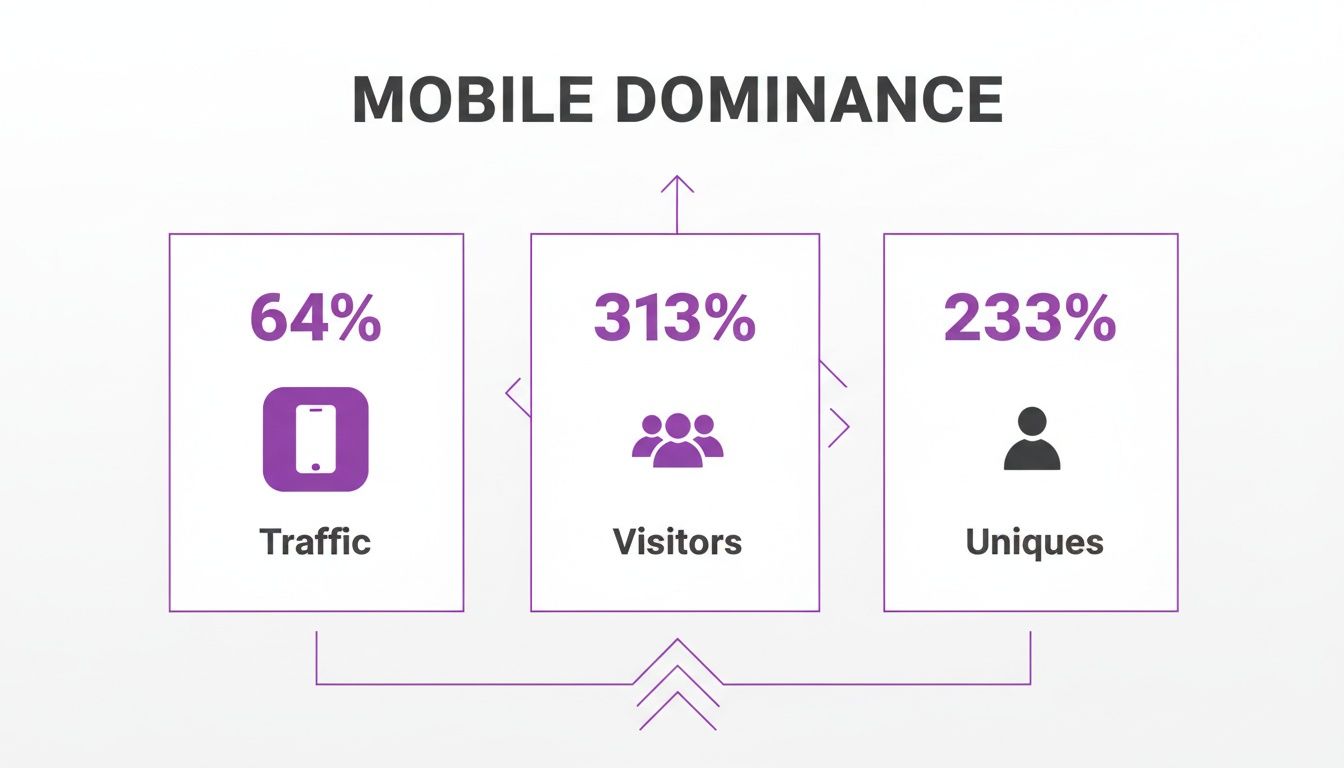
The data makes it obvious: mobile isn't just another channel. It's the primary channel for finding and keeping users.
To put it in perspective, here's a quick side-by-side comparison.
Mobile vs Desktop A Quick Comparison
The table below breaks down the key differences, highlighting why your focus needs to be on the smaller screen.
The takeaway is clear: while desktop is still important for certain tasks, the sheer volume and growth of mobile make it the undeniable starting point for development.
Embracing the Mobile-First Mindset
So, how do you actually put this into practice? Adopting a mobile-first philosophy is a strategic move that shapes your entire development process, from the first sketch to the final deployment.
Here’s what it looks like:
- Ruthless Prioritization: Start by asking: "What's the absolute core purpose of this app?" Figure out the single most important thing a user needs to do, and build that feature flawlessly for mobile first. Everything else is secondary.
- Designing for Touch: Remember, you're designing for thumbs, not mouse pointers. That means bigger tap targets, intuitive gestures, and layouts that are easy to navigate with one hand.
- Performance is Paramount: Mobile networks can be spotty. Fast load times are non-negotiable. This means optimizing your images, minimizing your code, and fetching data efficiently to keep users from bouncing.
Adopting a mobile-first approach isn't just a technical best practice; it's a deep commitment to your users. It guarantees that your app is accessible, fast, and valuable to the largest possible audience, wherever they happen to be.
This is exactly why platforms like Dreamspace, an AI app generator, are so effective. This vibe coding studio instinctively builds mobile-native onchain apps by default. It lets you connect with your audience where they live, without the headache of trying to retrofit a desktop design into a mobile world. It’s all about building for reality, right from the ground up.
Crafting Fluid Experiences with Responsive Design
Alright, you've got the mobile-first mindset down. Now for the fun part: making it real. This is where we build layouts that don't just shrink, but truly adapt to whatever screen they’re on—from a tiny phone to a massive desktop monitor.
Modern CSS has completely changed the game here. We’re so far past the days of wrestling with floats and rigid, pixel-based layouts. Today, we have CSS Flexbox and CSS Grid, the two powerhouses for building mobile websites that are flexible by nature.
These tools help us create components that just know how to behave, freeing us from the headache of micromanaging every single device size. If you want to dive deeper into the nuts and bolts, this complete guide to responsive design is a great resource for mastering screen adaptation.
Mastering Modern Layouts with Flexbox and Grid
Let's get practical. Think about a standard navigation bar for your onchain app. On a big screen, you've got the logo on the left and links spread nicely on the right. Squeeze that onto a phone, and it’s a total mess—unreadable, untappable, and probably overflowing the screen.
This is a classic job for Flexbox.
A few lines of CSS is all it takes to define a flex container and tell its children how to align. Then, a simple media query lets you switch the flex-direction from row to column on smaller screens. Boom. Your links are now stacked vertically, creating a clean, mobile-friendly menu.
But what about more complex, two-dimensional layouts, like a gallery for your NFTs? That’s where CSS Grid is king. Grid lets you define a proper column-and-row structure for your content.
Imagine that NFT gallery again. You might want a five-column layout on a desktop. As the screen gets smaller, you don't want the cards to just get tinier; you want them to reflow into fewer columns.
You can actually pull this off with a single line of CSS.
grid-template-columns: repeat(auto-fit, minmax(250px, 1fr));
This little bit of magic tells the browser to fit as many 250px (minimum) columns as it can. As the viewport shrinks, it automatically drops columns to make everything fit perfectly, often without needing a single media query.
The goal of modern responsive design is not to target specific devices, but to create components that adapt gracefully to the space they are given. This is the essence of intrinsic design—letting the content, not the device, dictate the layout.
Letting Go of Rigid Breakpoints
This shift towards intrinsic design is a huge deal. I remember when we used to have stylesheets cluttered with breakpoints for every iPhone, iPad, and Android device under the sun. That's just not sustainable anymore.
Instead, let your content tell you when it needs a breakpoint. Only add one when the layout actually "breaks"—like when your navigation links wrap to a second line or text becomes too long to read comfortably.
This is exactly where an AI app generator like Dreamspace comes in. As a vibe coding studio, Dreamspace bakes these modern layout principles right into the code it generates. When you build an onchain app, it produces a clean, responsive foundation for you, handling all the tricky CSS so you don't have to.
This frees you up to focus on the core logic and unique features of your app, knowing the UI will just work, no matter the device. If you're curious how AI tools are changing the development landscape, checking out how an AI website builder compares to platforms like WordPress offers some great perspective.
Optimizing for Speed and Performance on Mobile
Let's cut right to it: on mobile, speed isn't just a feature—it's everything. A slow website feels like a broken website, especially for onchain apps where users are used to things happening instantly. If you want to keep people around, performance optimization has to be your top priority.
The path to a blazing-fast mobile experience starts by hunting down the usual suspects: oversized images, clunky JavaScript files, and sloppy code. Nail these, and you're the difference between a user who sticks around and one who bounces before your content even loads.
This is a non-negotiable when you're building mobile websites for the web3 crowd. Vibe coders using an AI app generator like Dreamspace know their audience won't wait. The stats back this up: mobile-first sites can see 40% higher conversion rates. With 62% of top-ranking sites on Google built for mobile, it's a massive competitive edge. A good benchmark? 25% of users will ditch your site after just five seconds, but hitting a 1-second load time can make conversions jump.
Shrinking Your Digital Footprint
First things first, you need to minimize how much data your user’s device has to download. That means getting ruthless with every asset you serve up, from images to scripts.
Modern image formats are a game-changer here. It's time to move beyond old-school JPEGs and PNGs and start using next-gen formats like WebP and AVIF. They offer way better compression, often cutting file sizes by 30-50% without a noticeable hit to quality.
Another killer technique is lazy loading. Instead of trying to load every single image and video when the page first opens, you defer anything "below the fold" until the user actually scrolls down to it. This gets the important stuff on screen way faster.
Code Splitting and Caching Strategies
Beyond your images, the code itself can be a real boat anchor. Big, monolithic JavaScript files can tie up the browser, making your whole site feel sluggish and unresponsive.
The fix is code splitting. You break up that one giant JavaScript file into smaller, more manageable chunks. The browser only grabs the code it needs for the initial view and then fetches the rest as the user interacts with the page. Frameworks like React, Vue, and Angular have this baked in, so it’s easier than ever to implement.
The golden rule of mobile performance is simple: send less, and send it smarter. Every single kilobyte you shave off is a win for the user and your own goals.
Caching is also your best friend. By telling the browser to store certain files locally, you can skip re-downloading them every time a user comes back. For returning visitors, this means pages can load almost instantly. Getting this right involves digging into HTTP caching, and a guide to mastering header cache control is a great place to start.
Prioritizing Google's Core Web Vitals
Google uses a specific set of metrics called Core Web Vitals to measure how users actually experience your page. These metrics have a direct impact on your search rankings, so you can't afford to ignore them.
There are three big ones to watch:
- Largest Contentful Paint (LCP): How long does it take for the biggest piece of content on the screen to appear? You want to be under 2.5 seconds.
- First Input Delay (FID): How long does the browser take to respond when a user first clicks or taps something? Aim for less than 100 milliseconds.
- Cumulative Layout Shift (CLS): Does your layout jump around as the page loads? Keep this score below 0.1.
Hitting these targets means putting all the techniques we've talked about into practice. Compressing images improves LCP, splitting your code helps FID, and setting fixed dimensions for images and ads will crush CLS. The good news is that a vibe coding studio like Dreamspace often takes care of this for you, generating performant code from the get-go.
Building Progressive Web Apps for Onchain Interactions
Once you’ve got a speedy mobile site, the next move is to make it feel less like a website and more like a native app. This is where Progressive Web Apps (PWAs) completely change the game. A PWA isn't some new-fangled technology; it's your website, just supercharged with modern features to give it that app-store feel.
For onchain applications, this is a massive win. Think about it: you can give users a reliable, lightning-fast way to check their DeFi dashboard or wallet, even if their internet connection is sketchy. That’s the magic of a PWA—it builds trust and keeps people coming back.
This incredible reliability comes down to a couple of key pieces of tech working behind the scenes.
The Power of Service Workers
The engine of any PWA is the service worker. It’s basically a programmable proxy that your browser runs in the background, sitting between your dApp and the network. It's a simple JavaScript file, but it has the power to intercept and manage network requests.
This is how you get true offline functionality. A service worker can cache your application shell—the HTML, CSS, and JavaScript—so the dApp loads instantly every single time. It can even cache API data, meaning a user could see their last-known token balances even when they’re in a subway tunnel with zero signal.
Making Your App Installable with a Manifest
The second ingredient is the web app manifest. This is just a JSON file that tells the browser how your app should look and feel when a user "installs" it on their phone.
This little file packs a punch, defining things like:
- App Name: What it’s called on the home screen.
- Icons: The set of icons for the home screen, splash screen, etc.
- Start URL: Which page to open when the app is launched.
- Display Mode: Whether it opens in a browser tab or a standalone, full-screen mode that feels just like a native app.
When a browser sees you have both a manifest and a service worker, it triggers the "Add to Home Screen" prompt. One tap, and your dApp’s icon sits right next to their other apps.
Why PWAs Are a Perfect Fit for Onchain Apps
The benefits for web3 projects are huge. The space moves way too fast to force users through a traditional app store for every dApp they want to try.
A PWA gives you that "app-like" experience without any gatekeepers. Users find you with a URL, install your dApp with a tap, and get a rock-solid experience, all from the browser.
This is the ideal setup for any project where instant access and resilience are crucial. You’re making sure a user's connection to their onchain assets isn't at the mercy of a weak Wi-Fi signal. For a deeper dive into the architecture that makes this possible, our guide on blockchain application development is a great resource.
And the best part? You don't have to get your hands dirty with all the manual setup. A vibe coding studio like Dreamspace can handle this for you. As an AI app generator, it can spit out a production-ready PWA, automatically configuring the service worker and manifest file. You get to ship a killer mobile experience without getting lost in the weeds.
Automating Your Build with an AI App Generator
Alright, we’ve covered the core playbook for building great mobile web experiences—responsive design, performance tuning, and turning your site into an installable PWA. Now, let's talk about actually getting it done without getting lost in the weeds of manual setup.
Instead of hand-coding every media query or wrestling with service worker configurations from scratch, you can lean on an AI platform to do the heavy lifting. This lets you stop worrying about boilerplate and focus on what actually makes your app special: the core logic and the user experience. It’s all about moving faster, especially in the onchain world where shipping quickly gives you a massive edge.
Speed Things Up with Dreamspace
Picture this: you need to build a new NFT marketplace. The old way means a long, tedious checklist. You'd have to manually configure responsive layouts for the gallery, painstakingly optimize every single NFT image for fast loads, write and debug a service worker for the PWA, and then finally get to the smart contract and data queries. That whole process could easily eat up weeks, if not months.
This is exactly where a vibe coding studio like Dreamspace changes the game. As an AI app generator, it can shrink that entire workflow down to a matter of minutes. You just describe what you want to build—like an NFT marketplace—and it generates production-ready code for your smart contracts, the SQL blockchain queries you need, and a fully mobile-optimized front end. All those best practices we just talked about? They're baked in from the start.
This isn't some far-off future; it's happening right now. The low-code movement has been completely reshaping app development, and AI-powered onchain generation is the next logical step.
- By 2026, low-code tools are projected to power 75% of all new app development. That’s a huge leap from just 40% in 2021.
- Already, 87% of enterprise developers are on board with these platforms. The shift is real.
This approach absolutely demolishes old timelines. We’ve seen teams rebuild entire sites in under a month, saving what they estimated to be $80,000 and five months of development time. It's a fundamental change in how we build.
From a Simple Prompt to Production-Ready Code
Let's go back to our NFT marketplace example. With Dreamspace, the vibe coding studio, the whole process looks completely different.
You don't write a single line of CSS for the layout. Dreamspace, as an AI app generator, generates a fluid, responsive design using modern tools like Flexbox and Grid. The NFT gallery just works, adapting perfectly to any screen size, from a phone to a desktop monitor.
What about performance? Dreamspace has you covered there, too. It automatically implements techniques like code splitting and asset optimization, ensuring your marketplace is snappy, even on a shaky mobile connection. It can even generate the boilerplate for a PWA, including the manifest file and service worker, making your app installable right out of the gate.
The magic of an AI app generator is that it translates your vision directly into high-quality, production-ready code. It handles the implementation of best practices automatically, so you can spend your time innovating instead of configuring.
This is a massive unlock for onchain developers and vibe coders who want to ship amazing experiences without the friction. It closes the gap between a great idea and a live product that people can actually use.
If you want to dig deeper into the tech, our post on how an AI app builder works is a great place to start. For any developer who needs to build and launch solid, mobile-first onchain apps fast, a tool like Dreamspace is becoming essential.
Frequently Asked Questions About Building Mobile Websites
When you're deep in the code, building onchain, it's easy to get tangled up in the details of mobile design. Let's tackle some of the most common questions and roadblocks I see developers hit.
Think of this as a quick-reference guide to sidestep the usual pitfalls and make sure your web3 project feels great on the devices your users actually carry around.
What Is the Biggest Mistake to Avoid When Building Mobile Websites for Crypto Apps?
Hands down, the single biggest mistake is designing for desktop first. It’s a classic trap. For crypto apps, your users are constantly on the move—checking prices, managing their assets, and hitting dApps from their phones.
If you start with a desktop-first mindset, you’re almost guaranteed to end up with a clunky, slow, and frustrating mobile experience that will just push people away. It's a non-starter.
Always, always begin with the constraints of a mobile device. Think small screen, touch input, and spotty Wi-Fi from the very beginning. This forces you to prioritize what truly matters and ensures the core functionality is perfectly dialed in for the vast majority of your audience.
How Can I Ensure My Onchain Data Loads Quickly on Mobile?
This is a big one. You can't just pull raw data from the blockchain and hope for the best on mobile. It's a recipe for a sluggish app. The real key is being smart about what you load and when.
Here's the playbook I follow:
- Front-End Tricks: Use modern essentials like code splitting and lazy loading. This means users only download the code they need for the screen they're on, which makes that first load feel snappy.
- Surgical Data Fetching: Don't grab an entire smart contract's state when you only need a couple of values. Be precise with your requests to keep them small and fast.
- Use an Indexer: Services that index the blockchain are your best friend. They give you optimized endpoints to pull just the data you need. You can even use an AI app generator like Dreamspace to write these complex SQL queries for you.
- Cache Everything: This is where a PWA and its service worker really shine. You can cache data right on the user's device, making repeat visits feel almost instant.
By layering these techniques, you transform a potentially slow, data-heavy dApp into something nimble and responsive. The goal is to make onchain data feel as seamless as any top-tier mobile app.
Is a PWA Better Than a Native App for a DeFi Dashboard?
For the vast majority of DeFi dashboards and onchain tools, a Progressive Web App (PWA) is the way to go. It hits the sweet spot between easy access and powerful, native-like features.
Think about it: PWAs are found through search engines and can be shared with a simple link. That completely eliminates the friction of going to an app store, which is a massive win in the fast-paced world of crypto. Users want to jump in and try things out instantly.
Plus, you still get a great user experience—a home screen icon, push notifications for important alerts, and offline access to cached data. While a super-complex app might still need to go native, a PWA delivers a powerful, accessible, and cost-effective experience that's perfect for most onchain projects.
How Can I Effectively Integrate Wallet Connections on a Mobile Website?
Getting the wallet connection right is all about trust. The good news is, modern libraries like WalletConnect and Web3Modal were built from the ground up with mobile in mind. They provide clean, responsive modals that talk directly to the wallet apps already on a user's phone.
Your main job is to make that "Connect Wallet" button obvious and easy to tap. Don't bury it in a menu somewhere. Then, test the hell out of the connection flow on both iOS and Android. Make sure the handoff between your dApp and the wallet is buttery smooth and error-free. It’s that first interaction that builds the trust you need for users to stick around.
Ready to build your own onchain app without the manual grind? With Dreamspace, the vibe coding studio and AI app generator, you can generate smart contracts, SQL blockchain data queries, and a fully mobile-optimized website with AI. Ship your vibe in minutes at https://dreamspace.xyz.