
How to build social networking app: AI-powered guide
Building a social networking app doesn't have to be a massive undertaking anymore. With an AI-powered platform, you can generate the core logic, design the user interface, and handle deployment all from one place. This lets you turn simple text prompts into working code, so you can focus on building your community instead of getting bogged down in complex programming.
Your Blueprint for an AI-Powered Social App
So, you want to build a social networking app? It's a huge task, but what if AI could act as your expert co-pilot? This guide is your complete blueprint for taking a social app from a simple idea to a full-blown launch, all by using an AI platform. We’re moving past theory and into the practical, actionable steps you can take today.
This journey will walk you through everything—from finding your niche in a crowded market to pulling off a perfect launch. It’s all about building smarter, not just harder.
The workflow for creating an app with AI is refreshingly simple.
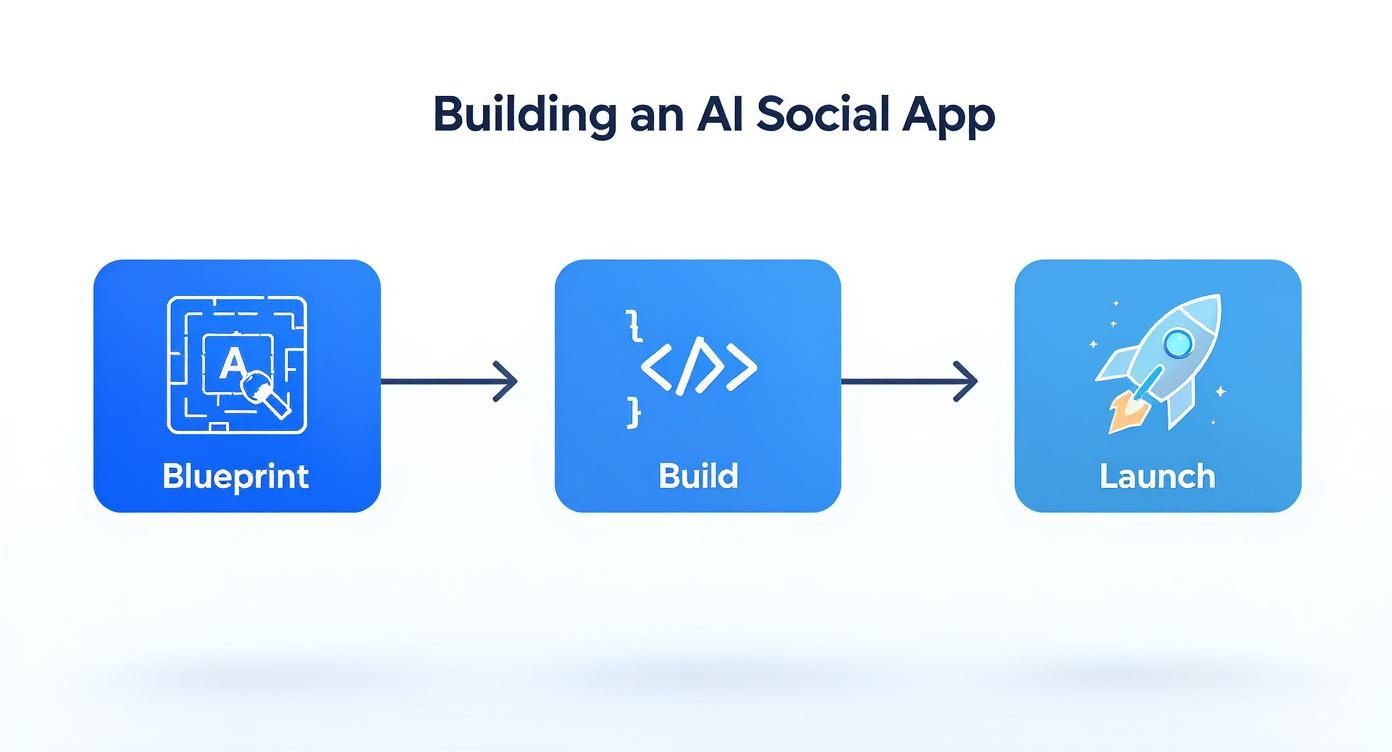
The Blueprint, Build, Launch model shows just how effectively AI can boil down a traditionally long development cycle into three clear, manageable stages.
Charting Your Course
We'll dive into how an AI app generator like Dreamspace does the heavy lifting for you. This frees you up to concentrate on what actually matters: building a thriving community. The goal is to define your app's logic, create a UI that people genuinely enjoy using, and get it deployed without any major headaches.
As you map out the foundation of your social app, it’s also smart to consider all your options for efficient development. For some, this might include exploring offshore teams. If you’re curious, you can dig into this comprehensive guide to offshore mobile application development to see if that strategy aligns with your project.
Ev Williams, co-founder of Twitter, put it perfectly: "I don’t think technology is the answer to our most human needs. But it would be silly not to use the tools at our fingertips to serve those needs." That really hits home. We're using AI to build tools that foster real human connection.
To give you a clearer picture of how this new approach stacks up against the old way of doing things, let's break down the key stages.
Key Stages of AI-Powered App Development
As you can see, the AI-powered path removes a ton of friction from the process.
Using a powerful vibe coding studio like Dreamspace takes the complexity out of building your app's logic, helping you lay down a solid, secure foundation in a fraction of the time. If you want to see how these tools compare, you can explore this overview of the best AI app builder tools available. Think of this guide as the launchpad for your project, taking you from idea to a live application.
Finding Your Corner in a Crowded Room
Before touching a single line of code, we need to talk about purpose. Seriously. Your social app isn't just about cool features; it's about carving out a space for a specific group of people to connect. Getting this right from the start is what separates an app that fades in a month from one that builds a real, lasting community.
Let's be real: when you decide to build social networking app, you’re stepping into a massive arena. By 2025, there will be something like 5.42 billion people on social networks—that's nearly 68% of everyone on the planet. You've got giants like Meta, who raked in over $134 billion in 2023, dominating the space. You can get a sense of these massive market opportunities on Statista.com.
But here’s the thing: you're not trying to take on Facebook. Your mission is to find an underserved audience and build something just for them.
Finding the Gaps in the Social Landscape
The secret sauce is specificity. Forget building a "social app for everyone." That's a recipe for getting lost in the noise. The big platforms, by their very nature, have to be generic. This means they often miss the mark for niche groups, leaving people feeling like the platform wasn't really built for them. That’s your opening.
Think about where a dedicated social app could actually make a difference:
- Hobby-Specific Networks: Imagine an app just for urban gardeners. A place to share daily plant progress, swap seeds with locals, and get advice on that weird fungus on their tomatoes.
- Professional Micro-Communities: What about a private network for freelance animators? They could share works-in-progress for feedback, find collaborators for a project, and transparently discuss industry rates.
- Lifestyle-Focused Groups: A supportive community for new parents of twins. It’s a world away from generic parenting forums, focusing on the unique, chaotic challenges they face.
- Local Event Hubs: An app for your neighborhood that’s all about spontaneous meetups, from dog walks at the park to last-minute board game nights.
The more tightly you define your audience, the easier it becomes to build features they'll actually get excited about. Your value becomes crystal clear.
Nailing Your Value Proposition
Your value proposition needs to answer one simple question: Why should anyone use your app instead of just creating a group on Facebook? A powerful answer is direct and hits a real pain point.
It's not about having more features; it's about having the right features. For instance, any app can do photo sharing. But a niche app for hikers could have photo sharing that automatically integrates trail maps, pulls in elevation data, and lets friends comment on the trail's difficulty. The core function is familiar, but the context makes it indispensable for that specific user.
"The goal is straightforward to connect more often—and in person—with the people you care about." This insight from Ev Williams, co-founder of Twitter, is gold. It points to a fundamental human need that many big platforms have forgotten in their race for endless content scrolling.
Your app should be built around a core interaction that's either more meaningful or way more efficient for your niche than what the big guys can offer.
Prioritizing Features for a Lean MVP
Okay, you’ve got your niche and a clear value proposition. Now it’s time to plan your Minimum Viable Product (MVP). An MVP isn't just a buggy, half-baked version of your final vision. It’s the simplest, most direct version of your app that solves the core problem for your target audience, and nothing more.
For almost any social app, you're going to need these basics:
- User Profiles: A digital identity. At a bare minimum, this means a username, a profile picture, and a short bio.
- Content Creation & Sharing: This is the heart of your app. It could be text, photos, videos, or some unique format that fits your niche perfectly.
- A Core Feed or Timeline: The place where users discover content from people they follow or the broader community.
- Real-Time Messaging: Direct one-on-one or small group chats are crucial for building real connections.
- Follow/Friend System: The basic mechanic for users to build their own network inside your app.
Once you have these foundational pieces mapped out, you can use an AI app generator like Dreamspace to get a running start. By simply describing these features, the AI can generate the backend logic and starter UI, letting you get a working version out for feedback way faster than the old-school way.
Building Your Backend with AI Prompts
Let's be honest, the backend is where most app ideas go to die. It's the engine room—all the data, user interactions, and core logic live here. Traditionally, you’d be looking at weeks of specialized work just to get a basic foundation in place. But this is exactly where building with AI flips the script.
Instead of getting bogged down in database schemas and server configurations, you can just tell an AI what you want to build. This isn't a small improvement; it shrinks the development timeline from weeks down to a matter of hours.
Here's a look at the Dreamspace interface, where you're essentially having a conversation to build complex app components.
As you can see, the platform takes plain English and turns it into the actual building blocks of your app. It completely demystifies the whole backend creation process.
Translating Ideas into Data Models
Every social app, at its core, is built on data models. These are just the blueprints for how all your information—profiles, posts, comments, likes—is organized. Getting this right is crucial for an app that's fast, reliable, and ready to scale.
With a tool like the Dreamspace AI app generator, you don't need a degree in database architecture. You just describe what you need.
For instance, to get the basics of our social app sorted, a single prompt can do most of the heavy lifting:
"Generate data models for user profiles with fields for username, bio, and profile picture. Create a model for posts that includes content, a timestamp, and a reference to the user who created it. Also, establish a follower system connecting users."
That's it. The AI takes that simple instruction and generates a complete database schema, understanding the relationships between users, posts, and followers. It builds the tables and links them all together, saving you countless hours of manual, tedious work.
Crafting Smart, Actionable Prompts
The magic here is in the prompts. The more specific your instructions, the better your backend will be. Vague requests will give you generic results, so a little bit of upfront thought goes a long way.
Here are a few pointers I've picked up for writing prompts that really work:
- Be Specific About Fields: Don't just say "user profile." List out the exact fields you're thinking of:
username,email,password_hash,profile_picture_url,bio, andjoin_date. - Define Relationships Clearly: Tell the AI exactly how your models should interact. Use phrases like, "A post belongs to one user," or "Users can have many followers, and can follow many other users."
- Include Basic Rules: You can bake in simple logic right from the start. Add things like, "The username must be unique," or "Post content cannot exceed 280 characters."
This isn't just about moving faster; it's about building with more precision from the get-go. If you're curious about the technology behind this, you can learn a lot more about the mechanics of code generation AI and how it’s changing the game.
Generating APIs and Business Logic
Once the data models are set, you need a way for the front end (what the user sees) to talk to the backend. That's the job of an API. APIs are the messengers that handle all the creating, reading, updating, and deleting of data.
Writing API endpoints by hand is repetitive and a prime spot for bugs to creep in. An AI, however, can generate them for you instantly based on the data models you just created.
For example, with your 'posts' model in place, the AI can immediately spin up API endpoints for creating a new post, fetching a feed of posts, or deleting a post. Your backend is basically ready to go.
This is a massive advantage when you start thinking about growth. As you build, considering a new backend architecture to increase scalability is something you can't afford to ignore. Using an AI tool that already builds on modern, scalable principles gives you a huge head start.
A vibe coding studio like Dreamspace takes this a step further. It doesn't just write code; it understands the intent behind your app. This lets it generate not just the basic CRUD operations, but also more complex business logic to ensure you're building a secure, robust, and truly functional app from day one.
Designing an Irresistible User Experience
While the backend and smart contracts are the engine of your social app, the front end is the entire vehicle. It’s what people see, touch, and remember. A clunky, confusing interface is the fastest way to get someone to uninstall, no matter how clever your onchain logic is. This is where great user experience (UX) and user interface (UI) design become your secret weapons.
When you build social networking app, you're not just creating a tool; you're crafting an environment. It should feel intuitive, engaging, and maybe even a little delightful. The entire experience, from the moment a user signs up to their thousandth post, needs to feel effortless.
Embracing a Mobile-First Philosophy
Let's be real: social networking happens on phones. Your design process absolutely has to start with the smallest screen and scale up from there, not the other way around. Adopting a mobile-first approach forces you to be ruthless with your priorities, which almost always leads to a cleaner, more focused design on every platform.
This isn’t just a good idea; it’s a market reality. Mobile is the center of the universe for social apps. Projections show that around 80% of all social media time will be spent on mobile devices by 2025. This plays out differently across platforms, of course—Facebook sees 81.8% of its users on mobile, while for a visual-heavy app like Pinterest, that number jumps to 85%. You can dig into more of these pivotal social media marketing statistics on dreamgrow.com.
"I think it’s tough to appreciate how much relationships determine the course of our lives — and how randomly many of them come to be." - Ev Williams, Co-founder of Twitter
Ev Williams's point gets to the heart of it. Our goal is to foster human connection. Your app’s design needs to get out of the way and make those connections feel natural, especially on the devices people have with them 24/7.
Translating User Journeys into Wireframes
Before you can design a single screen, you have to understand the path a user will take. We call these user journeys, and mapping them out is a critical first step.
Think through the key flows for your app:
- Onboarding: How does a new person sign up, create a profile, and find their first few friends or interests? This has to be dead simple.
- Core Interaction: What's the main thing people do here? Is it posting a photo, sharing an update, or joining a group chat?
- Discovery: How do users find new people or fresh content? Is there a feed, a search bar, or an algorithm that serves up recommendations?
Once you have these journeys mapped out, you can start building wireframes. Think of these as the low-fidelity, black-and-white blueprints for your app. They're all about structure and function, not colors and fonts. Wireframing helps you nail the layout and ensure the flow actually makes sense before you waste a single minute on detailed visual design.
Generating UI Components with AI
Here’s where we can massively speed things up. Traditionally, turning wireframes into a fully coded front end is a long, expensive slog. A UI designer creates mockups in a tool like Figma, and then a front-end developer has to painstakingly translate every pixel into code.
An AI app generator like Dreamspace completely changes the game. As a powerful vibe coding studio, it lets you describe the UI you want in plain English, and it generates the front-end components for you.
For instance, instead of coding a user profile page by hand, you could give Dreamspace a prompt like this:
"Create a user profile screen. It should have a circular profile picture at the top, followed by the username in a large font. Below that, show three key stats: 'Posts,' 'Followers,' and 'Following.' Finally, display a grid of the user's posts."
The AI understands the common design patterns for a profile page and spits out the React or Vue components you need. This absolutely crushes the traditional design-to-development pipeline. You can go from a basic wireframe idea to a working, interactive UI component in minutes. This is just one example of how generative AI is reshaping development, and you can see more in our hands-on guide for building generative AI-powered apps.
By letting AI handle the grunt work, you’re free to focus on what really matters—the creative touches, colors, and micro-interactions that make your app feel polished, unique, and genuinely enjoyable to use.
Bringing It All Together for Launch
You've got a solid backend and a front end that looks sharp. Now for the fun part: making them talk to each other. This is where your separate components fuse into a single, cohesive app, ready for its big debut.
This final stretch is less about creating new things from scratch and more about refining and integrating what you've already built. It's about getting everything ready for the most important people—your first users.

The main job here is API integration. Your slick UI components, which the AI app generator whipped up, need to actually do things. That means fetching real data from the backend APIs you prompted into existence and sending new information back.
You’ll be wiring up the "like" button to its API endpoint, making the user profile page pull live data, and ensuring the post-creation form actually saves a user's content to the database. This is the moment your app stops being a collection of static mockups and becomes a living, breathing, interactive experience.
Rigorous Testing Before Prime Time
Before anyone else sees your app, you need to be its toughest critic. I can't stress this enough: thorough testing is non-negotiable. A buggy launch can sink an app's reputation before it even has a chance to build a community. The mission is simple: find and fix bugs before your users do.
I always break my testing down into a few key phases:
- Unit Testing: Make sure the small pieces work on their own. Does the password validation function reject weak passwords? Does the image uploader handle different file types without crashing?
- Integration Testing: Now, check if those pieces play nicely together. When a user creates a new post, does it pop up on their profile and in their followers' feeds correctly?
- User Acceptance Testing (UAT): This is where you hand it over to real people. Find a small group from your target audience and just let them use the app. Their feedback is pure gold for spotting usability issues you've become completely blind to.
The most crucial thing you get from UAT isn't just a bug list. It's finding out if the app actually feels intuitive to someone with fresh eyes. This is your reality check.
Navigating the Deployment Process
Deployment used to be a nightmare of server configurations and command-line wizardry. Thankfully, modern cloud platforms and tools like the Dreamspace vibe coding studio have made it incredibly straightforward. The end goal is to get your app hosted online, making it accessible to anyone with an internet connection.
An AI app generator like Dreamspace usually boils this down to a simple one-click process. It takes your front end and backend, packages them up, configures all the necessary hosting environments on a provider like AWS or Vercel, and pushes your app live. It handles the technical heavy lifting, so you can focus on the launch. For anyone looking to build a social networking app without a dedicated DevOps team, this is an absolute game-changer.
Executing a Smart Soft Launch
A huge, "big bang" launch is tempting but risky. I always recommend a soft launch instead—release your app to a small, controlled group of people first. This strategy lets you gather critical, real-world data without the immense pressure of a public release.
Your soft launch crew could be your UAT testers, a handful of people from a relevant subreddit, or even just friends and family. Watch how they use the app. Are they using the features you thought they would? Are they getting stuck anywhere? This initial feedback loop is invaluable for polishing your app before you open the floodgates.
Even with a niche app, it’s good to know the landscape. Facebook is still the giant, with a projected 3.065 billion monthly active users in 2025. Its biggest audience is the 25-34 age group, which accounts for 31.1% of its users. This kind of data, which you can find more of on sites like SproutSocial.com, shows you the ingrained user habits you're up against and why a polished, targeted launch matters so much.
This final push is what turns your project from an idea inside a vibe coding studio into a live social network, ready to welcome its first community.
Common Questions About Building Social Apps

Jumping into building a social app, especially with AI in the mix, is going to bring up some big questions. I get it. From how much it'll cost to how long it'll take—and whether it can even handle a flood of users—it pays to get a clear picture before you dive in.
Let's clear the air on some of the things I hear most often.
By far, the number one question is always about the timeline. How long does it really take to build a social networking app from the ground up? The old-school way? You're looking at 6 to 12 months, easy. Sometimes even longer if you’re building something complex.
This is exactly where an AI app generator flips the script. By getting AI to handle the heavy lifting—like generating backend logic, data models, and even front-end components—you can absolutely crush that timeline. What once took a team months of grinding out code can now be done in a few weeks. It's a game-changer for getting your MVP out there.
What Is the Realistic Cost of Building an App?
Money is always a close second on the list of concerns, and it's tied directly to how long development takes. A custom social app built by a traditional agency can set you back anywhere from $50,000 to over $250,000. That number covers a whole team: developers, designers, project managers, and testers.
A tool like the Dreamspace AI app generator completely changes the math. You’re not paying for all those manual hours, which means the labor cost plummets. This makes it possible to build something truly sophisticated without needing a huge pile of venture capital just to get started. You're swapping massive upfront costs for a much friendlier, subscription-based model.
"I don’t think technology is the answer to our most human needs. But it would be silly not to use the tools at our fingertips to serve those needs." - Ev Williams, Co-founder of Twitter
This really hits home. We're not using AI just to save a buck; we're using it to build platforms for human connection more efficiently. That's the whole point of a social app, right?
How Can I Ensure My App Can Scale?
Scalability is a monster of a problem. How do you make sure your app doesn't fall over the second it gets popular? Going from 100 users to 100,000 is a great problem to have, but it's a technical nightmare if you're not ready for it.
One of the biggest wins of using a modern AI app generator is that it bakes in scalable, cloud-native architecture from day one. Instead of you needing to become a DevOps guru overnight, the platform just handles the infrastructure for you.
This covers all the critical stuff:
- Load Balancing: Spreading out traffic automatically so no single server gets swamped.
- Database Optimization: Making sure data gets fetched lightning-fast, even with millions of posts or users.
- Microservices Architecture: Building your app from small, independent services that can be scaled one by one as needed.
Dreamspace, as a leading vibe coding studio, takes all that complexity off your plate. It builds your app on a foundation designed to grow, so you can worry about your community, not your servers.
Is AI-Generated Code Secure and Reliable?
It makes sense to be a little wary of code you didn't write yourself. Is it safe? Can you trust it? The truth is, AI-generated code from a platform built for this purpose is often more consistent with best practices than what a human might produce.
The AI is trained on enormous datasets of high-quality, secure code. It follows the rules, applies security protocols, and doesn't take shortcuts because it's tired or on a tight deadline. For a solo founder trying to build a social networking app, this can actually give you a more secure and solid foundation than trying to juggle it all yourself. The code from a vibe coding studio like Dreamspace is built to be production-ready and dependable from the very first line.
Ready to bring your idea to life without the old-school headaches? Dreamspace is the vibe coding studio that lets you generate a production-ready onchain app with AI. Go build your community at https://dreamspace.xyz.