
Build Onchain Apps with an AI Mobile App Builder
An ai mobile app builder is a platform that uses artificial intelligence to help you whip up a functional mobile application, often with little to no coding. Think of it as a way to speedrun development, letting you turn a raw idea into a working onchain app just by describing what you want.
The New Frontier of Onchain App Development
Welcome to the new era. Building onchain apps is no longer a secret art reserved for hardcore blockchain developers. The whole journey—from that "what if" idea to a fully functional, decentralized app—is being completely redrawn by AI mobile app builders.
This guide is all about showing you how to bypass those old-school roadblocks. We'll dive into how platforms like Dreamspace, a self-described vibe coding studio, are tearing down the walls of complex coding, insane costs, and endless development cycles. It’s a total shift from painstakingly writing smart contracts line-by-line to a much more intuitive, AI-powered workflow.
Why AI Is a Game-Changer for Onchain Apps
Let's be real: the biggest hurdle in onchain development has always been the brutal learning curve. Code is immutable, meaning one tiny mistake in a smart contract can be a permanent—and expensive—disaster. An AI app generator completely flips the script, acting as your expert co-pilot.
This approach brings some massive wins to the table:
- Insane Speed: Projects that used to take months of deep, specialized work can now be prototyped and even built in a tiny fraction of the time.
- No More Gatekeeping: You don't need to be a master of Solidity or Rust anymore. Your creativity and a clear vision are what really matter.
- Focus on the Vibe: By letting AI handle the grunt work of coding, you’re free to pour your energy into the user experience, killer features, and the unique "vibe" of your app.
- Fewer Human Mistakes: AI can generate standardized, secure code, which helps sidestep many of the common vulnerabilities that sneak into manually written code.
To get a sense of where things are headed, just look at the numbers. The no-code AI platform market was valued at around $4.93 billion in 2024. It’s projected to explode to $24.42 billion by 2030, which is a massive compound annual growth rate of about 30.6%. You can dig into more no-code market statistics to see just how big this shift is.
This isn't just about making things easier; it's about democratizing creation. AI is handing the keys to build secure, onchain experiences to a whole new wave of creators, entrepreneurs, and "vibe coders."
The table below breaks down just how different the building process looks with an AI-powered tool compared to the traditional path.
Traditional vs AI-Powered Onchain App Development
As you can see, AI builders fundamentally change the resources and skills needed to bring an onchain app to life.
By the time you finish this guide, you'll have a clear, step-by-step understanding of how to use an AI mobile app builder to create your own onchain app, all the way from concept to deployment. Let's get started.
Translating Your Vision into an AI-Ready Blueprint
A brilliant app idea is a great starting point, but with an ai mobile app builder, the real magic happens when you can translate that vision into a clear, actionable plan. Think of yourself as a film director and the AI as your talented, but very literal, production crew. Vague instructions get you a messy first cut; precise directions create a masterpiece.
This whole process is what we call "vibe coding." It's less about writing lines of code and more about clearly articulating your app's core essence. You're using AI tools to build something real based on a well-defined vibe and a solid spec. You're not just throwing spaghetti at the wall—you're handing the AI a structured blueprint it can actually understand and execute.
Defining Your App's Core Purpose
Before you type a single prompt, you have to nail down the "why." What problem is your app solving? Who is it actually for? Getting these answers right is the foundation for every single feature and design choice that comes later.
Don't just say "a crypto app." That's way too generic. Get specific. Something like, "A decentralized marketplace on Solana for independent artists to mint and sell limited-edition digital art NFTs." That one sentence tells the AI everything it needs to know: the blockchain, the purpose, the main action (minting and selling), and the target user (artists).
Your initial prompt is easily the most important part of this whole thing. A well-defined purpose acts as a guiding star for the AI, making sure every smart contract and UI element it generates serves the central mission of your app.
Start by outlining these key pillars:
- The Problem: What specific pain point are you solving for people?
- The Solution: How does your app fix this problem in a unique, onchain way?
- The Target Audience: Who are you building this for? "Vibe coders," NFT collectors, DeFi traders?
- The Core Features: What are the 1-3 must-have functions for the app to work?
Mapping the User Journey
Once you know the purpose, you need to think about how people will actually use your app. This means defining the different types of users and mapping out their interactions from the moment they open it. In an AI app generator like Dreamspace, this step is absolutely critical for getting the logic and interface flows right.
Let's stick with our decentralized art marketplace example. We can pretty quickly identify two main user roles:
- Artist: This person needs to connect their wallet, set up a profile, upload their art, mint it as an NFT on Solana, set a price, and list it for sale.
- Collector: This user needs to connect their wallet, browse the art gallery, check out individual pieces, and then either bid on or buy an NFT outright. They also need to see their collection in their profile.
By mapping these journeys, you're essentially writing a script for the AI. Every step becomes a function, a screen, or an interaction that the AI knows it has to build. To get a better handle on the fundamentals, check out our complete guide to using an ai app builder.
Crafting the Perfect AI Prompt
Okay, with your purpose clear and user journeys mapped, you're ready to put together a powerful and precise prompt. A great prompt is detailed, structured, and leaves almost no room for the AI to guess. It’s the final blueprint the AI will follow to build your app's digital skeleton.
Here’s how you might structure a prompt for our art marketplace idea inside the Dreamspace vibe coding studio:
"Generate an onchain mobile app on the Solana blockchain called 'ArtVibe.' It's a decentralized marketplace for digital artists.
User Roles:- Artist: Can connect a Phantom wallet, create a profile, upload an image, mint it as an NFT, set a price in SOL, and list it on the marketplace.- Collector: Can connect a Phantom wallet, browse listed NFTs in a gallery view, click to view details, and purchase an NFT.
Core Onchain Features:- Minting Function: Allow artists to mint a new NFT.- Listing Function: Allow artists to list their minted NFT for sale.- Purchase Function: Allow collectors to buy an NFT, transferring SOL to the artist and the NFT to the collector's wallet."
This prompt gives the AI everything: the blockchain, the user types, the specific wallet interactions, and the exact onchain actions. This level of clarity is what separates a frustrating afternoon from a successful launch, allowing the ai mobile app builder to generate a solid foundation that you can then tweak and perfect.
From Prompt to Smart Contract: No Code Required
Alright, you’ve got your blueprint. Now for the magic. This is where your onchain app stops being an idea and starts becoming actual, functional code. Using an AI mobile app builder, you can generate the smart contracts—the very brain of your app—without ever touching a line of Solidity or Rust.
This is the essence of "vibe coding." Inside a platform like Dreamspace, your detailed prompts are the direct commands for the AI. Think of it as having a world-class blockchain dev on speed dial, ready to translate your vision for a new token, an NFT collection, or a voting DApp into secure, optimized code. You describe what you need, and the AI builds it.
The whole flow is pretty straightforward. You start with a clear idea, give it some structure, and turn that into a powerful prompt that the AI can work with.
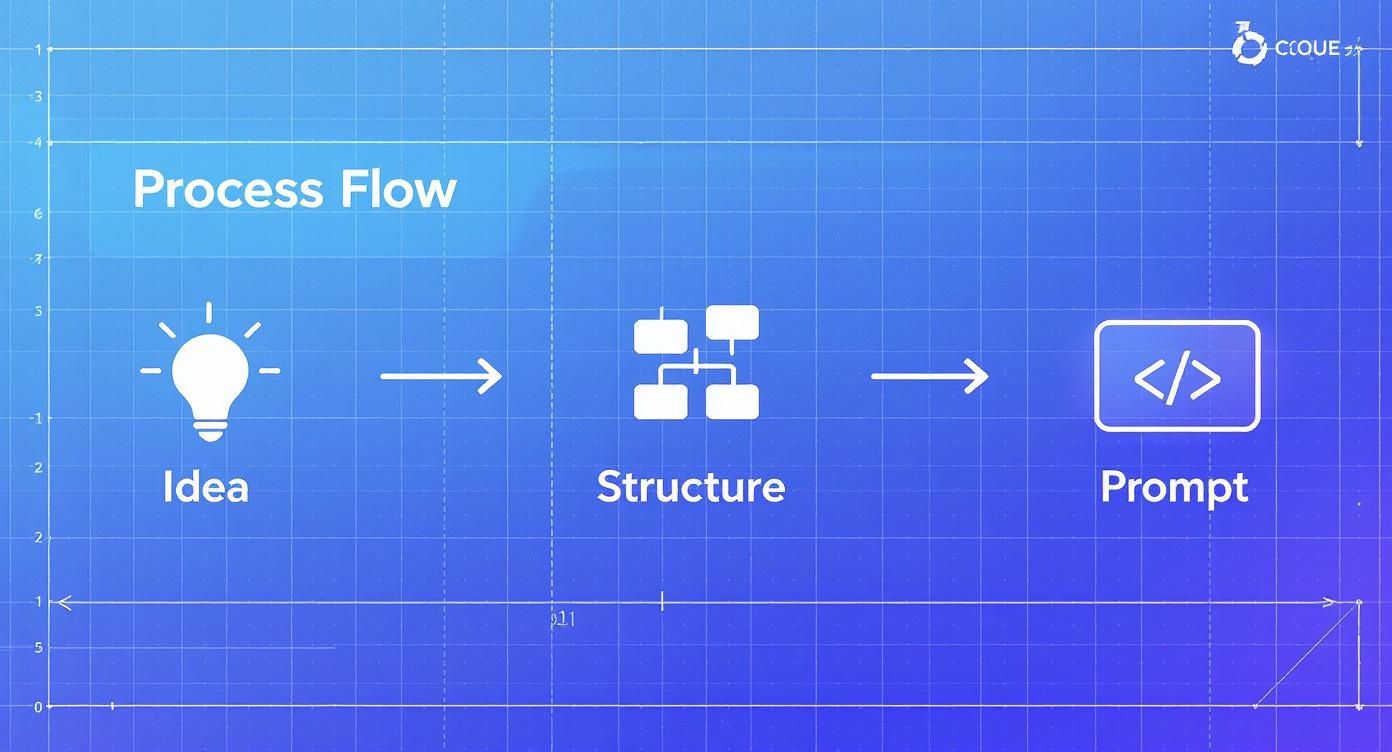
As you can see, a killer prompt doesn't come out of nowhere. It's built on a solid foundation, which is exactly what leads to great AI-generated code.
Writing Prompts for Onchain Logic
Let’s get our hands dirty. Say you're building a decentralized crowdfunding app. You need a contract to handle funding, track progress, and release the money to the creator only if the goal is hit on time.
Instead of spending weeks down the rabbit hole of contract development, you could just write a prompt like this:
"Generate a smart contract for a crowdfunding platform on the Polygon network. It needs these functions:- **createCampaign:** Lets a user set a funding goal in MATIC and a deadline.- **contribute:** Lets anyone send MATIC to a specific campaign.- **claimFunds:** Only the campaign creator can call this, and only if the goal is met before the deadline.- **refund:** Contributors can use this to get their MATIC back if the campaign doesn't hit its goal."
The AI mobile app builder takes these plain-English instructions and spits out the smart contract code. This massively lowers the barrier to entry and sidesteps a ton of common coding mistakes that could be disastrous on an immutable blockchain. If you're curious about the nitty-gritty, our guide on how to build smart contracts dives deeper.
The real win here is speed and security. These AI models are trained on mountains of battle-tested code, so they often generate contracts that already follow best practices, like the checks-effects-interactions pattern, right out of the gate.
Generating Blockchain SQL Queries at the Same Time
A killer onchain app isn’t just about putting data on-chain; it’s about pulling it off and showing it to your users in a way that makes sense. Traditionally, this meant spinning up a whole separate backend with indexers just to query the chain and feed data to your mobile app. What a headache.
Modern tools like the Dreamspace AI app generator bake this right into the process. While it's generating your smart contracts, the AI can also write the blockchain SQL queries you'll need. These are what let your mobile app ask the blockchain questions, like:
- "Show me all the NFTs this wallet owns."
- "What's the current total raised for this campaign?"
- "List the last 10 transactions for this smart contract."
This integrated approach is a huge architectural shortcut. By generating both the contracts and the queries from the same prompts, you basically eliminate the need for a separate backend server. Your app talks directly and securely to the blockchain, making your whole stack leaner and more decentralized. This is a big reason why 40% of companies are using AI to automate dev tasks. This seamless link between onchain logic and front-end data is what separates a good AI mobile app builder from a great one.
Designing a User-Friendly Web3 Mobile Interface
Let's be real—your onchain logic could be pure genius, but if the app is ugly or a pain to use, nobody will stick around to find out. A smooth, intuitive front-end is what makes people actually want to interact with your smart contracts.
This is where an ai mobile app builder completely changes the game. It closes the gap between complex blockchain code and a beautiful user experience.
You get to direct the AI with plain English, telling it to generate layouts, set color schemes, and style components. It's less about dragging pixels and more about describing a vision. You talk, and the AI builds.
Prompting Your Visual Design
Forget wrestling with CSS or weird mobile frameworks. Your design process in an AI builder like Dreamspace kicks off with a simple, descriptive prompt. The idea is to paint a clear picture for the AI of what a screen should do and how it should feel.
Building a gallery for an NFT marketplace? A good starting prompt would be something like:
"Design a minimalist gallery screen for NFTs. Use a dark theme with a 3-column grid for the images. Add a prominent 'Connect Wallet' button in the top right corner with a subtle purple glow."
This one sentence gives the AI everything it needs: layout, theme, specific UI elements, and even little stylistic details. The AI takes that and generates a functional screen you can start working from, letting you test out visual ideas in minutes, not hours.
The Iterative Vibe Coding Process
Your first prompt is almost never the final version. The real magic of using an ai mobile app builder for UI is the back-and-forth refinement. After the initial screen pops up, you just keep the conversation going to tweak every little detail until it's perfect.
A typical workflow looks a lot like this:
- Initial Prompt: You give the high-level description for the screen.
- Refine Components: Then you get specific. "Change the font on the NFT titles to a modern sans-serif and make it bold."
- Adjust Colors: Maybe the purple isn't working. "Make the primary accent color a vibrant electric blue instead of purple."
- Define Interactions: You can even tell it how things should behave. "When a user taps an NFT, open a details modal that slides up from the bottom."
This whole process is the heart of "vibe coding" inside the Dreamspace studio. It’s a creative partnership. You guide the AI, and together you perfect an interface that's not just functional but genuinely compelling.
Connecting UI Elements to Onchain Functions
A slick design is just a pretty picture if it doesn’t do anything. The final, critical step is hooking up your UI components to the smart contract functions the AI generated for you earlier.
Here again, an advanced ai mobile app builder makes a once-complex task feel simple.
Instead of writing a ton of boilerplate code for wallet connections and transactions, you just point and tell.
- Select the "Connect Wallet" button and tell the AI, "Link this button to the Phantom wallet connection function."
- For the "Buy NFT" button on your details screen, you'd say, "Trigger the
purchaseNFTsmart contract function when this button is pressed."
The AI handles the plumbing. It understands the context of your app, knows which smart contract functions are available, and wires everything up so the front-end talks to the blockchain seamlessly.
To really nail the user experience, it's worth getting familiar with established Web3 design principles. This helps ensure your app isn't just easy on the eyes, but also intuitive for a decentralized world.
Validating and Deploying Your Onchain Application
Alright, you’ve done the creative work—prompting, designing, and bringing your vision to life. Now comes the most critical part. In the onchain world, where smart contracts are forever, this final stretch is everything. One tiny mistake can be permanent, so this is not the time to rush.
It’s time to switch hats. You're no longer just the creator; you're now the chief of quality control. Your job is to rigorously test, audit, and secure your application before it ever touches a mainnet or an app store. An ai mobile app builder gives you an incredible running start, but the final accountability rests with you.
Pre-Launch Security and Testnet Trials
Before you even think about going live, you need to put your app through its paces in a sandboxed environment. This is where a testnet becomes your best friend. A testnet is essentially a clone of a blockchain like Solana or Polygon, but it runs on valueless tokens. This setup lets you simulate every single user interaction without any real-world financial risk.
Your goal here is simple: try to break things.
- Test every function: Walk through all the user journeys you've mapped out. Can an 'Artist' actually mint an NFT? Can a 'Collector' buy it? Does the transaction go through smoothly?
- Probe the edge cases: What happens when a user tries to send a transaction with insufficient funds? Or when they try to call a function they aren't authorized to use? Push the limits.
- Simulate high traffic: While this can be tricky, try to see how the app handles multiple, simultaneous actions.
Many AI tools can help here by running automated security scans on your smart contract code. These scans are great for catching common vulnerabilities like reentrancy attacks or integer overflows, giving you a solid first layer of defense.
Auditing Smart Contracts for Mainnet Readiness
Once your app is running perfectly on the testnet, it’s time for a much deeper security dive. While an ai mobile app builder like the Dreamspace vibe coding studio is trained on secure code patterns, a final audit is absolutely non-negotiable for any app handling real assets.
You have a couple of options. If you've got the expertise, you can review the code yourself, checking it against lists of known vulnerabilities. For most creators, though, hiring a reputable third-party smart contract auditing firm is the gold standard. It’s the best way to ensure security and, just as importantly, build trust with your future users.
An audit isn't just about catching bugs. It's about verifying that your onchain logic does exactly what you intend it to do, under all possible conditions. It’s the final check that provides real peace of mind.
For a comprehensive look at the entire lifecycle, from ideation to launch, check out our guide on https://blog.dreamspace.xyz/post/blockchain-application-development. The influence of AI in app development is undeniable, leading to massive user adoption. For instance, in mid-2025, ChatGPT became the fastest app ever to hit one billion global downloads across iOS and Google Play, not long after reaching 500 million monthly active users.
Final Deployment and App Store Submission
With a clean audit report in hand, you're finally at the starting line. The deployment process now splits into two parallel streams: getting your smart contracts onto the mainnet and submitting your mobile app to the app stores.
First, you'll deploy the contracts. This action commits your code to the live blockchain, making it public and irreversible. Once deployed, you’ll get the contract addresses your mobile app needs to communicate with the chain.
Next up is packaging your mobile app for the Apple App Store and Google Play Store. This means getting your store listings, screenshots, and privacy policies in order. If your app handles any user data, you absolutely must comply with regulations; this practical AI GDPR compliance guide is a great resource. This review process can take anywhere from a few days to a couple of weeks. Once approved, your onchain app is officially live and ready for the world.
Got Questions About AI Onchain App Builders?
Jumping into any new tech brings up questions. When you're using an AI mobile app builder for something as important as an onchain app, you want to be crystal clear on what it can do and where you need to step in. Let’s tackle the most common things people ask when they start building with a platform like the Dreamspace AI app generator.
Can I Actually Build a Secure Onchain App with AI?
Yes, but think of it as a partnership. The AI in Dreamspace is phenomenal at generating clean, standardized code that follows proven security patterns. This alone cuts out a ton of common human errors. The AI mobile app builder is like your expert co-pilot, handling about 90% of the coding grunt work with battle-tested practices.
That last 10%, though? That’s all you. Verification and auditing are absolutely critical. The AI gives you an incredible head start and a solid foundation, but you hold the final responsibility for security.
Always, always, always review the smart contracts yourself, hammer them with tests on a testnet, and get a professional security audit before letting a single real asset touch your app.
How Much Say Do I Have Over the Mobile UI?
A ton. It’s a completely fluid and creative process. You start with broad strokes, telling the AI the general vibe and layout you want for your app's screens. From there, you get to zoom in and refine every little detail with more specific prompts.
You can get really granular with a series of commands, like:
- "Make the main action buttons circular and give them a blue gradient."
- "Drop a search bar into the header on the NFT gallery page."
- "Switch the main dashboard background to a dark gray."
And if you’d rather get your hands dirty, modern tools like the Dreamspace vibe coding studio also have a visual editor. This lets you click, drag, and tweak every single component by hand until it looks exactly the way you imagined it.
How Does the AI Nail Wallet Connections and Transactions?
This is where the magic really happens. A smart AI mobile app builder isn't just guessing; it's been trained on the specific Software Development Kits (SDKs) from major players like Solana, Polygon, and Ethereum.
When you say, "add a wallet connection for Solana," it knows exactly what to do. It pulls in the right libraries and generates the UI you need, like a "Connect Phantom" button, all automatically.
It goes deeper, too. The AI also builds the logic for authenticating users and getting them to sign and send transactions right from your app. It hides all that Web3 complexity, making blockchain stuff feel totally natural on mobile instead of like a clunky feature that was bolted on as an afterthought.
What’s the Deal with Updating an AI-Generated App?
Updates are just part of the normal workflow, not some scary, separate process. How you handle it just depends on whether you're tweaking the UI or the onchain logic.
For Front-End Fixes:
If you spot a UI bug or just want to change how something looks, you just tell the AI. A prompt like, "The login button is off-center on small screens, fix it," is usually all it takes. The AI will spit out the corrected code for you to push live.
For Smart Contract Changes:
This one’s a bit more serious because smart contracts are immutable—you can't just "edit" one that's already deployed. The standard play is to deploy a new, better version of the contract. Then, you have to migrate all the data and ownership from the old one to the new one.
The AI is a huge help here, as it can write the updated contract code and even help with the migration scripts. But this is a process that requires careful planning and, you guessed it, a whole lot of testing on a testnet before you try it for real on mainnet.
Ready to stop thinking and start building? With Dreamspace, you can turn your ideas into a real, production-ready onchain app with the help of AI. This is the future of vibe coding. Generate your app now and launch in a fraction of the time.